
This guide is for the agent who works customer cases. Your xMatix day is cases: you log what customers report, pick up what is handed to you, answer from the knowledge base, keep each case moving before its SLA deadlines, and pull in colleagues or escalate when a case outgrows you. You work in the web app, mostly in the Support app. An administrator sets up the queues, SLA policies and macros you work with, and a case that needs hands-on work becomes a service order for the service team.
Overview
A support agent's day in xMatix follows one loop:
| Stage | What you do | Where |
|---|---|---|
| Find your work | Check the cases given to you and the ones closest to breaching | Support → Cases |
| Log new cases | Record what a customer reports | Support → Cases → New |
| Respond | Answer, set the status to In Progress | The case record page |
| Answer from knowledge | Find an article, attach it or email it | The case's Knowledge tab |
| Save keystrokes | Run a macro for a routine reply or triage | The Macros drawer in the status bar |
| Wait without breaching | Park the case while the customer answers | Status On Hold |
| Work together | Add colleagues, merge duplicates | Record header, Duplicates tab |
| Escalate or hand on | Escalate, or raise a service order | Record header actions |
| Finish | Resolve with a summary, close with a reason | Resolution tab |
Two things shape all of it:
- You see the cases you own, not the whole desk. Cases are private records. The shipped profiles that carry case actions have no View All on cases, so you see the cases you own and those owned by people whose roles sit below yours. Setting Assigned To to you does not by itself let you see a case. See Permissions.
- Routing offers work but does not hand it over. When a case is routed through a queue, xMatix records an offer to an agent. Accepting the offer is what sets the case's Assigned To and Owner, and no shipped screen offers Accept. On the shipped screens, cases reach you by being assigned to you by hand or moved to you on the Case Allocation console. See Queues and omni-channel routing.
Where you work
The Support app is the desk. As shipped it has these menu entries, in this order:
| Entry | What it is | Who sees it as shipped |
|---|---|---|
| Case | The case list | Anyone with the Support app and read access on cases |
| Call | The call register | Profiles with read access on calls |
| Case Allocation | The board for handing out cases by hand | Sales Executive and System Admin |
| Account | Customer accounts | Profiles with read access on accounts |
| Knowledge Article | The knowledge base | Profiles with read access on articles |
| Reports, Dashboards | Shared reports and dashboards | Anyone with the Support app |
| Settings | Queues, SLA policies, business hours, skills and the rest of the desk setup | System Admin only |
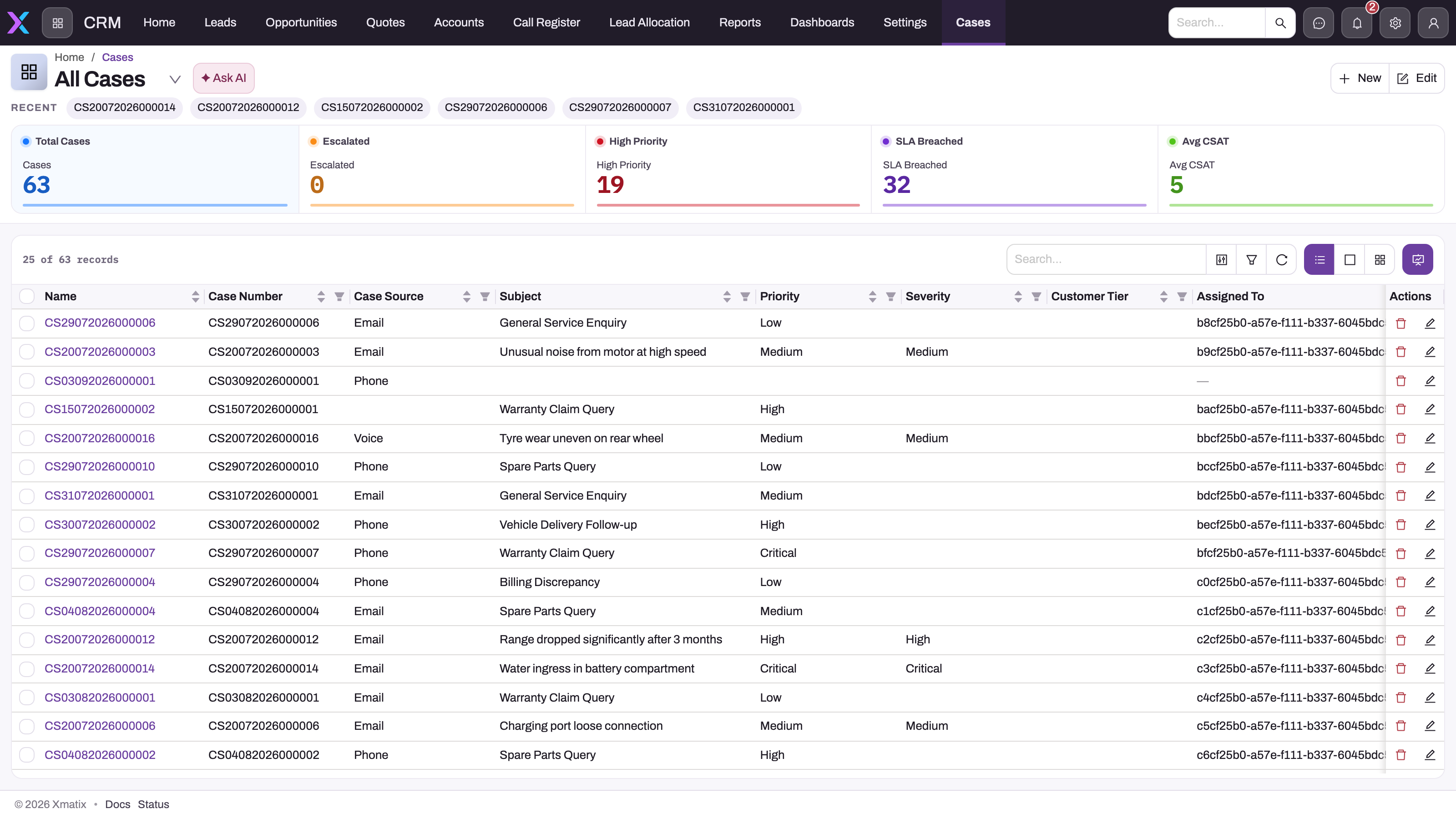
As shipped, only Sales Executive and System Admin open the Support app. A user without it can still reach cases from the App Launcher's entity search. The shipped case list views are All Cases, Escalated Cases and SLA Breached Cases. There is no shipped "my cases" view, so filter the Assigned To column to yourself.
A case record page has the tabs Overview, People & Queue, SLA, Resolution, Knowledge, Duplicates, Call Register, Attachments and Related, with the Activities timeline on the right. Its header buttons, as shipped, are Appointment, Lead, Opportunity, Service Order, Duplicate, Edit and Delete. Escalate, Close, Reopen, Pause SLA and Resume SLA exist as case actions but are not in the shipped header; an administrator adds the ones your desk uses. See Configuration.
Your path
Read these in order. Each one is the full procedure; this guide doesn't repeat them.
- xMatix Support: the product overview and how cases, queues, SLAs and knowledge fit together.
- The case lifecycle: the statuses, what each one does, owner versus assigned to, and what creating a case stamps.
- SLA policies and milestones: how a policy is chosen, the first-response and resolution clocks, business hours and pausing.
- Author and share knowledge articles: finding an answer on a case, emailing it, and writing down what you learn.
- Build and run macros: ordered steps that set fields, add notes or send email in one run.
- Collaborating on cases: collaborators, followers, duplicates and merging.
- Escalating a case: what Escalate changes and how an SLA breach flags a case.
- Queues and omni-channel routing: who gets offered work, and why an offer is not an assignment.
- Using the softphone: going online and taking calls if your desk handles phone work.
- Troubleshooting the support desk: when routing, SLAs or case actions don't behave.
Prerequisites
Before your first day, your administrator must have:
- Given you a profile that opens the Support app, reads and edits cases, and grants the case actions you are trusted with. No shipped profile is built for this role; see Configuration.
- Decided how cases reach you: assigned by hand, moved to you on Case Allocation, or created by you. If the desk shares one pool of cases, your profile needs View All on cases; see Let agents see the desk's cases.
- Set up the SLA policies and business hours your cases are measured against. A case that matches no policy has no SLA.
- For the Macros drawer and the softphone: switched on the Telephony (CTI) module and linked your user to a resource in the pool of an active queue.
- Licensed your organization for Support. An app of an unlicensed product is hidden even when your profile grants it.
Procedure
This is a normal day. Each step links to the page with the full detail.
Step 1 — Find the cases that need you
Open Support → Cases. Filter Assigned To to yourself, then sort by the first-response or resolution due time so the case closest to breaching is first. Check SLA Breached Cases and Escalated Cases for anything already over. Open a case and read its Overview, SLA tab and Activities timeline before you act. See The case lifecycle.
Step 2 — Log a new case
Select New on the case list and fill the subject, description, account and priority. When you save, xMatix numbers the case, sets Status to New, fills the contact details from the account, attaches the first matching SLA policy and writes a Case acknowledgement email to the timeline. The acknowledgement is sent when the case has a Contact Email. If the case has a Queue, the shipped Auto-route new cases rule routes it. See The case lifecycle.
Step 3 — Respond and start work
When you first reply to the customer, set Status to In Progress. This stamps First Response Date and meets the first-response milestone. Two shipped rules also set the status on every save: Assigned when Assigned To is filled, and In Progress once First Response Date is set. So a manual status change can be overwritten when you save. See The case lifecycle.
Step 4 — Answer from the knowledge base
Open the case's Knowledge tab. xMatix suggests Published articles that share words with the case, and you can search the rest. Attach an article to the case, or select the envelope to email it to the case's Contact Email. If the email can't be sent, your own mail program opens instead. See Author and share knowledge articles.
Step 5 — Run a macro
Open Macros in the status bar at the bottom of the workspace and run the macro for the job, such as a triage routine or a canned reply. Its field and status changes are saved at once, and the run is added to the timeline with what was applied and skipped. See Build and run macros.
Step 6 — Wait without breaching
When you are waiting on the customer, set Status to On Hold. If the case's SLA policy pauses on that status, the clock stops, and the due times move forward by the paused business time when you set the case back to In Progress. See SLA policies and milestones.
Step 7 — Bring in colleagues or merge duplicates
Add collaborators and followers from the chips in the record header; they are emailed when the case changes. Open Duplicates to find open cases from the same contact, account or phone number and merge them into this one. Merged cases are closed with the close reason Duplicate. See Collaborating on cases.
Step 8 — Escalate, or hand on to service
Select Escalate where your administrator has added it to the case page: Status becomes Escalated and the Escalated flag is ticked. When the case needs a repair or a site visit, select Service Order; the case needs a Partner Account and a Branch, and only one service order can be raised per case. See Escalating a case and The service order lifecycle.
Step 9 — Resolve and close
On Resolution, write the Resolution Summary and set Status to Resolved. To close, choose the Close Reason and set Status to Closed. A resolve without a summary, or a close without a reason, is refused. If the customer comes back, set the case to Reopened. See The case lifecycle.
Example
An agent at a water-pump supplier starts the Tuesday shift.
- At 09:00 they open Support → Cases, filter Assigned To to themselves and sort by resolution due time. Six cases are theirs; one is due by 11:00.
- The urgent case reports a booster pump tripping. On the Knowledge tab the article Booster pump trips after ten minutes is suggested. They email it with the envelope, set Status to In Progress and save.
- A new call comes in about a leaking seal. They select New, pick the account and save. The case gets a number, the SLA policy for standard customers attaches, and the acknowledgement goes to the contact.
- The Duplicates tab of the seal case shows an open case from the same contact the day before. They merge it in; the older case closes as Duplicate.
- The seal needs replacing on site. They select Service Order, and the service team takes the visit. The case stays open for the customer conversation.
- The pump customer confirms the fix at 15:00. The agent writes the resolution summary, sets Status to Resolved, then Closed with a close reason.
Training
Practice exercise
In a sandbox, signed in with a profile that has the support agent grants:
- Create a case for a test account that has a contact with an email address.
- Open the case's Activities timeline.
- Set Status to Resolved without writing a Resolution Summary, and save.
- Write a Resolution Summary, set Status to Resolved again, and save.
Expected result: after step 1 the case has a number, Status New, and its contact details filled from the account. In step 2 the timeline shows a Case acknowledgement email with status Sent. Step 3 is refused with A resolution summary is required to resolve a case. After step 4 the case is Resolved and Resolution Date is stamped.
Quick reference
- You see the cases you own and your reports' cases, unless your profile has View All on cases.
- Assigned To is who works the case; Owner decides who can see it.
- Routing only offers a case; nothing on the shipped screens accepts the offer.
- In Progress stamps the first response; On Hold can pause the SLA.
- Resolved needs a Resolution Summary; Closed needs a Close Reason.
- Only Published articles appear on the Knowledge tab.
- The Macros drawer needs Telephony switched on and you in an active queue's pool.
- Escalate, Close and Reopen buttons appear only where your administrator adds them.
Permissions
A support agent needs four kinds of access:
- The app and its pages. The Support app needs an app grant. Case Allocation and Settings are pages, and each needs its own page grant.
- The records. Read, create, edit and delete follow the profile's entity permissions on Case, Case Milestone, Case SLA Event, Knowledge Article, Call, Macro and the collaboration records. View All and Modify All on Case decide whether you see and change the whole desk's cases or only your own.
- The actions. Every case action — Escalate, Route, Merge, Run Macro, Email Article, Close, Reopen, Pause SLA, Service Order and the rest — is granted on the profile's Actions tab. A user with record access but without the action doesn't get it.
- The product. Your organization's licence must include Support.
What the shipped profiles give a support agent:
| Area | Sales Executive | Standard User | Service |
|---|---|---|---|
| Support app | Yes, with Case Allocation | No | No |
| Cases | Read, create, edit, delete. No View All or Modify All | The same | Everything, including View All and Modify All |
| Case actions | All of them | All of them | None |
| Knowledge articles | Full access | Full access | None |
| Calls | Full access | Full access | None |
| Macros and macro steps | Full access | Full access | None |
| Collaborators, followers, side conversations | Full access | Full access | None |
| Mobile app | Assigned, with check-in required | Not assigned | Not assigned |
Sales Manager also has every case action, but cases without View All, no Support app and no access to calls or the collaboration records. System Admin has everything. Unlike cases, knowledge articles aren't private: a user with read access on articles sees everyone's, not just their own.
A user without a page doesn't see it in the menu. A user without an action doesn't get its button, and running it another way is refused with The current user is not allowed to execute server action …. If a screen or button is missing, start with A user can't see something.
Configuration
This section is for the administrator setting up a support desk's agents.
Set up a support agent
- On Setup → Access Control → Profiles, clone Sales Executive. It is the only shipped profile other than System Admin that opens the Support app and Case Allocation, and it already carries every case action. See Build a profile for a role.
- On App Permissions, remove the sales apps the agent doesn't use.
- On Entity Permissions, add View All (and Modify All if agents work each other's cases) on Case, Case Milestone and Case SLA Event if your desk works a shared pool. See the next section.
- On the Actions tab, remove the case actions agents shouldn't run, for example Merge or Delete.
- Create a resource for each agent, linked to their user, and add it to the resource group of an active queue. This is what makes the softphone and Macros drawer appear.
- Invite the user with the profile, and remove Standard User from them, because access is additive.
If you start from the Service profile instead, add the Support app, every case action your agents need, and access to knowledge articles, calls, macros and the collaboration records.
Let agents see the desk's cases
Cases ship with a Private sharing policy, Grant access using hierarchy on, and manual sharing and team access off. A user without View All on Case sees only the cases they own and those owned by people in roles below theirs. Owner is the user who created the case unless someone changes it. Setting Assigned To, or moving a case on Case Allocation, does not change the owner, so it doesn't make the case visible to the agent.
Choose one model:
- Shared pool. Give agents View All on Case, Case Milestone and Case SLA Event. Everyone sees every case; Assigned To says who is working it.
- Own cases only. Keep the shipped access and change Owner when you hand a case over. A supervisor sees an agent's cases when the agent's role sits below theirs in the role hierarchy. See Roles, teams and business units.
- Rule-based. Add an access grant rule on Case, for example by queue. See Record security.
Settings that shape the agent's day
| What | Where | Shipped value |
|---|---|---|
| Queues, SLA policies, business hours, skills | Support → Settings | System Admin only. See Support configuration reference |
| Case page buttons (Escalate, Close, Reopen, Pause SLA, Resume SLA) | Setup → Design Studio → Entities → Case → Experience → Layouts → the case View layout → Page Header → Actions | Not in the shipped header. See Escalating a case |
| Macros | Setup → Feature Hub → Service → Macros | None shipped. See Build and run macros |
| Case Status values | The Case Status picklist | New, Assigned, In Progress, On Hold, Resolved, Closed, Reopened, Cancelled. Waiting on Customer, Waiting on Third Party and Escalated get lifecycle behaviour once you add them. See The case lifecycle |
| Status rules | The Case business rules | Set Case Status To Assigned and Set Case Status to In Progress run on every save |
| Mobile | Setup → Design Studio → Apps → Mobile Apps → the mobile app → Profiles | The Support app is in the field app; only Sales Executive and System Admin are assigned. See Mobile app configuration |
Common problems
A case was assigned to me but I can't find it
Your profile has no View All on cases, and the case is owned by someone else. Assigned To doesn't grant access. Ask your administrator to change the case's Owner to you, or to give your profile View All on cases; see Let agents see the desk's cases.
The case was routed to me but nothing changed
Routing only records an offer. Assigned To and Owner change when the offer is accepted, and the shipped screens have no Accept. Ask a supervisor to assign the case to you, or to move it to you on Case Allocation. See Queues and omni-channel routing.
There's no Escalate, Close or Reopen button
The shipped case page header doesn't list these actions. Change the Status instead, or ask your administrator to add the buttons. If the button is on the page but you don't see it, your profile doesn't grant the action. The shipped Service profile grants no case actions.
My status change didn't stick
Two shipped rules set Status on every save: Assigned when Assigned To is filled and In Progress once First Response Date is set. Use an action such as Escalate, or ask your administrator to narrow the rules. See Escalating a case.
There is no Macros drawer
The status bar shows Macros only when the Telephony (CTI) module is on and your user is linked to a resource in the pool of an active queue. Use the desktop browser. See Build and run macros.
I can't open the Support app
As shipped, only Sales Executive and System Admin have it. Ask your administrator for the app grant. Until then, find cases from the App Launcher's entity search.
Common questions
Which case do I pick up first?
The one closest to breaching. SLA milestones, not arrival order, set the priority. Filter the case list to your cases and sort by the first-response or resolution due time, then check SLA Breached Cases for anything already over. A breach ticks the case's Escalated flag but doesn't change its status, so breached cases show under SLA Breached Cases rather than Escalated Cases. SLA policies and milestones explains the clocks, the warning before a breach and what happens at the breach.
Does the SLA clock stop while I wait on the customer?
Only in a status the case's SLA policy pauses on. When a policy lists no pause statuses, On Hold, Waiting on Customer and Waiting on Third Party pause the clock, and the shipped picklist has only On Hold of those. When the case returns to an active status, each paused deadline moves forward by the working minutes it spent paused. The Pause SLA action doesn't help on a case in an active status, because the status rule restarts the clock in the same save. SLA policies and milestones covers the details.
What's the difference between Owner and Assigned To?
Owner is whose record it is in the security sense; it decides who can see and change the case. Assigned To is who is working it now; it drives the Assigned status and the timeline's assignment entries. They can differ: a case you create is yours by ownership even if someone else is assigned to it. Accepting a routed offer sets both to the same user, but no shipped screen accepts offers. See The case lifecycle.
I solved something new. Where should the answer live?
In the knowledge base, before you forget it. Create an article from the Knowledge Article list with a clear title, summary and body. It is offered on cases only once its Status is Published, and the shipped forms don't include Status, so your administrator may need to add it or publish for you. Author and share knowledge articles covers writing, classifying and publishing.
Related topics
- Support configuration reference: the settings behind your queues and policies.
- The dispatch console: how Case Allocation hands out cases.
- Role guide: dispatch manager: the supervisor's side of allocation.
- Activities: the timeline every call and email lands on.
- Asking Sense about your data: quick answers about your own caseload.
- Role-based guides: every role and the shipped security profiles.