
This guide is for the accountant: in xMatix most entries post themselves, so your day is the work automation can't do — manual journals, payments to record and apply, the bank to reconcile, statements to read and, at month-end, the close. Invoices, bills, payments, credit and debit notes, payroll runs and stock movements each write the ledger when their posting action runs. You check what they posted, correct what is wrong with a reversal or a new entry, and close each month once it is right.
Overview
A finance user's month in xMatix is one loop:
| Stage | What you do | Where |
|---|---|---|
| Watch what posted | Read the journals documents created, and catch postings that failed | Finance → Journals, the Posting Error Log |
| Enter what nobody else will | Accruals, reclassifications, corrections | Finance → Journals → New |
| Record and apply money | Receipts and payments, matched to the documents they settle | Finance → Payments |
| Reconcile the bank | Match statement lines to posted entries, post what is missing | Finance → Banking → Bank Reconciliation |
| Keep the subledgers clean | Open items, ageing, control-account tie-out | Open Transactions, the ageing statements |
| Report | Trial balance, profit and loss, balance sheet, cash flow | Finance → Statements |
| Close | Verify the period's ledger, close it, lock it after sign-off | The fiscal period record |
Two rules run through all of it. A posted journal can't be edited or deleted: the correction is Reverse, then a new entry. And a Closed or Locked fiscal period refuses every save or post dated in it, whatever your permissions.
Where you work
The Finance app holds the documents and the finance screens. As shipped, its menu has these entries, but each one appears only if your profile grants it (see Permissions):
| Menu entry | What it holds |
|---|---|
| Home | The finance home page |
| Invoices, Bills, Expenses, Payments, Journals | The document lists. Expenses are expense vouchers |
| Adjustments | Credit Note and Debit Note |
| Banking | Bank Reconciliation, plus Bank Transfer, Bank Statement, Cheque Transaction and Cheque Register |
| Chart of Accounts | The account tree (web only) |
| Statements | The statement tiles: profit and loss, balance sheet, trial balance, cash flow, ratios, GL balances and ledger, and the statutory filings |
| Reports, Dashboards | Your organization's reports and dashboards |
| Settings | The finance masters: fiscal years, accounting books, bank accounts, business units, cost centres, posting definitions, the Posting Error Log, budgets, valuation policies, interest, TDS and GST registrations |
Documents raised elsewhere land here too: a supplier bill is raised in Procurement, a customer invoice comes from a sales order, a payroll run posts its accrual journal from Payroll, and stock movements post from Inventory and Warehouse. Each leaves a journal you can open from Journals.
Your path
Read these in order. Each one is the full procedure; this guide does not repeat them.
- xMatix Finance & Accounting: the product overview and the mental model of document posting and statements.
- Chart of accounts, books and periods: the structure everything posts into.
- Working with journals: finding a journal, the manual entry, posting, reversal and recurring journals.
- Posting Error Log: documents that failed to post automatically.
- AR and AP subledgers: open items, settlement, ageing and the control-account tie-out.
- Recording and applying payments: money in and out, matched to what it settles.
- Banking in xMatix Finance: bank accounts, statements, transfers and the cheque register.
- Reconciling a bank account: the matching workspace.
- Financial statements: every statement screen, read live from posted balances.
- Closing a period: verify, close, reopen for an approved correction, lock.
- Fiscal years and periods: creating the year and closing it.
Prerequisites
Before your first day, your administrator must have:
- Given you a profile that opens the Finance app with the menu entries you use, and the posting actions you are trusted with. No shipped profile is a finance profile; see Permissions.
- Created the company's fiscal year and its periods, with the current period Open.
- Set up the chart of accounts, with receivable and payable accounts marked as control accounts.
- For bank reconciliation: created a bank account record linked to a GL account of type Bank, and set your default company and branch on your resource record, because the workspace starts from them.
- Licensed your organization for Finance & Accounting.
Procedure
This is a normal month. Each step links to the page with the full detail.
Step 1 — Check what posted overnight
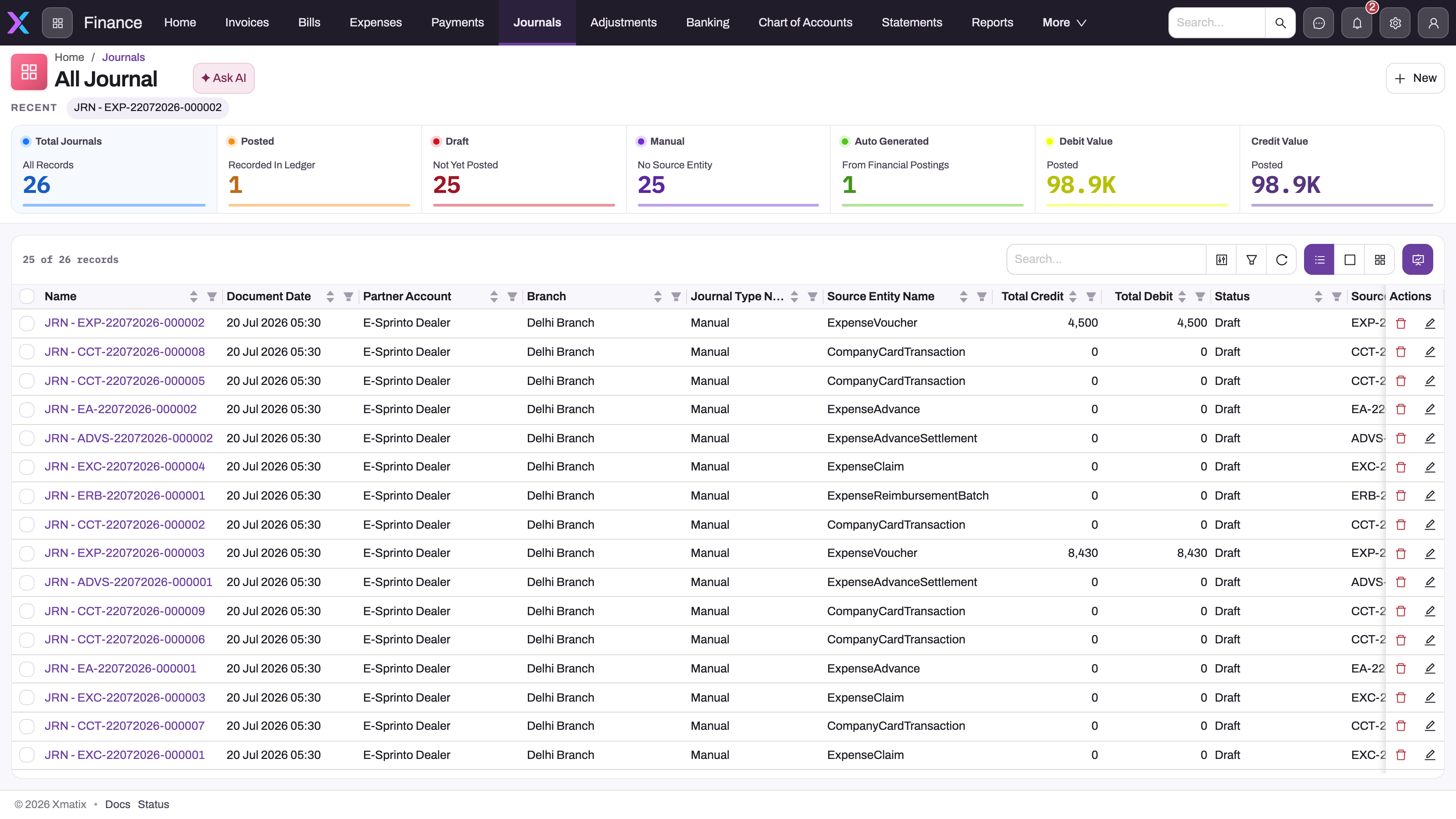
Open Finance → Journals. The default view, All Journals, lists every journal with its Journal Type Name, Source Entity Name, Source Record, totals and Status. Posted Journals shows only posted ones.
To tell who created a journal, read Source Entity Name and Source Record, not Journal Type Name: documents and recurring runs can carry the type Manual too. A journal still in Draft is not in the ledger.
If your organization posts synced documents automatically, open the Posting Error Log from Finance → Settings and work through the Pending entries: each names the document and why it didn't post.
Step 2 — Enter and post manual journals
On Journals, select New. Choose the Partner Account (your own company, not a customer), the date and the type, then add at least two lines, each with a GL account and either a debit or a credit. A line on a control account needs a Party Account. Save: the journal is Draft.
Select Post. xMatix checks that debits equal credits and that the date falls in an Open period, then sets Status to Posted and fills Fiscal Period, Total Debit and Total Credit. If posting is refused, nothing is saved: fix the cause in the message and post the same draft again. See Working with journals.
Step 3 — Correct a posted entry
Open the posted journal and select Reverse. xMatix posts a mirror journal of type Reversal, dated today, and sets the original's Status to Reversed. Then enter the corrected journal as a new one. A reversal can't itself be reversed, and a journal can be reversed only once.
A posted document (an invoice, a bill, a payment) is corrected on the document, through a credit or debit note or the document's own actions, not by reversing its journal.
Step 4 — Record and apply payments
Open Finance → Payments and select New, or select Payment on an invoice to start one with the customer and the invoice filled in. A new payment starts as Payment Taken (a receipt); choose Payment Given to pay out. Check what is open for the account, enter the amount, date and mode, apply it to the documents it settles, and save. See Recording and applying payments.
Step 5 — Reconcile the bank
Open Finance → Banking → Bank Reconciliation, check the company and branch pickers, and choose the bank account. Import the statement if it isn't recorded yet (Import statement). On Bank transactions, work through the Unmatched lines: select a line, tick the posted entry that records the same transaction, and select Reconcile. For a bank charge or interest the books don't have yet, use the Post tab to create a pre-filled payment or journal, post it, then match. Only posted entries are ever suggested. See Reconciling a bank account.
Step 6 — Keep the subledgers clean
Open Open Transactions from the App Launcher (it is in no menu as shipped) to see what each customer and supplier still owes or is owed. Run the receivables and payables ageing, and tie their totals to the control accounts. Unapplied receipts and old balances are the things to chase. See AR and AP subledgers.
Before paying a supplier bill, match it to its order and receipt: nothing blocks a bill that disagrees with them.
Step 7 — Read the statements
Open Finance → Statements and choose a tile. Start with Trial Balance: if debits and credits don't agree, nothing else will. Then read Profit And Loss, Balance Sheet and Cash Flow. Statements are live: they read posted journals at the moment you open them, so a draft never appears and a late posting changes them. To slice by division, set Compare to By business unit, By branch, By GSTIN or By cost centre. See Financial statements.
Step 8 — Close the month
On the fiscal period record for the month:
- Make sure every document and journal dated in it is posted, failed postings are cleared and the bank is reconciled. Close Period checks none of this for you.
- Select Verify Ledger. It reports mismatched balances, unbalanced journals and open-item differences, and changes nothing. If balances drifted, select Rebuild Balances.
- Select Close Period. Status becomes Closed, and anything dated in the month is refused from now on.
- For an approved late entry, select Reopen Period, post it, verify and close again.
- After final sign-off, select Lock Period. Locked is final: a locked period can't be reopened.
As shipped, the fiscal period page shows only Edit and Delete: your administrator adds the period actions to its layout once (see Configuration). At year-end, Close Year on the fiscal year posts the closing journal; run it while the last period is still Open. See Closing a period.
Example
An accountant at a small furniture wholesaler closes April.
- On 2 May they open Journals and filter Status to Draft. Three drafts remain: two came from expense vouchers (their Source Entity Name says so), one is their own rent accrual. They post all three.
- The Posting Error Log shows one Pending bill: its supplier had no payable account mapped. Purchasing fixes the mapping and the bill posts.
- In Bank Reconciliation they import April's statement: 62 lines. Fifty-eight match on the first pass. A bank charge of 350 has no entry, so they use Post → Journal, add the bank-charges expense line, post it and match. Two customer receipts are still in transit; they leave them Unmatched as timing differences.
- The Trial Balance agrees. The receivables ageing total equals the Accounts Receivable balance.
- On the Apr 2026 period they select Verify Ledger (no mismatches) and then Close Period.
- On 9 May a sales invoice dated 29 April is refused because April is closed. The finance lead approves it; the accountant selects Reopen Period, the invoice posts, and they close April again. After the quarterly filing in July, the lead locks April, May and June.
Training
Practice exercise
In a sandbox, with a profile that has the Finance app, the Banking entry and the journal and period actions (System Admin is enough for practice), and with the period actions added to the fiscal period page:
- Create a journal dated today with two lines: debit 1,000 to an expense account, credit 1,000 to a bank account. Save it.
- Select Post.
- Select Reverse on the same journal.
- Try to select Reverse again.
- Open last month's fiscal period, select Close Period, then try to save a journal dated in that month.
- Select Reopen Period on it.
Expected result: after step 1 the journal is Draft. After step 2 it is Posted with Total Debit and Total Credit of 1,000. After step 3 the original is Reversed and a new posted Reversal journal points to it. Step 4 is refused because the journal is already reversed. In step 5 the save is refused because the period is Closed; after step 6 the period is Open again and the journal saves.
Quick reference
- Draft journals are not in the ledger; only Post puts them there.
- Source Entity Name tells you where a journal came from, not Journal Type Name.
- Posted journals can't be edited or deleted: Reverse, then enter the correction.
- A reversal is dated today, so it lands in the current open period.
- Only posted entries are suggested in bank reconciliation.
- Statements are live: they move when anything posts.
- Close Period runs no checks: reconcile and verify first.
- Open → Closed → Locked. Reopen Period only works on Closed; Locked is final.
- A Closed period in an Open year still refuses postings, and so does an Open period in a year that isn't Open.
Permissions
There is no shipped finance profile. A finance user needs four kinds of access, and the shipped profiles each cover a different part:
- The menu. Each Finance menu entry appears only if the profile grants it: page entries (Home, Chart of Accounts, Statements, Settings, Bank Reconciliation and each statement tile) through App Page Permissions, and the grouped entries (Adjustments, Banking) through App Permissions.
- The records. Read, create, edit and delete on the finance entities follow the profile's entity permissions.
- The posting actions. Post and Reverse on journals, the posting actions on documents, and the period actions are each granted on the profile's Actions tab. A user with record access but without the action can create and edit drafts but sees no button to post them. Since no approval process ships for journals, this is how you separate preparing an entry from posting it.
- The product. Your organization's licence must include Finance & Accounting.
What the shipped profiles give a finance user:
| Profile | Finance menu entries | Posting and period actions |
|---|---|---|
| System Admin | All of them, with every statement tile | Everything |
| Standard User | Documents, Journals, Chart of Accounts and Statements with eight tiles (profit and loss, balance sheet, trial balance, cash flow and four statutory filings). No Home, Adjustments, Banking or Settings | Journal Post and Reverse; document, payment, bank transfer and expense postings; Close Period, Reopen Period, Lock Period, Verify Ledger, Rebuild Balances; Close Year; bank reconciliation suggestions |
| Sales Manager | Documents, Journals, Chart of Accounts and the same eight statement tiles | Invoice, bill, credit note, debit note and payment postings. No journal Post or Reverse, no period actions |
| Sales Executive | Documents, Journals, Adjustments, Banking (without Bank Reconciliation), Chart of Accounts and the eight statement tiles | Close Period and Close Year, but no journal or document posting, no reopen or lock |
All four have full record access to journals, payments, the documents, fiscal periods and years, GL accounts and bank statements. So the differences that matter are the menu entries and the action grants. As shipped, only System Admin has both the Banking entry and the reconciliation actions, and only System Admin sees Settings, where the fiscal years and the Posting Error Log live.
A user without a menu entry doesn't see it. A user without an action doesn't see its button. If a screen or button is missing, start with A user can't see something.
Configuration
This section is for the administrator setting up a finance user.
Set up a finance user
- Clone Standard User on Setup → Access control → Profiles: it already has the journal, document and period actions. See Build a profile for a role.
- On the clone's App Permissions, add the Banking and Adjustments apps. Under App Page Permissions, add the Bank Reconciliation page, the Settings and Home pages of Finance if the person maintains the masters, and the statement tiles they read.
- On the Actions tab, take away what this person shouldn't do: for example keep Lock Period and Reopen Period for the controller only, or remove journal Post from a clerk who should only prepare entries.
- Invite the user with the profile, and set their default company and branch on their resource record.
Settings that shape the finance day
| What | Where | Shipped value |
|---|---|---|
| Fiscal years and periods | Finance → Settings → Fiscal Years; Generate Periods on the year | None: create the year first. A posting into a date with no period creates an April–March year for the company |
| Period actions on the page | The fiscal period's View layout, in the layout designer | Only Edit and Delete are on the page; add Close Period, Reopen Period, Lock Period, Verify Ledger and Rebuild Balances |
| Journal and line numbering | Setup → Feature Hub → Platform → Document Settings, one setting for Journal and one for Journal Line | None: journals have no number until you add them |
| Automatic posting of synced documents | Setup → Feature Hub → Modules → Finance → Settings, Auto-post synced documents | Off |
| Payment posting actions on the page | The Payment View layout | Only Edit and Delete; Post General Ledger and Repost GL Posting can be added |
| Bank accounts | Finance → Settings → Bank Accounts, each linked to a GL account of type Bank | None |
| Bank matching rules | The Matching rules tab of Bank Reconciliation | See Bank reconciliation matching rules |
| Open Transactions in a menu | Setup → Design Studio → Apps → Manage Items | In no menu; open it from the App Launcher |
| Recurring journals | The Recurring Journal entity's layouts and actions | In no app, and the forms need fields added; see Working with journals |
Common problems
"Fiscal period '…' is Closed — posting is not allowed."
The document or journal is dated in a closed month. Re-date it into an open period, or get the correction approved and have someone with Reopen Period reopen the month. A Locked period can't be reopened. See Closing a period.
There is no Post button on my journal
Your profile has record access to journals but not the Post action. Ask your administrator for it, or hand the draft to someone who posts. Among the shipped profiles only Standard User and System Admin have it.
I can't find Banking, Adjustments or Settings in the Finance menu
Your profile doesn't grant that entry. As shipped, Banking and Adjustments appear only for Sales Executive and System Admin, and Settings only for System Admin. Ask your administrator to add the app or page grant.
The period's page has no Close Period button
The fiscal period page ships with only Edit and Delete in its header. An administrator adds the period actions to the layout once; your profile also needs the action grants.
Statements show only a few tiles
Each statement tile is a page your profile must be granted. The broad shipped profiles get eight of them; System Admin gets all. Ask for the tiles you need.
"Journal does not balance: debits … ≠ credits …."
Total debits and credits differ. Correct the lines and post the same draft again; don't create a second journal. Other refusal messages are listed on Working with journals.
Common questions
A statement figure looks wrong. How do I trace it?
Drill down rather than guess. Open Trial Balance for the same dates and find the account, then the GL Account Ledger tile for its postings, and from each posting the journal and its Source Record. A customer or supplier balance traces through the subledger open items to the documents. The wrong figure is almost always a real document posted to the wrong account or date, and you correct it on the document or with a reversal, not on the statement.
Can anyone post into a closed period?
No. A Closed or Locked period refuses every save or post dated in it, for every profile including System Admin. The only way in is Reopen Period on a Closed period, which is why that action should be granted to few people. A Locked period can never be reopened. See Closing a period.
A journal says Manual but nobody keyed it. Is something wrong?
No. Manual is the default journal type, and journals created by documents and recurring runs can carry it. Read Source Entity Name and Source Record: a journal with a source was created by that document. Only a journal with no source was keyed in by hand. See Working with journals.
The bank reconciliation won't balance. What's usually the cause?
Timing, almost always: receipts or payments in the books that the bank hasn't cleared yet, or bank charges and interest nobody has entered. Leave in-transit items unmatched, and use the Post tab to enter the missing charges. Draft entries are never suggested, so post them first. Reconciling a bank account shows how to isolate each difference.
Related topics
- Fixed assets and running depreciation.
- Budgets and budget control: plans against actuals.
- Revenue recognition: when earned revenue differs from billed revenue.
- Interest on overdue payments: charging for late receivables.
- Statutory deductions and challans: the payroll payables that reach your books.
- Security profiles: the grants behind every menu entry and button.
- Role-based guides: every role and the shipped security profiles.