
This page helps you find out why the support desk did something unexpected: a case that wasn't routed, an agent who gets no offers, an SLA clock that ran or stopped at the wrong time, or a status change that was refused. Each decision the desk makes comes from a record you can read, such as the case, its queue, the agent's presence, the SLA policy or the business-hours calendar. Find that record and read it before you change anything. Agents can work through the case-level checks. The queue, presence and policy checks need an administrator.
Overview
Most support-desk tickets fall into four groups:
| Symptom | Usually caused by | Section |
|---|---|---|
| A case was never offered to anyone | No queue, nobody eligible, or the work is waiting as Pending | A case won't route |
| A case was routed but Assigned To didn't change | Routing only offers work, and nothing on the shipped screens accepts it | Routed, but nothing changed on the case |
| An agent gets no offers | Presence lease expired, work limit full, or the user is linked to the wrong resource | An agent gets no offers |
| A due time, pause, warning or breach looks wrong | Business hours, the policy's pause statuses, policy rank, or the background check | The SLA clock did something unexpected |
| A save or action is refused with a message | A required field, the reopen rule or a transition rule | Messages when you change a case |
How xMatix handles it
Where the evidence is
| Question | Where to look |
|---|---|
| Which queue was the case routed to? | Queue on the case's People & Queue tab |
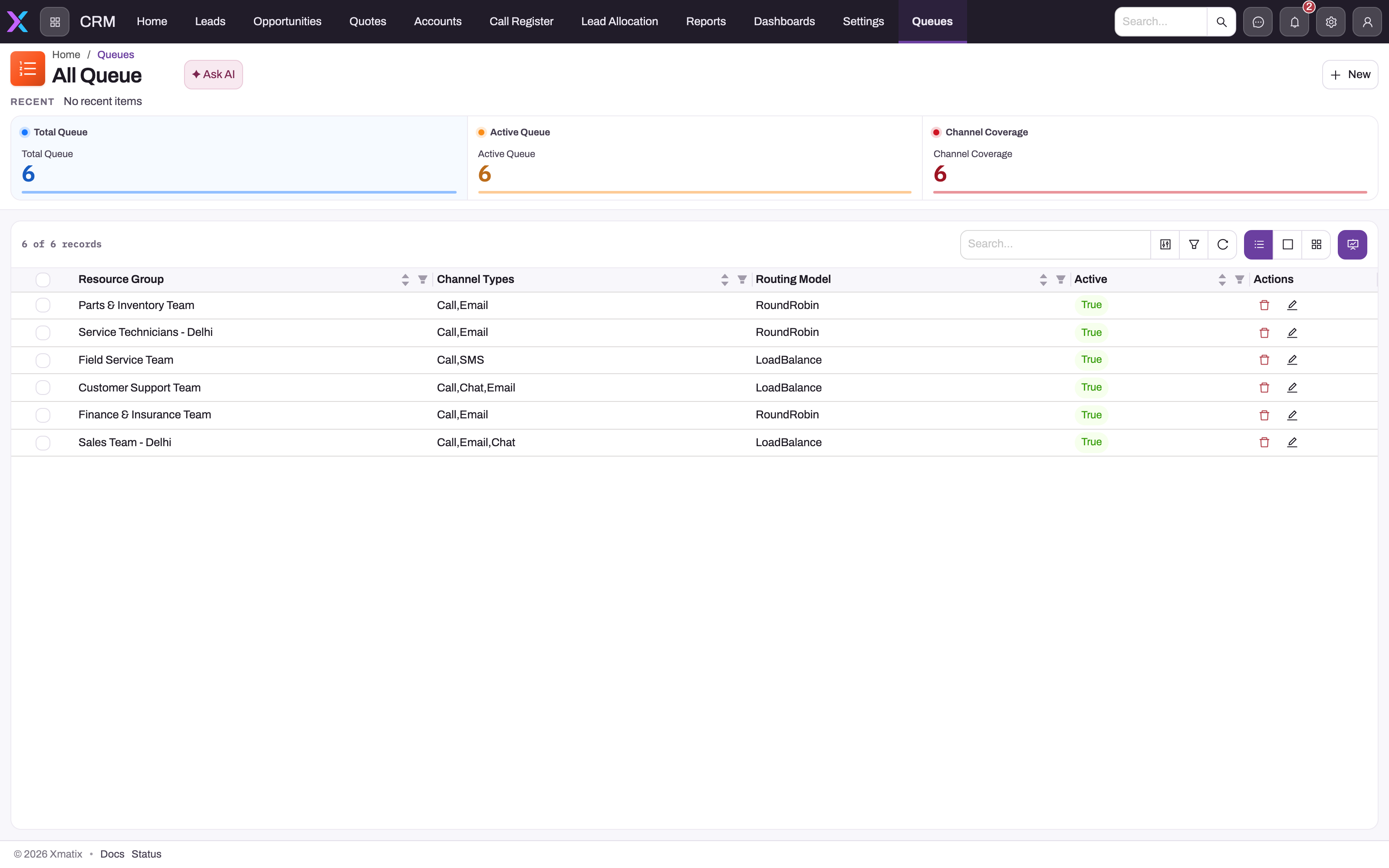
| What is the queue's agent pool and routing model? | Support → Settings → Queues (columns Resource Group, Routing Model, Channel Types, Active) |
| Who is in the pool? | Support → Settings → Resource Groups, then each member's resource record (active, linked user) |
| Is the agent online, and how full are they? | The Agents tab of the Supervisor Console: effective presence and open load |
| How much work is waiting? | The Supervisor Console's Queue backlog tile (active queues only) |
| Which SLA policy attached, and when is it due? | The case's SLA tab: SLA Policy, SLA Status, First Response Due, Resolution Due, Stopped Since |
| What did the SLA engine do, and when? | Case SLA Event records for the case (see A case's SLA events) |
| Who changed the status or assignee? | The case's Activities timeline (Status changed from … to …, Assigned to …) |
Each routing attempt is stored as a Resource Work item with a status of Pending, Assigned, Accepted, Declined, Transferred or Closed. Resource Work is in no shipped app, so it can't be opened from a menu. An administrator can add it to the Support app (Setup → Design Studio → Apps) or read it through the data API. The Supervisor Console's load and backlog figures are built from the same items.
- 1
Total and Active Queue count configured versus operationally enabled queues.
- 2
Channel Coverage summarises the Channel Types field, which is documentation only: routing never rejects work for arriving on an unlisted channel.
- 3
Resource Group is the first record to open when nobody can be found: check membership, active flag, user link, presence and capacity of each member.
- 4
Routing Model decides ranking (RoundRobin, LoadBalance, Skill, Direct); a Skill queue only filters when the request supplies a required skill.
- 5
Active: inactive queues drop out of membership checks and the snapshot, but an explicitly supplied inactive queue is still routed.
Prerequisites
- To read queues, resource groups, skills and SLA policies you need access to Support → Settings. In the shipped profiles that page is for System Admin only.
- To see the Supervisor Console's data you need the Supervise telephony (CTI) capability.
- To change business rules you need access to Setup → Process Studio → Business Rules.
A case won't route
Routing offers work; it never forces it. When a case seems to go nowhere, work through these checks in order and stop at the first one that fails.
Step 1 — Check that something asked for routing
Cases are routed by business rules, not by a button on the shipped case page. The shipped rule Auto-route new cases routes a case after it is saved, using the case's Queue. If the case has no Queue and the rule names none, nothing is routed and nothing is shown to the user. The skipped attempt is only logged. A Route to queue rule you write can name a queue or a single resource instead.
Fix: set Queue on the case's People & Queue tab and save, or have your administrator check that Auto-route new cases is active (Setup → Process Studio → Business Rules, entity Case).
Step 2 — Check the queue the case names
Open the queue in Support → Settings → Queues:
- Resource Group must be filled. A queue without one has no candidates, so all of its work goes to Pending.
- Routing Model decides who wins among the eligible agents. A blank model behaves as Load balance.
- Active and Channel Types are not checked by routing. A rule that names an inactive queue still routes through it.
High-priority cases need one more check. The shipped rule Set Case Queue To High Priority fills an empty Queue on a new High priority case with a queue your organization may not have. Until your administrator points the rule at one of your queues or switches it off, those cases show a queue that doesn't resolve and are not routed.
Step 3 — Check that the pool has routable agents
Each agent in the queue's resource group must be an active resource linked to a user. A resource without a user is skipped, because the case can't be assigned to it.
Step 4 — Check that someone is Available
Only agents whose presence is Available, and whose browser renewed it within the last five minutes, are eligible. Agents set their presence in the Calls drawer. The browser renews it every minute. A closed tab sets them Offline. A crashed, sleeping or disconnected browser stops counting after five minutes, even though the stored status still says Available. The Supervisor Console's Agents tab shows the effective status.
Step 5 — Check that someone has room
Each agent has a work limit (Max Work Items on their presence record, 5 unless changed). An offer goes only to an agent whose open work plus the new item fits. Open work is everything Assigned or Accepted to them across all queues. Items for cases that are now Resolved, Closed or Cancelled, and for calls that have ended, don't count.
Step 6 — On a Skill-based queue, check the skill
When the routing request names a skill, only agents with a Resource Skill of exactly that name, at proficiency 1 or higher, stay in. The name must match exactly. When no skill is named, a Skill-based queue behaves like Load balance.
If every check passes but nobody qualifies
The work item is created as Pending on the queue, and it stays there. Nothing re-checks Pending work later: an agent going Available or finishing a case doesn't pull it. Pending work moves only when the case is routed again (for example, by saving it again while it has a Queue) or when a supervisor reassigns it through the omni-channel API. See Queues and omni-channel routing.
Routed, but nothing changed on the case
The case was routed but still shows the old Assigned To
This is expected. Routing creates an Assigned work item for the chosen agent, but Assigned To and Owner change only when the agent accepts the offer. Accept, decline, transfer and reassign are part of the omni-channel service API. No shipped web or mobile screen offers them. To give the case to someone, set Assigned To on People & Queue and save. The shipped rule then sets the status to Assigned.
The assigned agent can't open the case
Assigned To does not give access to a case. Case access comes from the owner, the role hierarchy, teams and sharing on the security profile. Check with the access triage.
One case has several work items
Auto-route new cases runs after every save of a case that has a Queue, not only when the case is created, so each save adds another work item. Each item counts against an agent's limit until it closes. They close together when the case moves to Resolved, Closed or Cancelled. If your desk edits open cases often, ask your administrator to add a condition to the rule so it routes only when Queue changes.
An agent gets no offers
An agent shows Available but is never offered work
Check these in order:
- The lease. The Supervisor Console shows the agent Offline when their browser stopped renewing presence. Have them reload the page and pick Available again in the Calls drawer.
- The work limit. Compare their open load with their limit on the Agents tab. A limit of 0 means no offers ever.
- The pool. Their resource must be in the resource group of the queue the work is routed to.
- The resource link. If their user is linked to two resources, only one of them is used for presence. Keep one resource per user.
An agent who was getting offers has stopped getting any
Their open work has reached the limit. The usual cause is offers that are never closed: open cases that were saved several times with a Queue each hold one item per save. Finishing those cases (Resolved, Closed or Cancelled) frees the capacity straight away. To give an agent more room, an administrator changes Max Work Items on their presence record (see Check who is online and change a work limit).
A declined case went to another agent, not back to the queue
Declining routes the work again straight away through the same queue, leaving out the agent who declined. If nobody else qualifies, the new item is Pending. A skill named in the first request is not carried over to the new attempt, so check the new offer when skills matter.
Agents can't see the call and chat dock
An agent gets the dock only when their resource is in the pool of at least one active queue and telephony is switched on for your organization. Fix the pool or the link, then have them sign in again.
The SLA clock did something unexpected
The due time is later than the target suggests
Targets count working minutes on the business-hours calendar. Hours outside the calendar's window, non-working days, linked holidays and time spent paused don't count. A four-hour first response promised late on Friday is due on Monday morning on a Monday–Friday calendar. Recompute against the calendar before you doubt the clock.
The due time is earlier than expected
The policy has no Business Hours calendar, or its calendar has no working days. Both are treated as 24×7, so nights and weekends count. Due dates at creation always use the policy's calendar. The case's own Business Hour field is used only when a paused clock resumes, so a case whose Business Hour differs from its policy's can see its deadlines shift after a pause.
The clock didn't pause while the case was waiting
The case's status isn't in the matched policy's Pause Statuses. When that list is empty, On Hold, Waiting on Customer and Waiting on Third Party pause the clock. The shipped Status picklist has only On Hold of those three, so an administrator adds the others before agents can choose them. Running Pause SLA on a case in an active status doesn't help, because the clock follows the status in the same save. Put the case in a pause status instead. See Pausing and resuming the clock.
The clock started again on its own
The case moved to an active status (New, Assigned, In Progress, Escalated or Reopened). The shipped rules can do this for you: filling Assigned To sets the status to Assigned on every save, which restarts a paused clock. Check the status change on the Activities timeline.
The wrong policy attached, or none did
When a case is created, xMatix tries the active policies from the highest Rank down, with Default breaking ties. The first policy whose Match Formula is true wins, and a blank formula matches every case. A blank-formula policy at a high rank hides every policy below it. A formula that names a field that doesn't exist, or uses a label instead of a field name, counts as false with no error. If nothing matches, the case gets no SLA at all. The policy is chosen once, at creation: changing a policy or the case's priority later doesn't re-match. See How a policy is chosen.
The warning or breach appeared a few minutes late
Warnings and breaches are applied by a background check, so a milestone turns Warning or Breached shortly after its threshold, not at the exact second. A milestone whose warning point and deadline have both passed by the time the check reaches it goes straight to Breached. Paused milestones are skipped. When a policy leaves Warning % empty, the warning comes at 80% of the target.
A case shows Escalated but nobody escalated it
A breach sets the case's Escalated flag; it doesn't change the status. These cases show in the SLA Breached Cases view rather than Escalated Cases, which filters on the Escalated status. See Escalating a case.
The case is resolved but SLA Status still says Breached
A breached milestone stays breached. Resolving or closing the case doesn't clear it, because it records a missed promise. Closing or cancelling a case cancels its milestones that are still open.
Messages when you change a case
"A resolution summary is required to resolve a case."
You set Status to Resolved with an empty Resolution Summary. Fill it in on the Resolution tab and save again.
"A close reason is required to close a case."
You set Status to Closed, ran Close, or saved with Closed When Created ticked, and Close Reason is empty. Choose a Close Reason on the Resolution tab.
"Only resolved, closed or cancelled cases can be reopened."
Reopen works only on a finished case. For an open case, change its status instead.
"This case can't move from {status} to that status."
A shipped Block Case Transition From {status} business rule forbids that move. For example, a resolved case can only be closed or reopened. Pick an allowed status, or ask your administrator which rule refused it. The full table is in the case lifecycle.
"Routing requires the case's QueueId, or a queueId/resourceId argument."
The case's Route action ran on a case with no Queue, and the action gave no queue or resource either. Set Queue on People & Queue and run it again. Route is not on the shipped case header; it appears where an administrator has added it.
The status I chose didn't stick
The shipped rules set the status on save: Set Case Status To Assigned whenever Assigned To is filled, and Set Case Status to In Progress whenever First Response Date is filled. Depending on Close Reason, other rules set On Hold, Resolved or Cancelled. Your administrator can add conditions to these rules or switch them off.
I can't choose Waiting on Customer, Waiting on Third Party or Escalated
They aren't in the shipped Status picklist. Your administrator adds them on the Case entity (Setup → Design Studio → Entities). They already have lifecycle behaviour.
The customer didn't get the acknowledgement email
The acknowledgement goes to the case's Contact Email when the case is created. With no address it is recorded as a Draft email activity and nothing is sent. A Sent entry means the email was handed over for sending. It doesn't prove delivery, and a failed send isn't reported on the case. Check the address and your organization's outbound email setup.
A button or action is missing
That is usually an access or layout question. Case actions other than New, Edit and Delete each need a grant on the profile's Actions tab, and the shipped case page shows only the actions listed in its header. Work through the access triage.
Configuration
The settings behind the problems above:
| What | Where | Affects |
|---|---|---|
| Queues, resource groups, skills | Support → Settings | Who can receive routed work |
| Agent work limit | Max Work Items on the agent's presence record (data API) | How much open work an agent holds |
| SLA policies, milestones, business hours, holidays | Support → Settings | Which promise attaches, due times and pausing |
| Routing and status rules | Setup → Process Studio → Business Rules, entity Case | Auto-routing, the high-priority queue and status automation |
| Status picklist | Setup → Design Studio → Entities → Case | Which statuses agents can choose |
| Header actions (Route, Close, Reopen, Escalate, Pause SLA, Resume SLA) | The Case -View layout in the layout designer | Which actions agents see as buttons |
Field-by-field guidance is in the support configuration reference.
Common questions
Where do I see everything the SLA engine did to a case?
In the case's Case SLA Event records. They log the policy being applied, every pause and resume, warnings, breaches, cancellations and milestones met (including met late), each with a UTC timestamp. They are separate from the Activities timeline, which carries only status changes, assignments and logged activities. The case page has no list of them, and Case SLA Event is in no shipped app. An administrator first adds it to the Support app; then open All Case SLA Event and filter on Case. See A case's SLA events.
Pending work is piling up in a queue. What can I do?
First find out why: use the Supervisor Console's Agents tab to see whether agents are offline, at their limit or missing from the pool. Bringing agents online or finishing cases makes them eligible for the next offer, but it doesn't pull existing Pending work. That work moves when the case is routed again, for example by saving it with its Queue, or when a supervisor reassigns it through the omni-channel API.
Does deactivating a queue stop work reaching it?
No. Routing doesn't check Active, so any rule, mailbox or phone route that names the queue still sends work through it. Deactivating takes the queue out of the supervisor's backlog and can take the call dock away from agents in no other active queue. Point every source at another queue first, then deactivate it.
Why didn't changing a policy fix the deadlines on open cases?
A case's policy and milestones are fixed when the case is created. Changes to a policy's targets, rank or formula apply to cases created afterwards. Only a custom milestone's completion formula is read again on open cases.