
Record-level security decides which individual records of an entity a user can see and change, once their security profile has let them use the entity at all. It is the second of two gates: the security profile answers "may this user read, create, edit or delete Accounts?", and record security answers "which Accounts?". You configure it per entity with a sharing policy under Setup → Access Control → Policies, and fine-tune it with rules and shares.
Overview
Every record carries an owner. Each entity can have one sharing policy, which sets:
- the ownership model — whether records are filtered by owner at all;
- the default access that staff (internal) and portal or partner (external) users get on records they do not own;
- three switches that widen access: the role hierarchy, manual shares and team access;
- optional rules that grant extra access to records matching a condition, or filter what is visible.
When to use it
- A new entity you created is invisible to everyone except the people who created its records.
- Sales reps should see only their own leads, while their managers see their team's.
- A region, branch or business unit should see only its own records.
- Portal users should see a narrower slice than staff.
- One person needs access to one record they would not otherwise reach.
How xMatix handles it
Two checks, both must pass
For every read, edit or delete, xMatix first checks the user's profiles: one of them must grant the operation on the entity. A user with no grant is refused outright. Then record security filters the records: a list shows only the rows the user may read, and an edit or delete of a record outside the user's write scope is refused as if the record did not exist.
The same record filter applies wherever records are read — lists and views, record pages, lookups, related lists, list summaries, reports and the mobile app's sync. Policy and rule changes reach signed-in users within about two minutes.
What a user can read
A user can read a record when any one of these holds:
- the entity's policy is Organization Owned;
- one of their profiles has View All on the entity;
- the policy's default access for their audience is Read Only or Read Write;
- they own the record;
- Grant access using hierarchy is on and the record's owner holds a role below one of theirs;
- an enabled Access Grant rule with effect Grant Read targets them and its condition matches the record;
- Allow manual share is on and the record is shared with them — directly, or with a role, team or business unit they belong to, or with all internal or all external users.
Then every enabled Access Filter rule that applies to them narrows the result: only records matching all of those filters stay visible.
What a user can change or delete
Update and delete are narrower. They come from Organization Owned, Modify All, a Read Write default, ownership, the hierarchy, a share whose access includes that operation, or an Access Grant rule with effect Grant Write set to that operation. A Read Only default, a read-only share or a Grant Read rule lets the user see the record but not save changes to it. Access Filter rules set to Update or Delete narrow these operations the same way they narrow reading.
View All and Modify All skip record security
View All on a profile skips the whole record filter for reading: no owner check, no default, and no Access Filter rule applies. Modify All does the same for update and delete. These masks are for administrators and auditors. The shipped full-access profiles carry them, which is why an administrator often sees records that a scoped user cannot. Modify All on its own does not widen reading; a user also needs View All, or another read path, to see the records.
No policy, or an inactive policy
An entity whose policy is missing or switched off (Active off) is treated as User Owned and Private for both audiences, with hierarchy, manual sharing and team access all off. Its rules are ignored. Only each record's owner and View All holders can read it. Entities you create start with no policy, and not every shipped entity has one either. Check the Policies list before you assume an entity is shared.
Records with no owner are invisible under a Private baseline to everyone except View All holders, users reached by a matching rule, and users the record is shared with.
Shipped policies
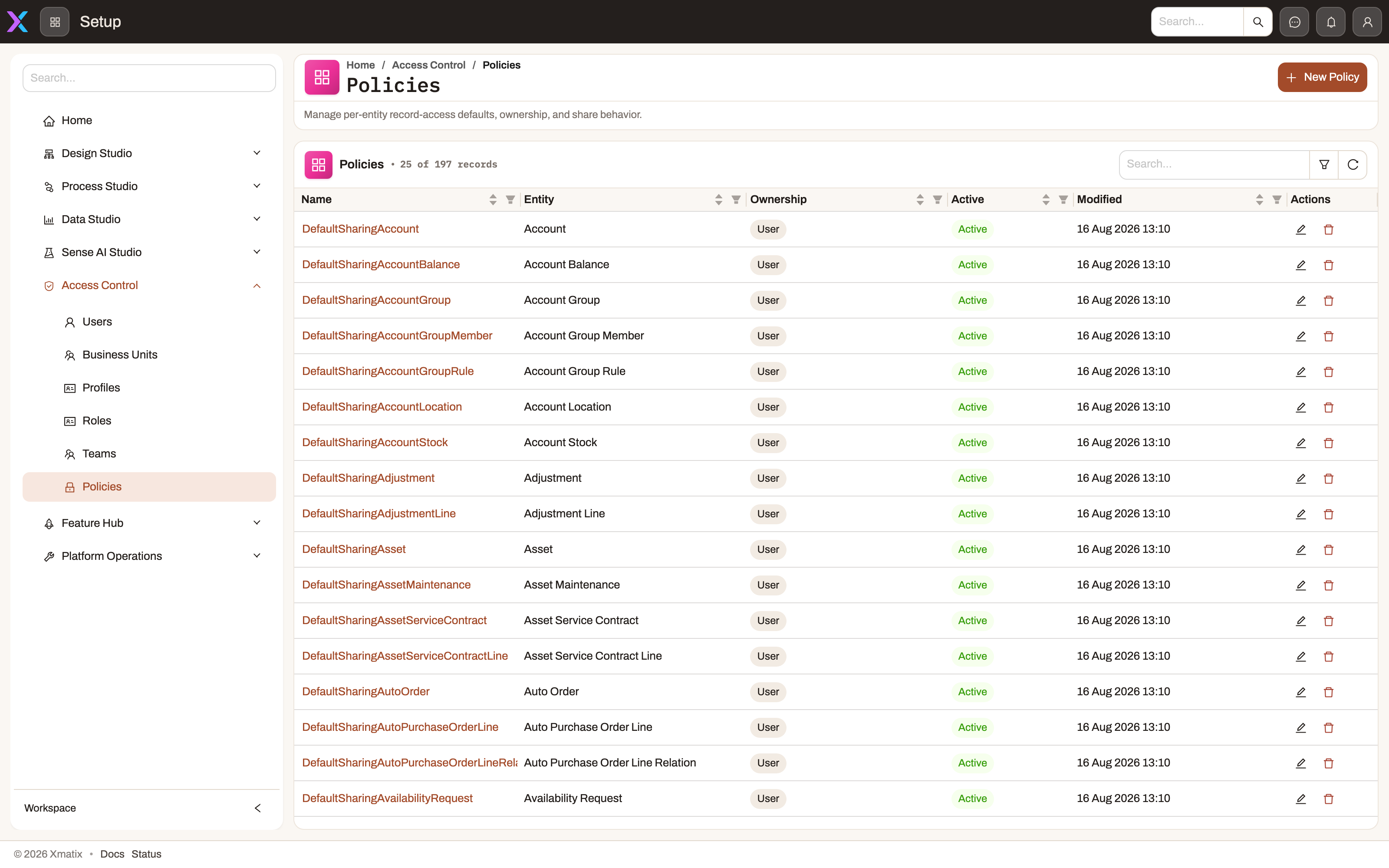
Most core entities ship with a policy named DefaultSharing<Entity>. Most of these are User Owned with Read Only for both audiences and all three switches on: everyone reads every record, and writing needs ownership, the hierarchy or Modify All. Some shipped policies are stricter or wider. Leads, opportunities, quotes, cases and activities are Private for staff, and leads, quotes and cases also have manual sharing off. Orders are Organization Owned. Several HR and payroll records are Read Only for staff and Private for external users. Open the Policies list to see the exact values in your organization; administrators can change them.
A few entities also ship with Access Filter rules. Visits and visit plans are filtered to the field resource they are assigned to (users not linked to a resource are not filtered). Employee, payslip, tax-declaration, monthly TDS projection and TDS certificate records are filtered to the reader's own employee resource. View All holders are not affected by these filters.
Prerequisites
- The Access control area in Setup, which needs the
setup.security.managecapability. - A plan of who should see what, written down before you change a live policy. Tightening a default hides records for everyone at once.
- A test user holding only the profile you are scoping. Your own account probably has View All, so it cannot show you what scoped users see.
Procedure
Step 1 — Find the entity's policy
Go to Setup → Access Control → Policies. The list shows each policy with its Entity, Ownership and status; search by name or filter by entity. Open the policy's name.
The detail page header shows Entity, Ownership, Internal Access, External Access, Status, Hierarchy Access, Manual Share and Team Access, followed by the Rules table (Type, Effect, Audience, Priority, Enabled, Description, Modified).
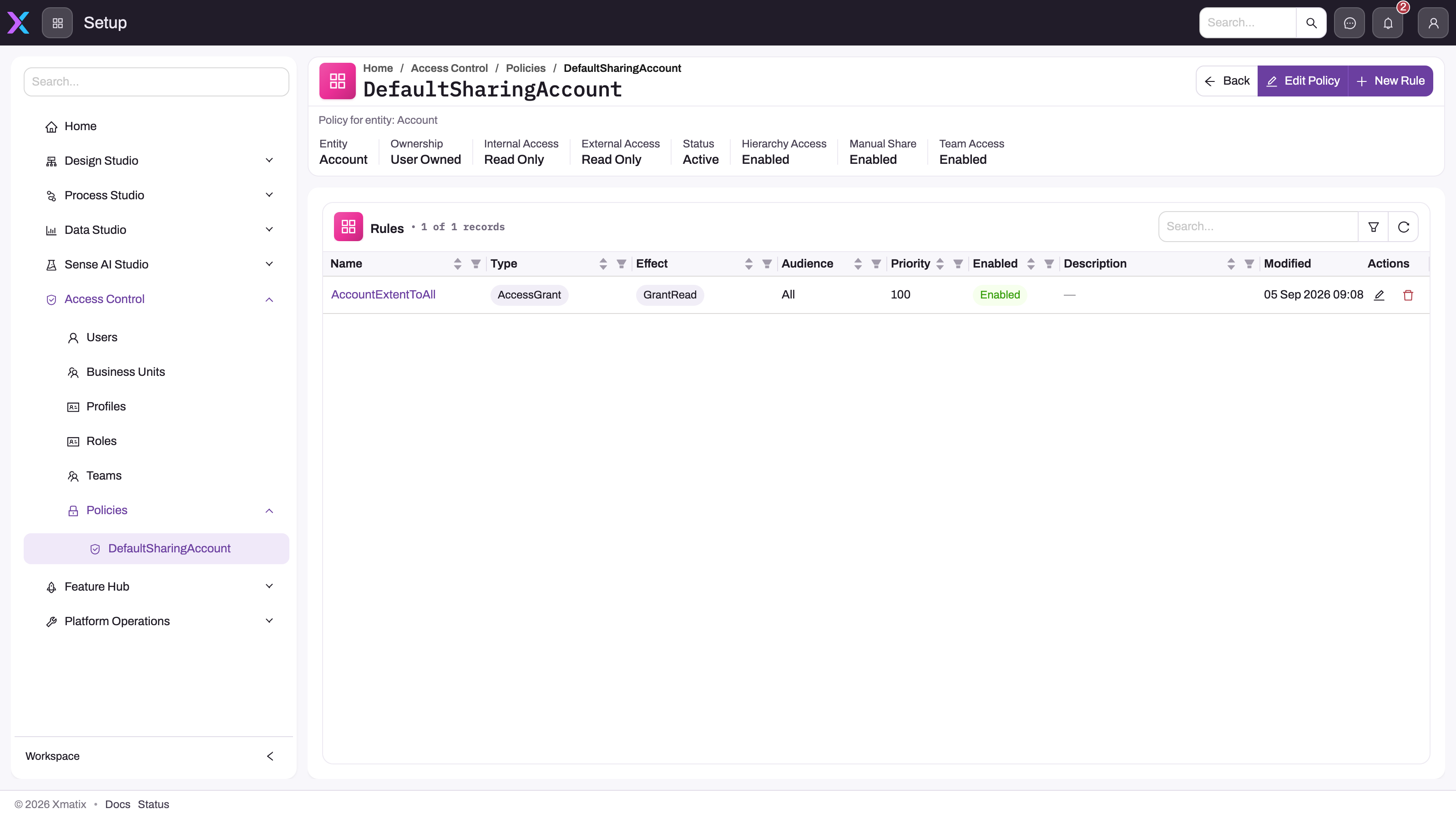
If the entity has no row, it has no policy. Go to Step 2.
Step 2 — Create a policy for an entity that has none
On the Policies list select New policy. Pick the Entity, and set the fields described under Fields. A new policy starts as User Owned, Private for both audiences, with all three switches and Active on. To make a new entity behave like the shipped ones, set both default access fields to Read Only. Save. Each entity can have only one policy, and the Entity cannot be changed after the policy is created.
Step 3 — Change the defaults and switches
On the policy detail page select Edit Policy, change the fields and save. Record the old values first so you can roll back. Changing Internal default access from Read Only to Private is the high-impact change: as soon as it takes effect, staff see only what ownership, the hierarchy, shares and rules give them.
Step 4 — Add a rule
Select New Rule. In the New Security Rule dialog, set Name, Rule Type, Effect, Applies To Audience, Applies To Operations, Priority, Description and Enabled. Untick Enabled while you build the rule. Then open the rule's name in the Rules table: its detail page has an Expressions section (Add Expression) for the condition and a targets section (Add Target) for who the rule is for. The step-by-step guide, including expression syntax, is in Restriction rules.
Step 5 — Test with a scoped user
Sign in as the test user. Allow up to two minutes for the change to reach them. Check one record that should be visible, one that should not, and one edit. Then enable the rule (Edit Rule → Enabled) and repeat.
Step 6 — Share one record (exceptions only)
Per-record shares are kept as security metadata. There is no share button on record pages in the web or mobile app. Shares are created through the metadata API by a user with setup.security.manage. Each share names the record, a principal (a user, role, team, business unit, all internal users or all external users) and the operations it grants. If you find yourself sharing the same kind of record again and again, use a policy default or an Access Grant rule instead.
Fields
The policy dialog (New policy / Edit Policy):
| Field | What it means | Notes |
|---|---|---|
| Name | The policy's name. | Shipped policies are named DefaultSharing<Entity>. Locked after creation. |
| Entity | The entity this policy governs. | Required. One policy per entity; locked after creation. |
| Ownership model | Organization Owned: no record filtering; only the profile check applies. User Owned: records are filtered by owner plus the mechanisms on this page. Team Owned: offered in the list but evaluated exactly like User Owned. | Required. Default User Owned. |
| Internal default access | What staff get on records they do not own: Private (nothing), Read Only (read every record) or Read Write (read, update and delete every record). | Required. Default Private for a new policy. |
| External default access | The same, for external users (portal and partner sign-ins). | Required. Default Private. Set independently of the internal value. |
| Grant access using hierarchy | Users can read and change records owned by users whose roles sit below theirs in the role tree. | Default on. Follows record ownership, not teams. |
| Allow manual share | Per-record shares count for this entity. | Default on. When off, existing shares are ignored. |
| Allow team access | Shares aimed at a team count for the team's members. | Default on. Rule targets naming a team work whatever this says. |
| Active | Whether the policy is used. | An inactive policy is ignored, along with all its rules (see "No policy, or an inactive policy"). |
The rule dialog (New Security Rule / Edit Security Rule):
| Field | What it means | Notes |
|---|---|---|
| Name | The rule's name. | Locked after creation. |
| Rule Type | Access Grant widens access; Access Filter narrows it. | Ownership Resolution and Principal Expansion are shown but cannot be selected. |
| Effect | For Access Grant: Grant Read, Grant Write or Grant Share. For Access Filter: Filter Visible Records. | Resolve Owner is shown but cannot be selected. |
| Applies To Audience | All, Internal or External. | Specific Principal Type cannot be selected. |
| Applies To Operations | The operation the rule takes part in. Grant Read is fixed to Read (1); Grant Write offers Update (4) or Delete (8); Grant Share is fixed to Share (16); Filter Visible Records offers Read, Update, Delete or Share. | One operation per rule: to grant both update and delete, add two Grant Write rules. |
| Priority | A number, default 100. | Shown in the Rules table. It does not change the result: every applicable grant is added and every applicable filter is applied. |
| Description | Free text shown in the Rules table. | Optional. |
| Enabled | Whether the rule takes part. | Disabled rules are ignored. |
| Stop Processing On Match | Shown but cannot be changed. | Has no effect. |
Rule targets (Add Target on the rule's detail page):
| Field | What it means | Notes |
|---|---|---|
| Mode | Applies to includes the principal; Except excludes it. | An Except target that matches the user switches the rule off for them, even if an Applies to target also matches. |
| Target Type | Current User, Owner, Team, Role, Business Unit, All Internal, All External or Profile. | Current User and Owner mean "whoever is reading"; the rule's condition does the selecting. Team, Role, Business Unit and Profile need you to pick the specific one. Custom Principal cannot be selected. Filters and Except targets offer only the principal types (Team, Role, Business Unit, All Internal, All External, Profile). |
| Grant Mask | Read (1). | The only value accepted. It does not limit a Grant Write rule; the rule's effect and operation decide what is granted. |
Business rules
- A grant rule with no Applies to target grants nothing. An Access Filter with no Applies to target applies to everyone (except View All holders for reads and Modify All holders for writes). The targets section of a filter is titled Applies To (none = everyone).
- Grants add up, filters narrow. The user's reach is their baseline (default, ownership, hierarchy, shares) plus every matching grant rule, then cut down by every matching filter rule. There is no deny effect.
- A rule takes part only in the operation it is set to. A Grant Write rule set to Update does not let users delete.
- Grant rules are skipped when the default already allows the operation. With a Read Only default, Grant Read rules change nothing, but Grant Write rules still widen editing.
- Shares must include the operation. A share that grants only read does not let the user edit. Shares are looked up only when the default does not already give the user every record.
- Business units come from roles. A user belongs to a business unit through the roles assigned to them, not through a field on the user. A user with no role is in no business unit.
- Teams. Team membership counts both direct team assignments and team-member rows. For shares it counts only when Allow team access is on; for rule targets it always counts.
- The hierarchy follows ownership down the role tree. A manager reaches records owned by users holding any role below their own roles, at any depth, through active roles only.
- Changing an owner needs Update on the record. The profile grid also lists Assign, but xMatix does not check it when the owner changes, so withholding Assign does not lock ownership.
- Grant Share and Share have no effect today. No screen or API in xMatix asks for Share access, so Grant Share rules and Share operations on filters change nothing.
- Rules that reports cannot apply fail closed. If a rule's condition cannot be translated for the report engine, reports that read the entity are refused for affected users rather than shown unfiltered.
Example
A distributor wants its sales staff to see only their own opportunities, managers to see their team's, and the West business unit to edit each other's West opportunities.
- The administrator opens Setup → Access Control → Policies and opens
DefaultSharingOpportunity. Internal Access is already Private and Hierarchy Access is on. - They check Setup → Access Control → Roles: the West sales manager role is the parent of the West sales rep role. The hierarchy therefore gives the manager the reps' opportunities with no extra work.
- They select New Rule: Name
West opportunities editable by West, Access Grant, Grant Write, Audience Internal, Operations Update (4), Enabled off. On the rule's detail page they add a condition that picks West opportunities, and an Applies to target of Business Unit = West. - They add a second rule,
West opportunities readable by West, with Grant Read, the same condition and target. Without it, West reps could not see the colleagues' records they are now allowed to edit. - They test as a West rep, then enable both rules and test again: the rep sees and edits West opportunities, but cannot delete them, because there is no Delete rule. An East rep sees only their own.
Training
Practice exercise
In a sandbox, create a custom entity and give two test users a profile that grants Read, Create and Update on it, but not View All or Modify All. Have each user create one record. Sign in as user A: you see only your own record, because the new entity has no policy. Then create a policy for the entity with Internal default access = Read Only, wait two minutes and sign in again: user A now sees both records but can save changes only to their own. Finally, set the default back to Private and add a Grant Read rule with an Applies to target of Role = user A's role: user A sees user B's record again.
Quick reference
- Two gates: the profile must allow the operation on the entity, and record security must reach the record.
- No policy, or an inactive policy, means Private with every switch off.
- Read Only default: everyone reads, owners (and their managers) write.
- View All skips the record filter for reading, including Access Filter rules; Modify All does the same for writing.
- Grant rules need an Applies to target; filters with no target apply to everyone.
- One operation per rule: Grant Write for Update and Grant Write for Delete are separate rules.
- Priority and Stop Processing On Match do not change the result.
- Business units come from the user's roles; the hierarchy comes from parent roles.
- Allow up to two minutes for a change to reach signed-in users.
Permissions
| Task | What you need |
|---|---|
| Open Setup → Access Control → Policies, create and edit policies, rules, expressions and targets | The setup.security.manage capability (it also unlocks the whole Access control area). |
| Create, change or remove per-record shares | The setup.security.manage capability. |
| Read every record of an entity regardless of record security | View All on the entity in one of the user's profiles. |
| Update and delete every record regardless of record security | Modify All on the entity. |
A user without setup.security.manage does not see the Access control area in Setup.
Configuration
| What | Where | What changing it affects |
|---|---|---|
| Sharing policy per entity | Setup → Access Control → Policies | Baseline visibility and editability of every record of that entity, for everyone without View All / Modify All. |
| Policy rules, conditions and targets | Policy detail → New Rule, then the rule's detail page | Extra read or write access for selected users, or filters that hide records. See Restriction rules. |
| Role tree (parent roles) | Setup → Access Control → Roles | Who reaches whose records through Grant access using hierarchy. See Roles, teams and business units. |
| Teams and members | Setup → Access Control → Teams | Who a team share or a Team rule target covers. |
| Business units of roles | Setup → Access Control → Business units and Roles | Who a business-unit share or Business Unit target covers. |
| View All / Modify All | Setup → Access Control → Profiles → the profile's entity grants | Who bypasses record security. See Security profiles. |
| Automatic profile and team assignment | Setup → Access Control → Security assignment | Assigns profiles and teams from resource attributes, which changes which rule targets match. |
Common problems
A user can see a record but cannot save changes
The read probably comes from a Read Only default, a read-only share or a Grant Read rule, none of which allows editing. Writing needs ownership, the hierarchy, a Read Write default, Modify All, a share that includes update, or a Grant Write rule set to Update, and the user's profile must also grant Update on the entity. Check the profile first, then decide which mechanism should give this user write access.
Nobody but the creators can see records of a new entity
The entity has no policy, so it is Private with every switch off. Create one with New policy and set the defaults you want. Read Only for both audiences with all switches on matches most shipped entities.
I shared a record but the person still cannot see it
Check in order: the user's profile grants Read on the entity (shares never widen entity access); the policy has Allow manual share on; for a team share, Allow team access is on and the user is an active member; the share's access includes the operation; the share is active. Then see Why can't a user see something?.
An administrator sees records a filter rule should hide
Their profile has View All on the entity, which skips the filters for reading. That is by design. Test with an account whose profiles lack View All.
A rule changes nothing
The rule is disabled; its condition is not marked valid; its audience does not match the user; it is a grant rule with no Applies to target; an Except target matches the user; or the policy is inactive. A Grant Read rule also changes nothing when the default is already Read Only.
Changes did not take effect straight away
Policy, rule and profile changes are cached for up to two minutes. Wait, then reload.
Common questions
How do managers see their team members' records?
Through the role hierarchy. Give the manager a role that is the parent (directly or further up) of their reports' roles, and keep Grant access using hierarchy on in the entity's policy. The manager then reads and edits records owned by anyone holding a role below theirs. Teams are a different mechanism: putting a manager in a team with their reports only helps for records shared with that team or rules that target it.
Does Organization Owned mean everyone can edit everything?
No. Organization Owned switches off record filtering, so every record is in scope, but the profile check still applies in full. A user whose profile grants Read but not Update on an organization-owned entity sees every record and can edit none. Access Filter rules on the policy still narrow what non-View All users see.
Can a rule let a group edit records they do not own?
Yes. Add an Access Grant rule with effect Grant Write, set Applies To Operations to Update (4), give it a condition and an Applies to target for the group. Add a second rule with Delete (8) if they should also delete. Unless the default is already Read Only, add a Grant Read rule as well, or they will not see the records they may edit. Their profile must still grant Update (and Delete) on the entity.
Can I exclude one group from a rule?
Yes. On the rule's targets add a target with Mode = Except and pick the role, team, business unit, profile or audience to leave out. A user who matches an Except target is not covered by the rule, even if they also match an Applies to target. For a filter, this is how you exempt a group (for example a head-office role) from the narrowing.