
The xMatix developer surface is the set of tools for working with an organization's configuration and data from outside the product's screens: a command-line tool for configuration under source control, a REST data API, an MCP endpoint for AI assistants, the connector engine behind the integration hub, and server-side automation scripts. Most customization needs none of it — the data model, layouts, business rules, workflows and approvals are all built in the product, and the customization guide covers them end to end. This section is for the work beyond that, and every surface in it runs on the same platform services and the same security model as the product itself: a developer surface never grants more than the signed-in user is permitted.
Overview
| Surface | What it does | Start here |
|---|---|---|
| The CLI | A git-friendly view of a tenant's configuration — automation scripts, business rules, workflows and metadata pull to files and push back, and metadata packages are built and installed — so configuration can be versioned, reviewed and promoted like code. It is an early release: dashboards and reports can be listed but not yet pulled or pushed | CLI overview |
| Data API | REST endpoints over every entity in the organization — list, read, create, update, delete, run actions, bulk and upsert, delta sync and the data model itself — with the caller's permissions always applied | The data API |
| MCP endpoint | The platform speaks the Model Context Protocol, so AI assistants can discover entities, query and aggregate records, run reports and dashboards and search knowledge — and, when the organization allows writes, create and update records or use the setup tools — always as the signed-in user | The MCP endpoint |
| Integration connectors | The connector engine behind the integration hub — manifest connectors for JSON-over-HTTPS partners, compiled connectors for transports templated HTTP cannot express | Connector authoring |
| Script runtime | Server-side C# in a sandbox, bound to a phase of an entity's save lifecycle or to a server action a button runs — authored in the product, and round-trippable through the CLI | Your first automation script |
When to use it
- Configuration in git. You want pull-request review of scripts, rules and workflows, or to promote a reviewed state from one organization to another by pipeline — use the CLI, starting with the quickstart.
- Records flowing to and from your own systems. You push orders or customers in, pull transactions out, or keep an external copy current — use the data API. For a one-off spreadsheet load, Import data is quicker.
- AI assistants on governed data. You want an assistant to answer questions over your records, or an administrator to configure through one — use the MCP endpoint. To let the platform's own Sense agents call your tools, register an external MCP server instead (same page).
- A new external system. The partner is not in the connector catalog — read connector authoring to see whether the generic HTTP REST connector covers it.
- Logic the declarative tools cannot express. Cross-record calculations, external calls and custom button behavior — write an automation script. A business rule that can do the job is still the better choice, because any administrator can read and adjust it.
How xMatix handles it
The metadata is the contract. An entity's detail page under Setup → Design Studio → Entities links its Fields, Record Types, Field Mappings, Validations, Relations, Views, Actions and Layouts. Those definitions decide the shape of every API payload, what the MCP describe tools return and what the CLI pulls. Start any development by opening the entity definition: use logical names rather than display labels, and read the supported metadata instead of hard-coding assumptions.
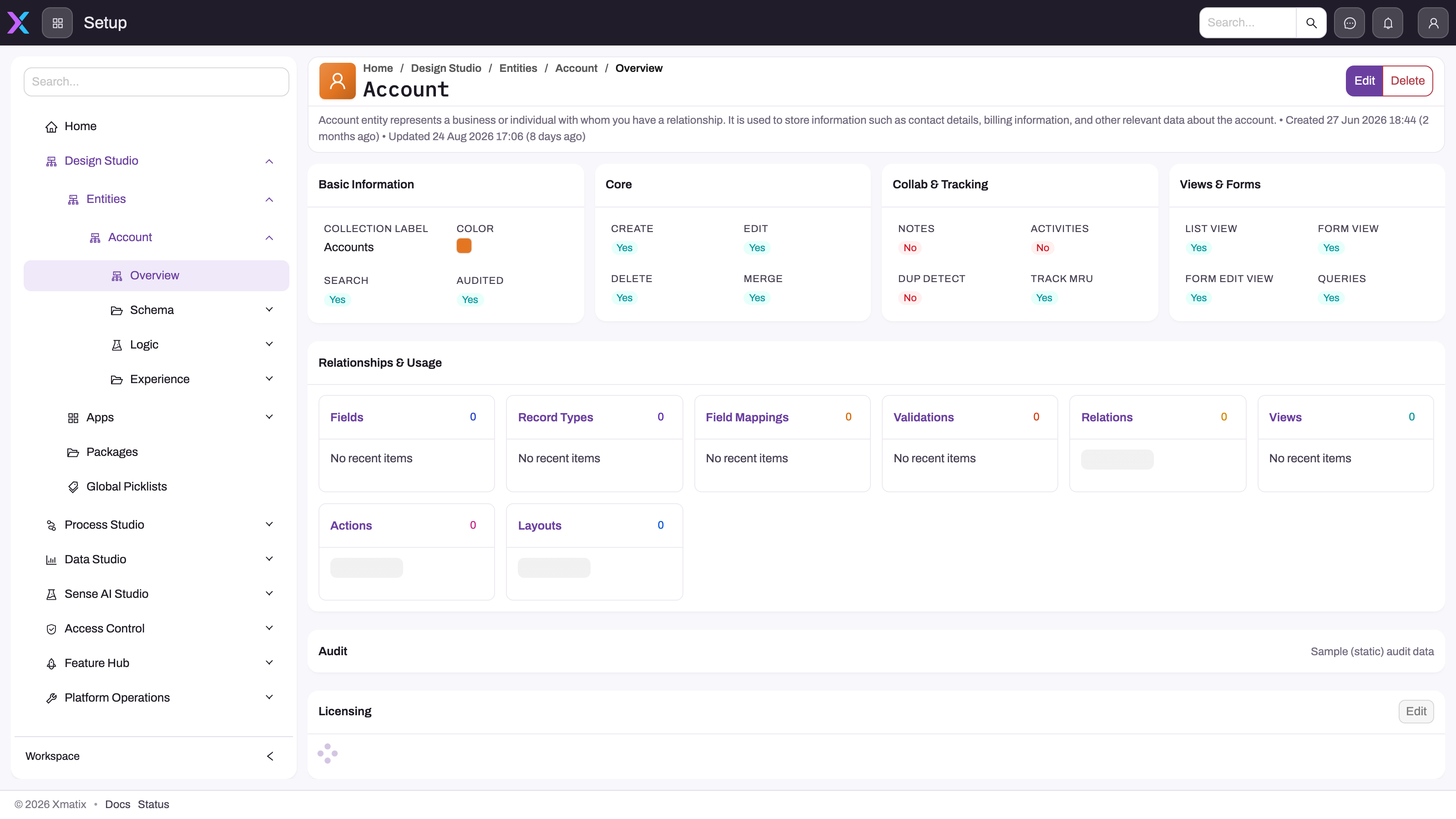
- 1
The entity header identifies the logical model whose contract you are inspecting.
- 2
Capability cards show which create, edit, delete, merge, tracking and view behaviors the entity supports.
- 3
Relationships & Usage links Fields, Record Types, Relations, Views, Actions and Layouts back to the same entity contract.
- 4
Schema, Logic and Experience organize the metadata you should verify before hard-coding an integration assumption.
One pipeline for every writer. The data API is the same API the product's web and mobile clients run on — there is no separate integration API with different behavior. A record written through the API, an MCP write tool or a script runs exactly the defaults, validations, business rules, bound scripts, workflows and approvals a record saved on a form runs (what runs when you save a record).
One identity. Every request executes as an authenticated user. The CLI signs in with a device code and keeps its tokens in your operating system's secure storage, one cache per tenant slug (Authentication). Data API calls carry an OAuth 2.0 bearer token from your organization's sign-in authority. MCP assistants sign the user in through the organization's normal sign-in and receive a short-lived token bound to that one organization. In every case the user's security profiles, record security and restriction rules are applied on the server.
How the pieces relate. Scripts are authored and tested inside the product; the CLI's scripts commands let you edit the same scripts in your own editor and push versions from git. The MCP endpoint wraps the same services the data API uses behind tools an assistant understands, and the reverse direction — your tools called by Sense agents — is registered in AI Studio and described in Extending Sense. Connectors belong to the integration hub, where scheduled flows move data between xMatix and external systems.
Prerequisites
- A user to act as. Every surface acts as a user, so decide which one first. For an unattended integration, an administrator creates a dedicated user with a security profile that grants exactly the entities, fields and actions it needs.
- Logical names. Find entity and field logical names in Setup → Design Studio → Entities, with the CLI's
metadata pull, or with the MCP endpoint's describe tool. - For the CLI, the .NET 10 SDK on the machine that runs it, and on Linux a running keyring (secret service) for the token cache.
- For the MCP endpoint, an administrator must first allow external assistants — it is off for every organization until then.
Permissions
A developer surface never widens access. What each one needs on top of ordinary record access:
| Surface | Who can use it, and what gates it |
|---|---|
| CLI | Any signed-in user, limited to what that user can do. Metadata and package commands need the Manage metadata packages capability (the one that opens Setup → Design Studio → Packages); scripts, rules and workflows need the access those areas need in the product |
| Data API | Any user with a token. Reads need Read on the entity; writes need the entity grant, record access and field permissions; actions need the action's grant. Refusals return 403 with a code such as ENTITY_ACCESS_DENIED |
| MCP endpoint | Users of an organization that has allowed external assistants. Reading needs the read scope; record writes need the write scope and the organization's write opt-in; the setup tools need the setup scope, which also needs the write opt-in |
| Integration hub and connectors | The integration administration capability, which opens Setup → Platform → Integrations, plus a role on the specific integration app |
| Automation scripts | The scripts capability, which opens Setup → Process Studio → Scripts |
Capabilities are granted on a security profile's Entitlements tab. Setup hides a menu entry from a user who lacks its capability.
Configuration
Administrators control the developer surface through the product's own settings:
- Data API — there is no separate API switch. Control what an integration can do through its user's security profile and the entity's own settings (an operation switched off on the entity is refused through the API for every caller). See the data API's configuration.
- MCP endpoint — Setup → Sense AI Studio → Configuration → External assistants holds Allow external assistants, Allow writes (create/update records; setup changes for administrators) and the optional Approved assistants list, and lists every connection with a Disconnect action. External MCP servers that Sense agents may call are registered under Setup → Sense AI Studio → Configuration → MCP servers. Both screens need the AI Studio agents capability.
- Connectors — connections, flows and their schedules live under Setup → Platform → Integrations; see Connect an external system.
- Scripts — written, bound to entities and activated under Setup → Process Studio → Scripts.
The pages in this section
| Page | What it covers |
|---|---|
| CLI overview | What the CLI is, installing it, and the full command map |
| CLI quickstart | A first session end to end: sign in, export the tenant, push a change |
| Authentication | The device-code sign-in, the token cache, and workspace configuration |
| Metadata, Workflows, Scripts, Rules, Dashboards & reports | Round-tripping each artifact kind, and where each still falls short |
| Migrations, Snapshots, CI recipes, Workspace layout | Whole-repository operations and pipelines |
| Packages | Building, validating, installing, upgrading and removing metadata packages |
| The data API | The REST surface over entities, queries, actions, bulk writes and delta sync |
| The MCP endpoint | AI tools over governed data, in both directions |
| Connector authoring | The two connector tiers and the manifest contract |
| Troubleshooting | Developer-surface symptoms and their fixes |
Training
Practice exercise
In a sandbox organization, find the logical name of the Account entity and three of its fields under Setup → Design Studio → Entities, then read one page of accounts through the data API as a test user. Remove Read on Account from that user's security profile and repeat the call. Expected result: the first call returns accounts; the second is refused with a 403 — the API applies exactly the access the user has in the product.
Quick reference
- Every surface acts as a user — choose and scope that user first.
- Use logical names, never on-screen labels, in code and payloads.
- API, MCP and script writes run the same rules, validations and workflows as a form save.
- Data API routes use the version segment
1.0(/api/1.0/...). - External assistants stay off until Allow external assistants is switched on; writes need Allow writes too.
- CLI tokens live in your operating system's secure storage, never in the repository.
- Prefer a business rule to a script when the rule can do the job.
Common questions
Do I need any of this to customize xMatix?
No. Every customization tool — entities and fields, layouts, business rules, workflows, approvals, even automation scripts — has a full authoring experience inside the product, and administrators use them without touching a terminal. The developer surface earns its keep when you want configuration in git with pull-request review, changes promoted by pipeline instead of by hand, records flowing to and from your own systems, or AI assistants working on your data under governance.
What authentication do the developer surfaces use?
OAuth 2.0 tokens issued by your organization's sign-in authority — the same identity that signs users into the product. The CLI acquires tokens with a device-code flow and caches them in the operating system's secure storage per tenant slug; data API calls present a bearer token; MCP assistants sign the user in and receive a 60-minute token bound to one organization. Every call executes as that user, with security profiles and the rest of the security model applied on every request.
Can an API integration see more than a user can?
No — there is no bypass tier. Every request executes as the authenticated user, and the platform applies that user's permissions, record security and restriction rules on the server for every read and write. Designing an integration therefore starts with deciding which user it should act as, and granting that account exactly the access the integration needs.
Should an integration use the data API or the MCP endpoint?
Use the data API for programs you write: your code decides exactly what to read and submit, and it has bulk, upsert and delta-sync endpoints built for integration volumes. Use the MCP endpoint when the consumer is an AI assistant or agent framework — it needs nothing but the endpoint URL and a sign-in, and its tools are shaped for discovering, describing and querying data the way language models work.