
Fixed assets in xMatix are two separate layers. The Asset record is an operational register with identity, ownership, location, acquisition, lifecycle and stored depreciation-related fields. Recurring Depreciation is the finance schedule that actually computes and posts a periodic charge. Saving an Asset or linking a Depreciation Policy does not generate that schedule and does not post a journal.
Start from the asset list
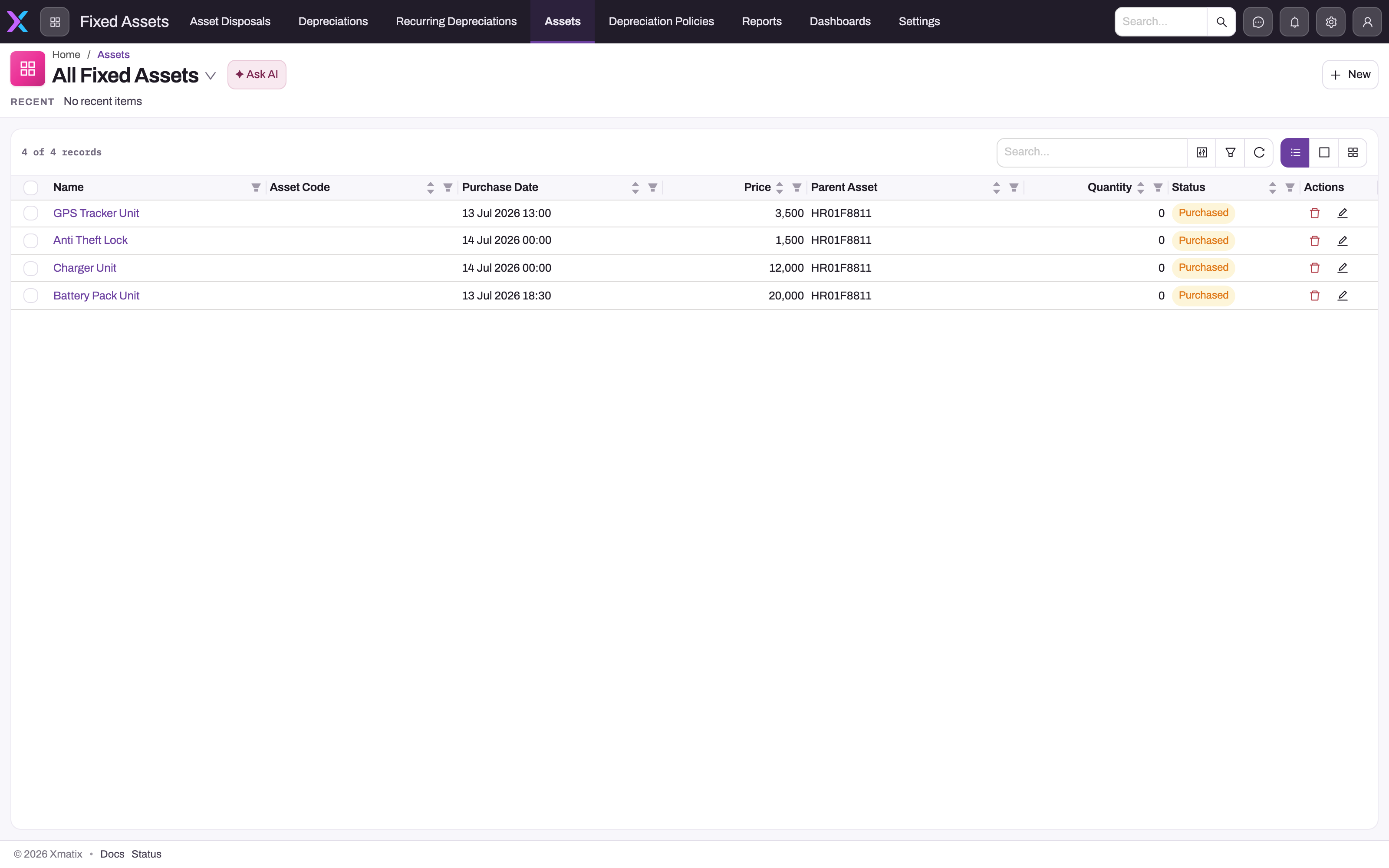
- 1
Name opens the saved Asset record; four populated demonstration rows are visible.
- 2
Asset Code is blank on these records, which is a visible completeness issue rather than a mask.
- 3
Purchase Date and Price are list fields that should be checked against the detail values.
- 4
Parent Asset shows that these records are components of another asset.
- 5
Purchased is the current stored status on every visible row.
The list shows the entity register rather than a generic finance page. The populated demonstration rows expose name, purchase date, price, parent asset, quantity and status. Blank asset codes and zero quantities are visible data-quality facts; they are not masked values. Open a representative row before deciding that the list price, stored purchase cost and net book value agree.
Read the screen
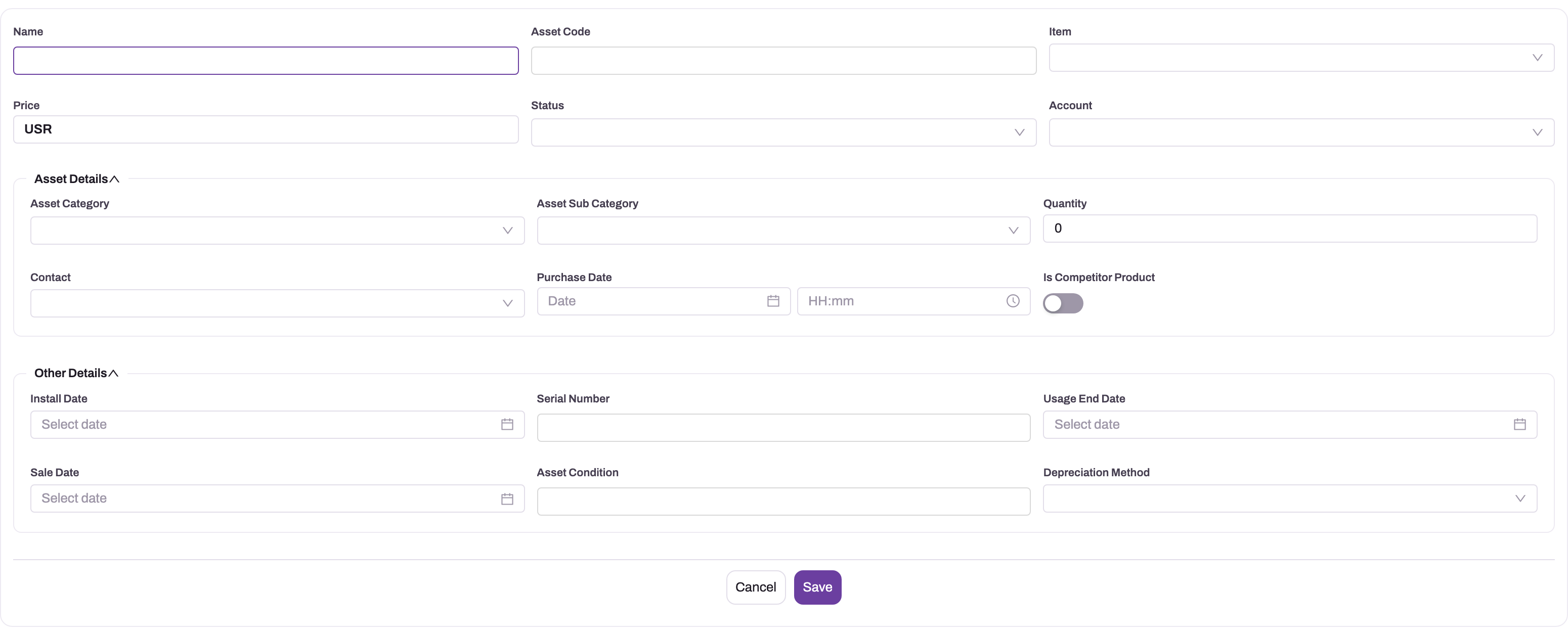
- 1
Name and Asset Code provide the register identity used across service, location and accounting records.
- 2
Item, Category and Subcategory classify the asset for reporting and policy selection.
- 3
Price, Quantity and Purchase Date are stored acquisition fields; Purchase Cost and Net Book Value remain separate.
- 4
Status and installation or sale dates describe the operational lifecycle; they do not themselves post depreciation.
- 5
Depreciation fields and a policy express intent; only a separate Recurring Depreciation run posts to the ledger.
The create form begins the operational audit trail. Name is required. The standard form also has asset code, item, price, status, account, category, sub-category, quantity, contact, purchase date, install date, serial number, usage end date, sale date, condition and depreciation method. Your form may differ from the screenshot. Populate only facts supported by the purchase, receipt or installation evidence. For serial-tracked items, goods receipts and sales invoices create and update assets automatically. The full procedure is on Assets. Do not infer that Price × Quantity automatically becomes Purchase Cost or Net Book Value; those are separate fields on the asset model.
Status, sale/disposal dates, useful life, salvage value, method, policy and net book value describe stored state, but the master alone does not create a journal. After saving an asset that should depreciate, create and verify a separate recurring schedule with its method, period amount or rate, residual value, current WDV, dates and both GL accounts. The useful control is a three-way reading: the register says what the asset record contains, the schedule says how future runs will be calculated, and posted journal lines prove what reached the ledger.
Read the saved details
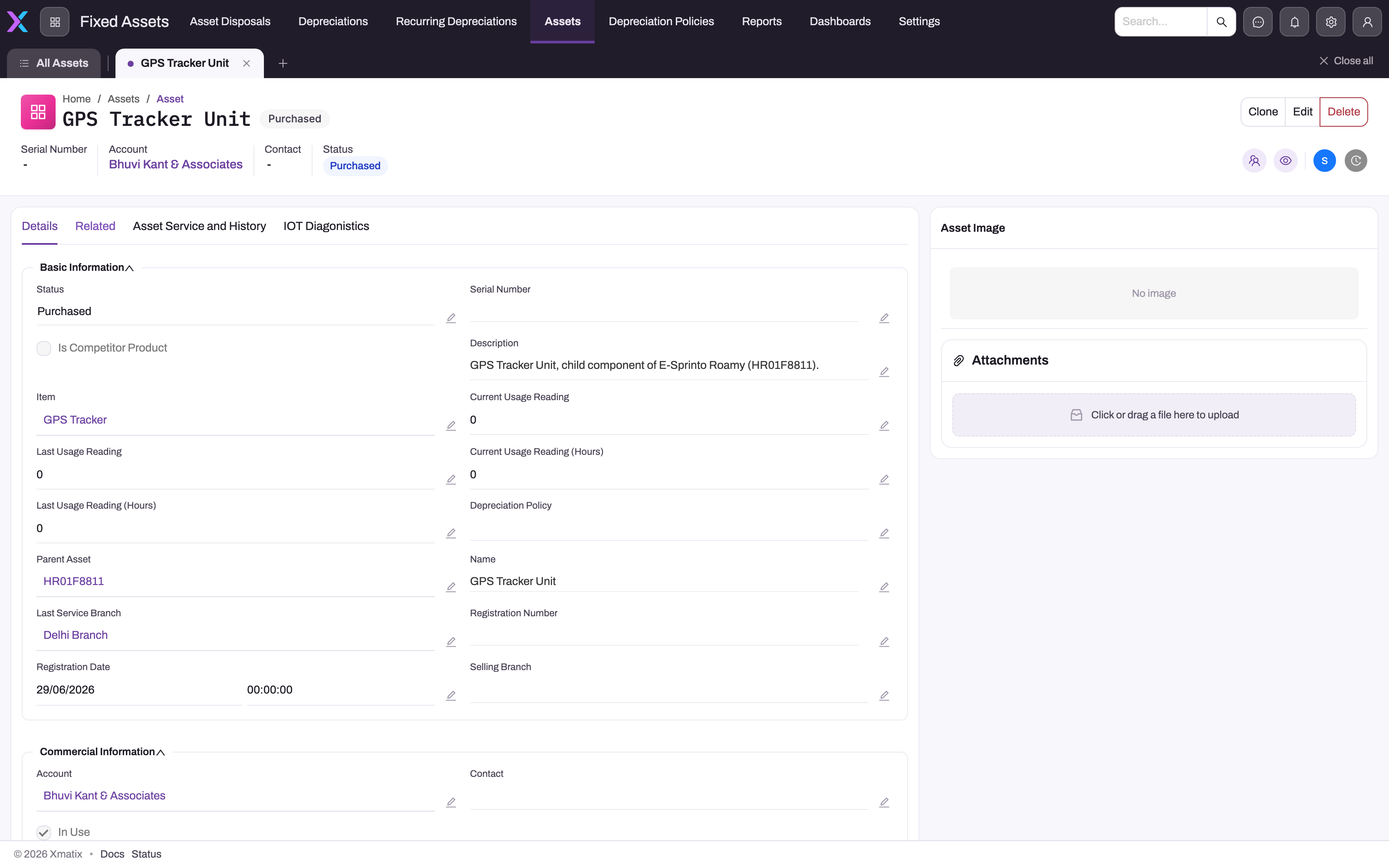
- 1
The header identifies the Asset record, account and current Purchased status.
- 2
Basic Information contains the stored status, description and linked item.
- 3
Parent Asset records the component hierarchy for this GPS tracker.
- 4
Depreciation Policy is empty, so no policy application should be inferred.
- 5
Last Service Branch is operational history and is independent of the depreciation schedule.
The upper Details view covers operational identity and hierarchy. This example is Purchased, links to an item and parent asset, identifies the account and last-service branch, and has no serial number or depreciation policy. Empty fields remain visible so the screenshot does not overstate completeness.
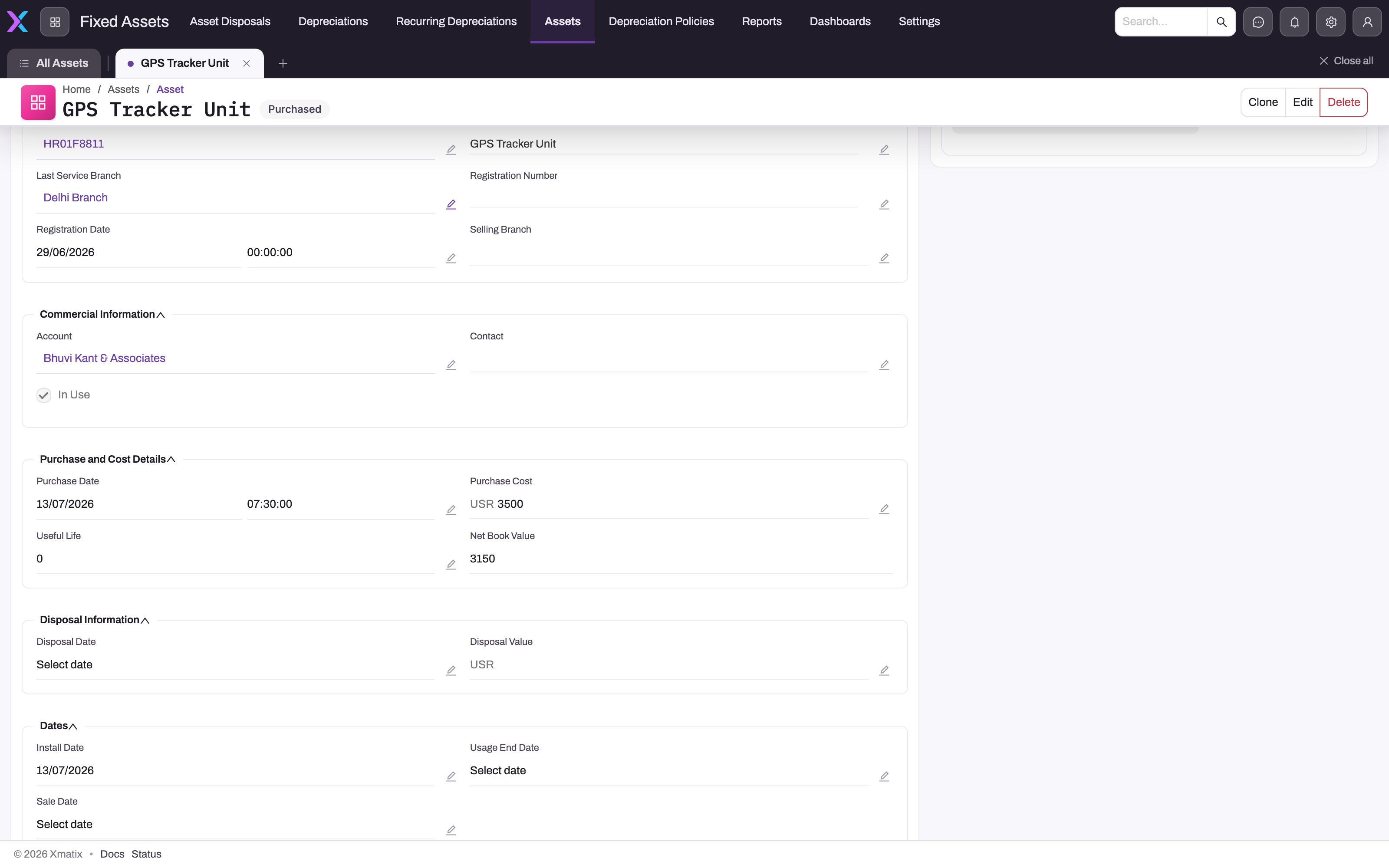
- 1
Commercial Information retains the linked account and current In Use flag.
- 2
Purchase Date and Purchase Cost are stored independently from the list's Price field.
- 3
Useful Life is zero on this record, so a valid schedule cannot be inferred from the asset alone.
- 4
Net Book Value is stored as 3,150; this screen does not prove how that value was calculated.
- 5
Disposal fields are blank because no disposal event is recorded on this asset.
Farther down the same tab, Purchase and Cost Details exposes the stored purchase date, purchase cost, useful life and net book value. Here the useful life is zero and no policy appears above, even though net book value is 3,150. Treat that value as a stored field to reconcile, not as proof that a depreciation engine calculated it. Disposal and lifecycle dates are also visible and blank where the event has not occurred.
The asset register
The register lives in the Fixed Assets app. Create one asset record per asset you track, carrying:
| Facet | Fields |
|---|---|
| Identity | Name, asset code, category and sub-category |
| Acquisition | Price, quantity, purchase cost and date as distinct stored fields |
| Depreciation intent | Method, useful life, salvage value and an optional linked policy |
| Carrying value | Stored net book value, which must be reconciled to posted depreciation |
| Lifecycle | Status plus installation, sale, usage-end and disposal dates/values where populated |
Operational facets — serial and batch numbers, branch and storage location, install and service dates, parent-child hierarchy — make the register useful well beyond accounting.
Depreciation policies
A Depreciation Policy records how a class of assets should depreciate: asset category and sub-category, method (Straight Line or WDV), depreciation rate, useful life in years and frequency. An Asset can reference a policy, but xMatix does not generate or update a Recurring Depreciation schedule from it. Use the policy as documented intent and manually verify that the finance schedule carries the approved terms. Do not claim that a category default or statutory useful life has been applied unless the saved asset, policy and schedule all show it. The full procedure, including how to convert a policy's rate into a schedule's Rate Per Period, is on Depreciation policies.
Two statutory books
The repository contains two distinct calculation models, but their persistence coverage differs:
- Companies Act book — Recurring Depreciation can post either a fixed straight-line period amount or a written-down-value rate on current WDV, floored at residual value.
- Income-Tax block calculation — Asset Block stores block code, rate, opening WDV, fiscal year and partner account. A calculation helper supports full-rate additions, half-rate additions and deductions, including the 180-day rule, but those movement inputs are not columns on Asset Block and the checked-in Form 3CD path currently supplies them as zero. Treat this as a calculation/disclosure foundation, not a complete automatically maintained tax subledger. The procedure for keeping blocks, and why a block's company must match the fiscal year's, is on Asset blocks.
The depreciation engine
The posting engine is Recurring Depreciation—one record per asset or pool, naming the asset in text, its method, amount/rate, current WDV, residual, schedule dates and two GL accounts. A background evaluator finds due Active schedules and the same service backs the manual post action. A successful run posts the charge, advances Next Run Date and completes when current WDV reaches residual or the advanced date passes End Date. A scheduled run that is refused pauses the schedule. The full procedure is on Running depreciation.
The register and engine are linked by name and convention, not by an Asset foreign key. Create the schedule deliberately, keep its asset name traceable to the register, and reconcile its current WDV and accumulated depreciation to the Asset and ledger.
Depreciation documents
The Fixed Assets app also has a Depreciations list. These are different from Recurring Depreciation schedules. A Depreciation document belongs to one asset and records an intended Depreciation Method (Straight Line or WDV), Total Periods, Start Date and End Date. The document's Status is Draft, Active or Completed, and you set it by hand. The document appears on the asset's Related tab.
The document's record page has a list of Depreciation Lines, one row per period. You add rows with New on that list. Each row has Period Number, Date (the period start), Opening Book Value, Accumulated Depreciation and Closing Book Value. On the row's own record page you can also edit Depreciation Amount in place. Saved documents and rows are numbered automatically.
These records hold only what you type. Saving a document does not create its period rows. Nothing calculates the period figures or checks that they add up, and nothing posts them to the ledger. Changing the Status has no effect, and no report reads these records. Use them only as a planning or reference table. For the real charge, use Recurring Depreciation and reconcile against the posted journals.
Disposals
When an asset is sold, scrapped or donated, record an Asset Disposal in the Fixed Assets app and select Post Disposal. Posting creates one balanced journal: it reverses the accumulated depreciation, removes the asset's cost, books any proceeds and books the gain or loss. It also sets the asset's Status to Disposed and its Net Book Value to 0. You type the cost and accumulated depreciation on the disposal, and posting does not stop the recurring depreciation schedule. See Asset disposals.
The PPE movement note
The Schedule III property, plant and equipment movement note is derived from fiscal-period balances on GL accounts whose account types are Fixed Asset or Accumulated Depreciation, grouped by Schedule III classification. Its reliability therefore depends on correct account types/classification and posted movements; the Asset register itself is not the source of that statement.
Common questions
I created an asset but no depreciation posted. Why?
Expected — the register is descriptive. An asset record's method, life and value fields document intent; nothing reads them to post. Create a recurring depreciation schedule for the asset and set its Next Run Date on the record page; the ledger postings begin on that date. See Running depreciation.
I filled in depreciation lines on a Depreciation document. Why is nothing posted?
Depreciation documents and their lines are reference records only. The platform never reads the figures you type on them, so a line's Depreciation Amount never becomes a journal. Setting the document's Status to Active doesn't start anything either. The rows aren't checked: closing value isn't compared with opening value minus the charge, and the accumulated total isn't added up from earlier rows. To post depreciation, create a Recurring Depreciation schedule for the asset and let it run, as described on Running depreciation. You can keep the document as a planned schedule and compare it with the posted journals.
Do I need both a policy and a schedule?
The schedule is what matters to the ledger; the policy is stored intent. Linking the policy does not create a schedule. If you use both, compare method, rate/useful-life intent and frequency manually and retain evidence of that review.
Where does the tax book's depreciation come from?
The block calculation helper accepts opening WDV, full-rate additions, half-rate additions, deductions and a block rate. The saved Asset Block row contains only opening WDV and rate plus scope fields, so additions and deductions must come from a caller or supporting workpaper; they are not automatically maintained on that row. Nothing in this path posts the tax calculation to the ledger. See Asset blocks.