
Invoices in xMatix Sales are released from orders — over the counter for pending quantities, or for allocated lines at the end of the warehouse flow — and can also be created from delivery orders, in bulk, or by hand. Payments are their own records: a payment tagged to an invoice rolls up into the invoice's paid and outstanding figures and, when posted, settles the receivable open item in the ledger. For India, the invoice carries the e-invoice (IRN) and e-way bill actions.
Read the screen
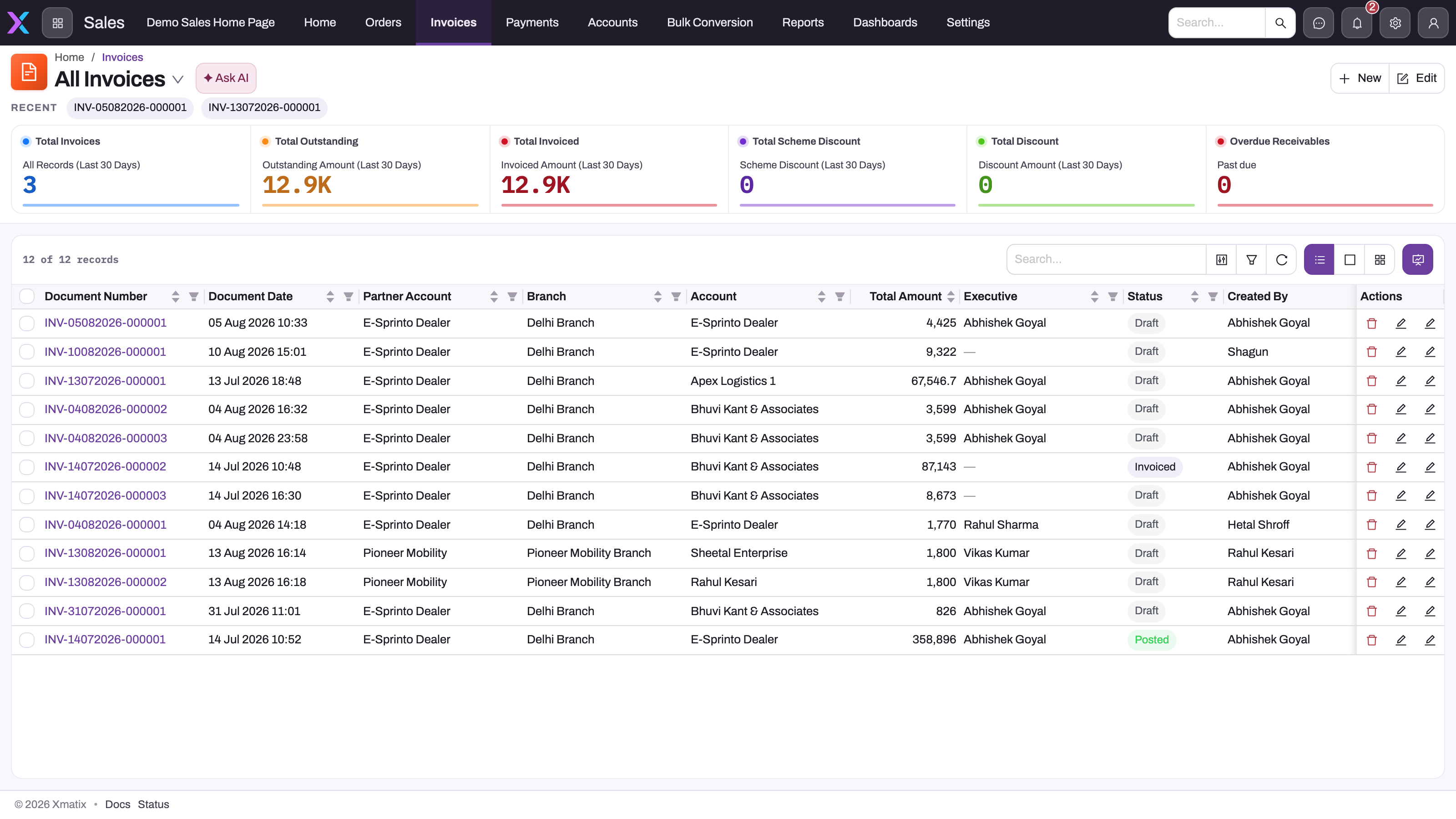
- 1
New creates a manual invoice header; operational invoices are normally released from an order, delivery order or bulk conversion instead.
- 2
Total Outstanding and Total Invoiced separate what was billed in the last 30 days from what is still unpaid.
- 3
Overdue Receivables counts invoices past their due date; it reads Outstanding Amount together with Due Date.
- 4
Document Date, Partner Account (the billing company), Branch and Account (the customer) fix legal ownership and the debtor.
- 5
Total Amount is the invoice value; Status is Draft until Post General Ledger runs and a rule flips it to Posted.
- 6
Open an invoice from its document number to see lines, amounts, payments and the e-invoice status.
The Invoices entry of the Sales app opens the register with 30-day summary cards: total invoices, total outstanding, total invoiced, scheme discount, total discount and overdue receivables. Read a row as both a commercial document and a future settlement target: document date and number establish identity, partner account and branch establish the billing company, account identifies the debtor, total amount establishes exposure and status shows whether the invoice has reached the ledger. Do not infer settlement from the existence of an invoice; open it and read the payments behind the outstanding figure.
Read an invoice record
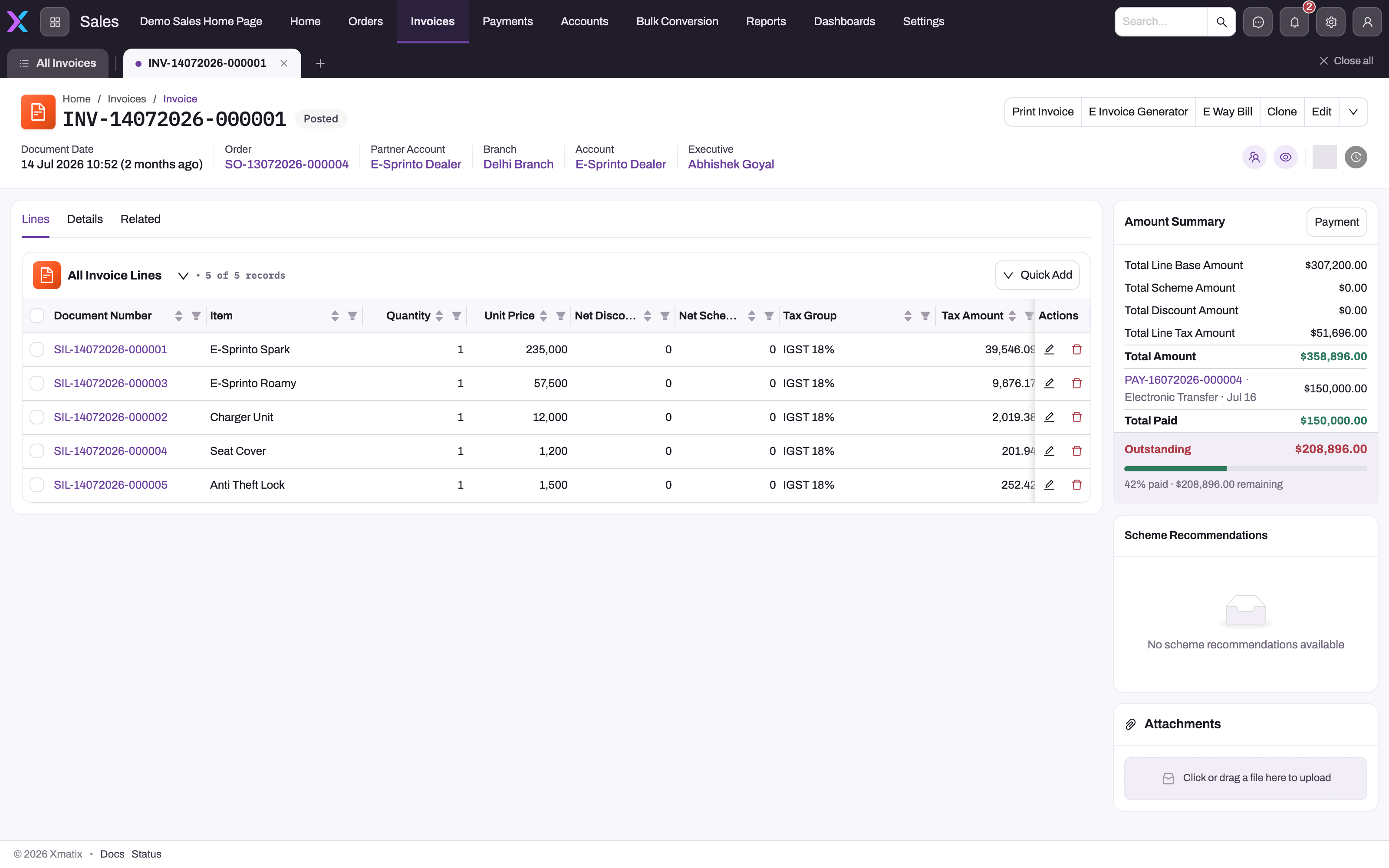
- 1
Document number and Posted status; Order links back to the sales order this invoice was released from.
- 2
Print Invoice, E Invoice Generator and E Way Bill: the print and India GST actions, with Clone and Edit; the chevron holds Post Inventory, Post General Ledger, Delivery and the scheme actions.
- 3
Each line carries item, quantity, unit price, net discount, net scheme discount, tax group and tax amount; header totals are roll-ups of these.
- 4
Quick Add appends a line; Draft invoices accept line edits, posted ones should be corrected by cancellation or credit note.
- 5
Amount Summary: base amount, scheme and other discounts, tax and Total Amount, followed by every Payment tagged to the invoice.
- 6
Total Paid and Outstanding come from the payments listed above; Payment opens the payment form for this invoice.
Lines is the billed detail. Each line carries item, quantity, unit price, net discount, net scheme discount, tax group and tax amount, and every money field on the header is a roll-up of these lines rather than a typed value. The Amount Summary panel restates the roll-ups — base amount, scheme and other discounts, tax and total — and lists every payment tagged to the invoice with the resulting Total Paid and Outstanding.
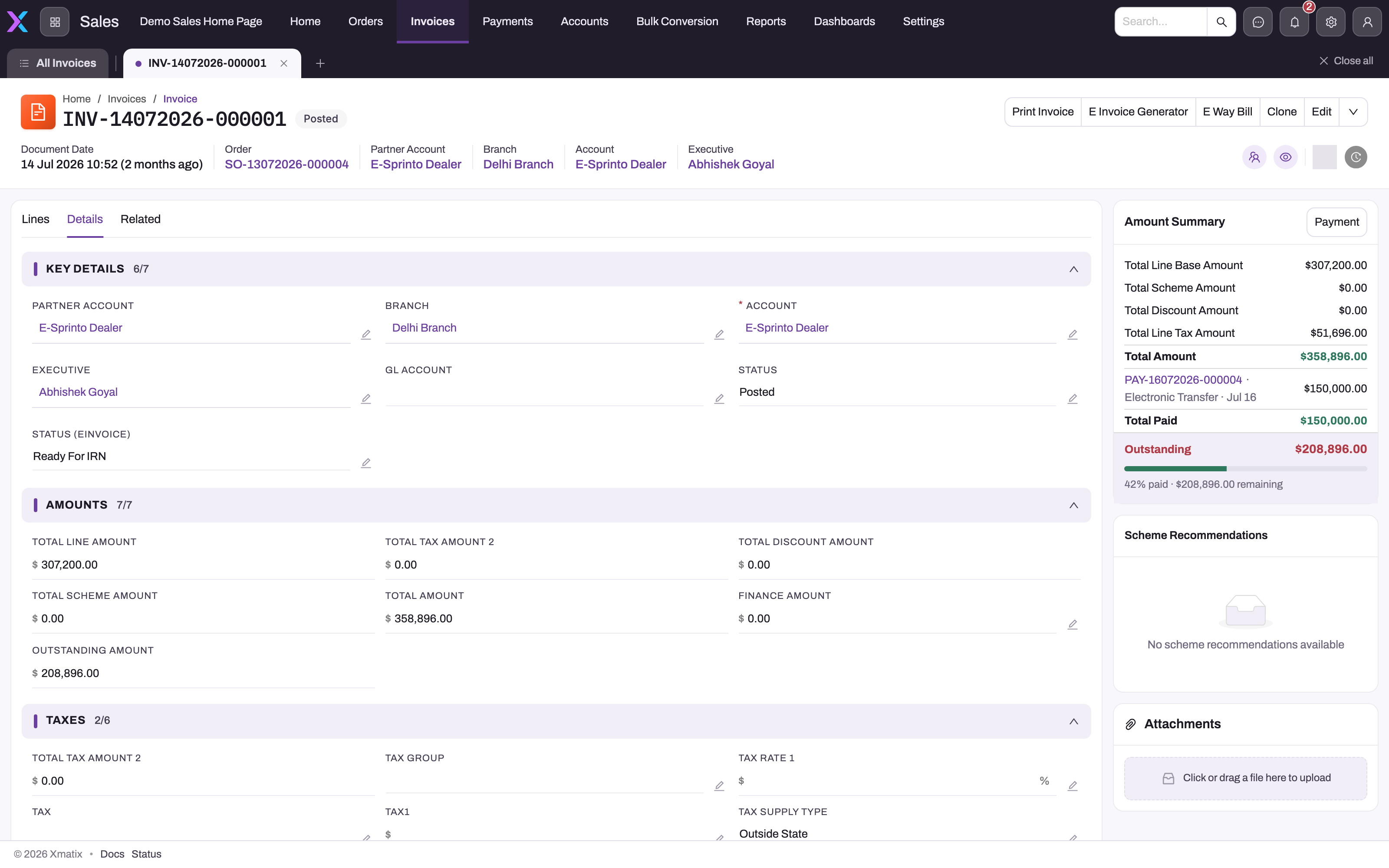
- 1
Partner Account is the company issuing the invoice and Account the customer being billed; both are fixed once the invoice exists.
- 2
Status is Draft or Posted; it follows the GL posting approval flag rather than being typed.
- 3
Status (eInvoice) moves from Ready For IRN to Pending when the payload is staged and records the IRN once the GST integration returns it.
- 4
Total Line Amount, Total Tax Amount, discounts and Total Amount are calculated from the lines, not entered.
- 5
Outstanding Amount is Total Amount minus payments tagged to the invoice; the Amount Summary panel shows the same figure with the payments behind it.
- 6
The Taxes section holds the header-level tax slot, tax group and Tax Supply Type used when the lines were taxed.
Details groups the header: Key Details (partner account, branch, customer account, executive, GL account, status and e-invoice status), Amounts and Taxes. Status is Draft, Posted or Cancelled: it follows the GL posting approval flag and cancellation rather than being typed. Status (eInvoice) is a separate lifecycle: Ready For IRN, then Pending once the payload is staged, then the IRN and acknowledgement once the GST integration has returned them. Related lists the delivery orders released from the invoice and the journals posted for it.
How an invoice is created
| Path | Action | Behaviour |
|---|---|---|
| Over the counter | Invoice (OTC) on the order | Invoices the order's pending quantities directly, drawing available stock |
| From allocation | Invoice on the order | Invoices the quantities already allocated to the order |
| Selective | Selective Invoice OTC / Selective Invoice on the order | Chosen lines and quantities only |
| In bulk | Bulk order processing | Many orders at once, with shortfall reporting |
| From delivery | Create Invoice on the delivery order | Invoices the delivered lines that still have pending invoice quantity; refuses when none do |
| From a claim | Claim and claim-batch settlement | See Trade claims |
| By hand | New on the Invoices list | A Draft header you add lines to yourself |
Whichever path creates it, the invoice header gets today's document date (a caller-supplied earlier date is honoured on insert; a future date is never accepted), a generated document number and Draft status. Account, partner account and branch are then fixed.
Credit check. When the invoice is created with a finance amount and the customer has a credit limit with this partner account, the customer's open receivables plus this invoice must fit under the limit, or the save is rejected with a message naming the party, the open amount and the limit. The check is deliberately fail-open: if the finance subledger cannot be resolved or queried, or the Sales module setting credit limit override requires approval is on (an approval process then governs the override), the invoice is created without a hard block. Finance administrators should monitor the subledger rather than treat every created invoice as proof of a passed check.
Working on an invoice
| Action | What it does |
|---|---|
| Post General Ledger | Sets the GL posting approval flag and posts one balanced journal (Dr Accounts Receivable / Cr Sales plus output tax) together with a Receivable open item — the row the AR subledger ages and settles. Re-posting is reverse-then-repost. A business rule moves Status to Posted. |
| Post Inventory | Runs the inventory ledger for lines that have not yet reached it; refused when every line is already posted. |
| Delivery | Creates a delivery order from the lines with pending delivery quantity; refused when nothing is pending. |
| Create Shipment / Selective Create Shipment | Create a shipment for the invoiced lines. |
| Payment | Opens a form to record a new Payment tagged to this invoice (also available from the Amount Summary panel). Nothing runs on the server for the action itself; the saved payment is what changes the figures. |
| Reprice, Apply Scheme and the other scheme actions | Behave as on the order; see Trade schemes. |
| Print Invoice, Preview | Print or preview the document template. |
| Clone | Copies the invoice into a new Draft. |
| Cancel | Only a Posted invoice can be cancelled, only inside the invoice cancellation window hours configured for the Sales module (0 turns the window off), and only while at least one line still has quantity to cancel. Cancelling reverses the invoice's inventory movement, any payment received against it and its GL journals; the window defaults to 24 hours, and outside it the message tells you to raise a credit note instead. |
A GL-posted invoice cannot be hard-deleted — deleting it would orphan its journal and receivable open item.
Payments, advances and adjustments
A Payment record is a single money movement. Payment Type gives it direction (Payment Taken is a customer receipt, Payment Given a payment you make), and the amount is always positive. The mode of payment (Bank, Cash, Cheque or Electronic Transfer) chooses the money-side ledger account when the payment posts. Cheque parks the amount in a cheques-in-hand account until it clears.
- Applied to an invoice. On the payment form you tick the invoice in Open Documents and enter the amount to apply. Each application is an allocation. It reduces the invoice's receivable open item, and the invoice's Amount Paid and Outstanding Amount follow it. An allocation can't exceed what is still open on the invoice.
- Taken against an order (advance). A payment taken from an order raises the order's advance and settles nothing yet. With the default Finance settings it is applied to the invoice raised from that order when the invoice posts.
- Nothing applied. A receipt applied to no document stays on the customer as an unapplied advance. You can apply it later with Apply payment on an invoice.
Payments post as soon as they are saved when the owning company has GL posting enabled. The payment's Status then moves from Draft to Posted. Settlement credit notes from trade claims are netted against the partner's open invoices oldest-first in the same way. The full procedure, settings and rules are in Recording and applying payments.
E-invoice and e-way bill (India)
E Invoice Generator on a posted invoice opens the e-invoice panel. Its Generate button sets Status (eInvoice) to Ready For IRN (through the Set E-Invoice Status action) and waits for the result. Run directly — from the mobile panel or the API — the action instead builds the e-invoice payload from the invoice and its lines, stores it on the invoice and sets the status to Pending. The GST integration flow your administrator has connected submits the request to the invoice registration portal and writes the returned IRN, acknowledgement number and date and signed QR code back onto the invoice. Once an IRN exists the action refuses with "This invoice already has an IRN; an e-invoice cannot be regenerated." Full details are in E-invoicing.
E Way Bill creates a Draft e-way bill register entry (the Part A consignment record) for the invoice, with optional distance, transport mode (Road by default) and vehicle number; the connected flow generates the e-way bill number and records it on the invoice. Delivery orders show e-way bill fields, but their own E Way Bill button is not bound to a handler and does nothing; generate from the invoice, and treat the delivery order's fields as manual capture.
Both actions stage and record; the exchange with the GST systems is done by the integration. Without it, staged documents stay Pending.
Common questions
What is the difference between Invoice (OTC) and Invoice?
Invoice (OTC) invoices the order's pending quantities immediately, drawing stock as it goes — no allocation needed. Invoice invoices only the quantities already allocated to the order, so what was reserved is exactly what is billed. Use OTC for counter sales and the allocated path for warehouse-fulfilled orders.
Why do Outstanding Amount and Open Amount differ?
They measure different things. Outstanding Amount is total minus the payments tagged to the invoice. Open Amount is total minus payment adjustments applied to it. They agree only when every payment has also been applied as an adjustment; the ledger's own view is the receivable open item created at posting.
Can I regenerate an e-invoice?
Not once an IRN has been recorded — the generator blocks with an explicit message, because a registered invoice must not be registered twice. Corrections after registration are handled through credit notes and the GST processes your organization follows.
How do part-payments show up?
Each payment is its own record. The invoice's Amount Summary lists every tagged payment with its mode and date, then Total Paid, Outstanding and the percentage paid. Nothing requires a single full payment.
Related topics
- Invoices — step-by-step procedures, fields, permissions and settings
- The sales order lifecycle
- Bulk order processing
- Credit limits
- Working with journals
- Payment — entity reference