
Nudge administration is how you decide whether Sense nudges appear in your organization, who sees them, and how talkative each nudge source is. Nudges themselves are described in the nudge library. This page is the operator manual: two module switches in Sense AI settings, and the Nudges inventory in Sense AI Studio, where every source that raises nudges is listed and can be tuned.
Overview
Two screens control nudges:
- Setup → Sense AI Studio → Configuration → Sense AI settings holds the switches that turn the feature on for the whole organization.
- Setup → Sense AI Studio → Configuration → Nudges lists every nudge source and lets you switch each one off, change how long a dismissal lasts, cap how many of its nudges show on one screen, and, for built-in sources, change the numbers it decides with and the entities it watches.
The inventory stores only what you change. A source you have never edited follows the shipped defaults, so later product changes to those defaults reach you automatically.
When to use it
- You are rolling out Sense and want nudges on, or deliberately off while users learn the chat assistant.
- Users find one kind of nudge noisy, or a nudge they dismissed comes back too soon.
- A built-in source fires too early or too late for your business, for example the SLA warning window or the purchase-quantity tolerance.
- You want to see which business rules, agents and outside systems are raising nudges in your organization.
How xMatix handles it
A nudge is produced by a source. The inventory shows four kinds:
| Kind | Where it comes from | What you can change on the Nudges page |
|---|---|---|
| built-in | Ships with xMatix. These are the built-in library sources. | Enabled, Dismissal cooldown, Max nudges per view, Threshold overrides, Entities |
| rule | A business rule of yours with a Raise Nudge action | Enabled, Dismissal cooldown, Max nudges per view |
| agent | Published by an AI Studio agent. The row is named after the agent, or "Unknown agent" if the agent no longer exists. | Enabled, Dismissal cooldown, Max nudges per view |
| external | Sent in by an outside system through the nudge API | Enabled, Dismissal cooldown, Max nudges per view |
Built-in sources are always listed. Rule, agent and external sources appear only once they have raised at least one nudge in your organization. A saved change to a source that no longer exists stays listed as external so you can see it and reset it.
Sources run at three moments, shown in the Triggers column for built-in sources:
- OnSaved: after a record of a covered entity is saved. Several edits to one record within 60 seconds are collapsed into one calculation.
- Scheduled: in the organization's hourly sweep. The sweep also expires nudges past their end date and brings snoozed nudges back once the snooze ends.
- OnDemand: when a calculation is started directly through the API.
The settings change these behaviours:
- Enabled turns a built-in source off: the next calculation skips it. For a rule source, the rule's next run on a record removes that rule's nudges from the record and raises no new ones. For agent and external sources the switch is stored but not checked when they publish, so it does not stop them. Stop those at the source: unpublish or change the agent, or stop the outside system.
- Dismissal cooldown applies to every kind of source. A user who dismisses a nudge does not see it again until the cooldown has passed, even if the source keeps finding the same situation. The default is 168 hours (7 days).
- Max nudges per view applies to every kind of source on record panels and list views. It is not applied to the cross-entity Sense Home feed.
- Threshold overrides and Entities apply only to built-in sources.
Prerequisites
- Manage module settings (
setup.featurehub.settings.manage) to open Sense AI settings. - Manage AI agents (
setup.aistudio.agents.manage) to open the Nudges inventory. - Users who should see nudges need the Sense AI product through one of their security profiles. Every organization has Sense AI and it does not use paid seats. If your organization assigns product seats, a user who holds seats on other products but none on Sense AI loses Sense, nudges included. See Sense AI and Licensing.
Procedure
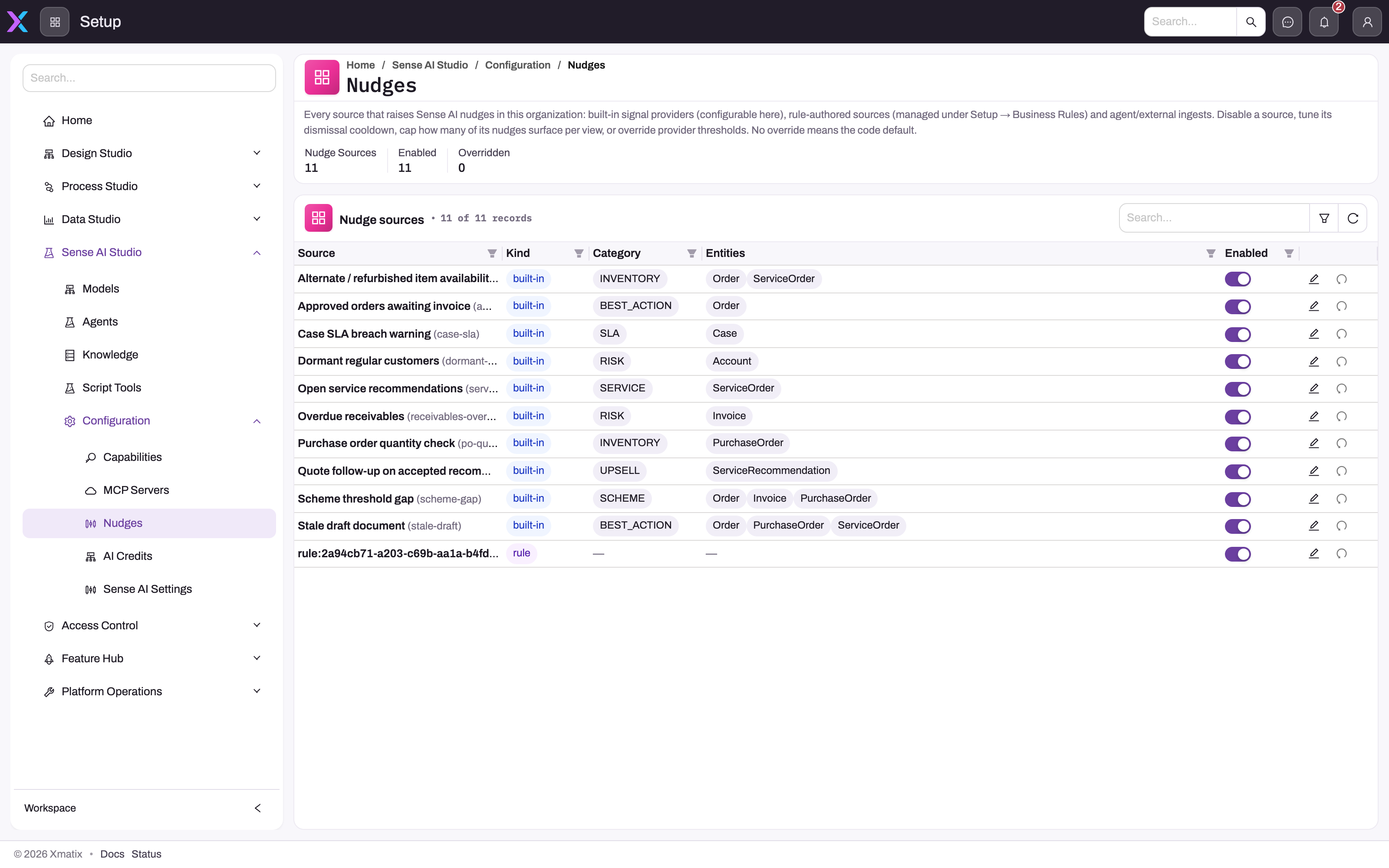
- 1
The description states the tuning model: nothing is stored until you override it, and a blank setting follows the code default.
- 2
Nudge Sources, Enabled and Overridden are the control totals to note before and after a change.
- 3
Kind (built-in, rule, agent, external), Category and Entities tell you where a source's logic lives and which records it can annotate.
- 4
Enabled is the per-source gate for future computation; it does not by itself retire nudges already stored.
- 5
Edit opens the cooldown, cap, threshold and entity overrides; the circular arrow is Reset to defaults.
- 6
Search, filter and refresh locate a source and re-read the saved inventory state after a change.
Step 1 — Turn the module switches on
Open Setup → Sense AI Studio → Configuration → Sense AI settings. Two switches in the General group matter:
- Enable Sense AI is the master switch for the whole module. Off removes the chat assistant and nudges for everyone, and stops nudge calculation.
- Enable Sense AI nudges controls nudges only. Off hides every nudge surface (record panels, list views, Sense Home) and stops the hourly sweep, while the chat assistant stays available.
Both are on by default. The master switch always wins: nudges show only when both are on. Click Save in the page header. Users pick up the change when the app next loads their settings, so ask them to reload the page.
Step 2 — Check who will see nudges
A user sees nudges when both switches are on and they have Sense AI (see Prerequisites). There is no separate nudge permission. Some nudges are aimed at one user, for example a field rep or their manager. Those show only to that user.
Step 3 — Review the source inventory
Open Setup → Sense AI Studio → Configuration → Nudges. The header shows three counts: Nudge sources, Enabled and Overridden (sources with a saved change). The table has the columns Source, Kind, Category, Entities, Triggers, Enabled, Cooldown (h) and Max / view, plus Edit and Reset to defaults in the actions column. Use the search box to find a source and the refresh button to reload the list. Cooldown (h) shows "default" when no cooldown has been set for the source.
Step 4 — Switch a source on or off
Flip the Enabled switch in the source's row. You see "Enabled" or "Disabled" with a confirmation that the change applies from the next calculation. The source's other saved values are kept.
Turning a source off does not clear nudges it has already raised. For a built-in source those stay visible until they reach their end date, the user dismisses or acts on them, or the source is switched on again and recalculates. For a rule source they clear when the rule next runs on that record.
Step 5 — Tune a source
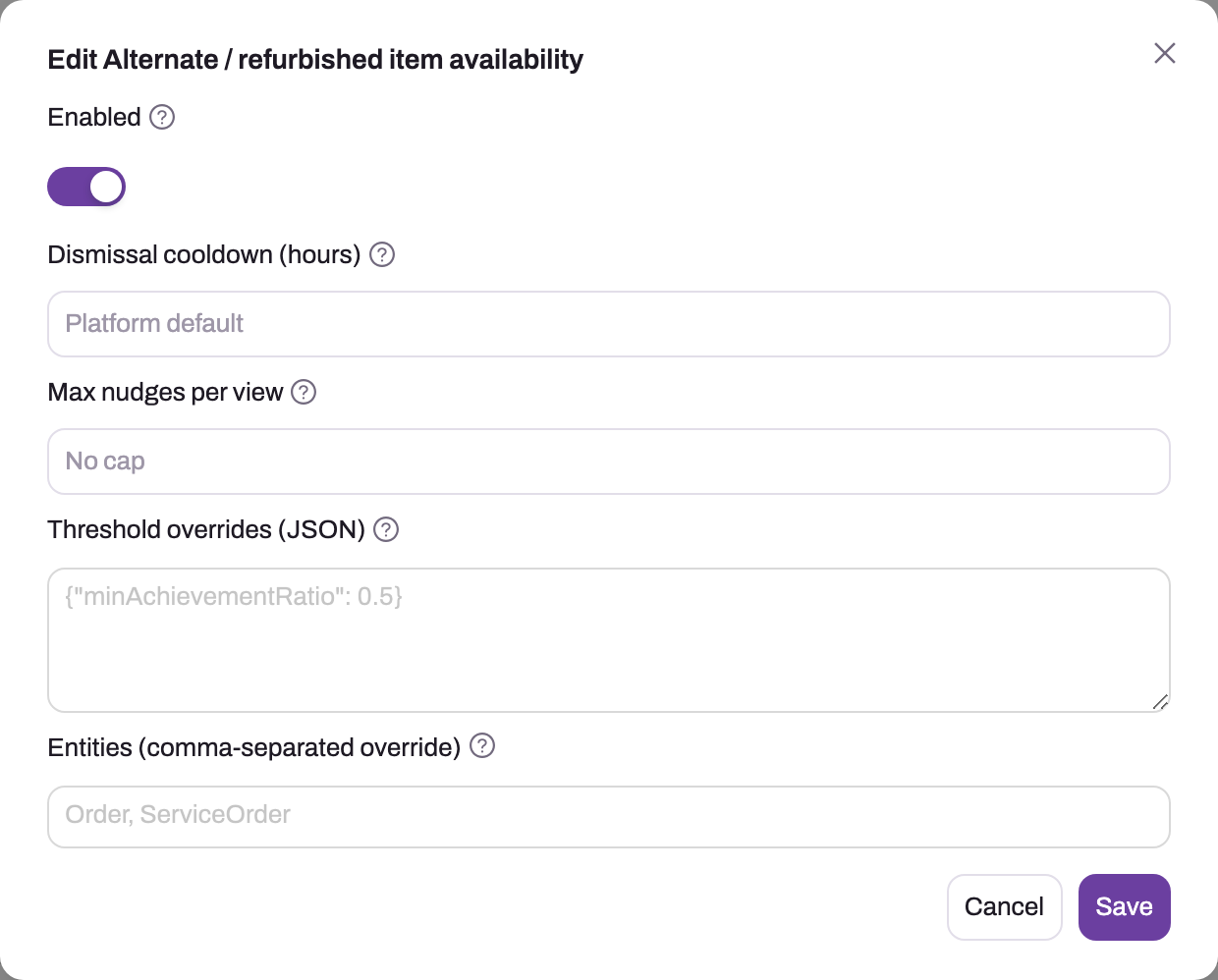
Click Edit in the source's row. The dialog is titled Edit followed by the source name.
- 1
The title names the exact source being tuned; check it against the row before saving.
- 2
Enabled gates future computation for this source; already stored Active nudges are not universally removed by switching it off.
- 3
Dismissal cooldown (1–8760 hours) is how long a dismissed occurrence stays suppressed; blank = the 7-day platform default.
- 4
Max nudges per view (1–50) caps this source on record panels and list strips; it is not applied to the Sense Home feed.
- 5
Threshold overrides must be a JSON object using the source's own key names; unknown keys are ignored silently.
- 6
Entities narrows a built-in source to a comma-separated list of entities; blank keeps its default scope.
- 7
Save writes the override row and invalidates the cache; the change is consulted on the next calculation.
Change the values you need (see Fields) and click Save. You see "Saved" with the source name. The new values apply to the next calculation: OnSaved sources when a covered record is next saved, Scheduled sources at the next hourly sweep.
Step 6 — Reset a source
Click Reset to defaults in the row and confirm the "Reset … to code defaults?" prompt. The source is switched on and its cooldown, cap, thresholds and entities are cleared, so it behaves exactly like the shipped source. Reset to defaults is only available on sources that have a saved change. Its saved row is kept with default values, so the source still counts as Overridden afterwards and the action stays available. Check the row's columns, not the counter, to confirm the reset.
Step 7 — Verify
- For an OnSaved source, save a record that should trigger it. The nudge appears within about a minute.
- For a Scheduled source, wait for the next hourly sweep.
- A source that fails or runs out of time produces nothing rather than an error, so an empty result means "check the configuration", not "it worked".
Fields
The Edit dialog:
| Field | What it means | Notes |
|---|---|---|
| Enabled | Whether the source raises nudges | On by default. Honoured by built-in and rule sources only (see How xMatix handles it). |
| Dismissal cooldown (hours) | How long a dismissed nudge from this source stays hidden before the source may raise it again | Whole numbers from 1 to 8760. Blank uses the default of 168 hours (7 days). |
| Max nudges per view | The most nudges from this source shown on one record panel or list view | Whole numbers from 1 to 50. Blank means no limit for this source. A screen still shows at most 5 nudges in total. |
| Threshold overrides (JSON) | The numbers a built-in source decides with | Built-in sources only. Must be a JSON object, up to 4000 characters. Blank uses the defaults. Keys are listed below. |
| Entities (comma-separated override) | Restricts a built-in source to some of the entities it covers | Built-in sources only. Use entity names, for example Order, Invoice. It can only narrow the source: an entity the source doesn't cover is ignored. Blank uses the source's own list, shown as the placeholder. |
Threshold keys for built-in sources
Only these sources read threshold overrides. The others have no tunable numbers, so for them only the switch, cooldown, cap and entities apply.
| Source | Key | Default | What it changes |
|---|---|---|---|
| Scheme threshold gap | minAchievementRatio | 0.4 | How close to the next scheme slab a document must be before the nudge appears, as a fraction from 0 to 1 |
| Purchase order quantity check | toleranceRatio | 0.25 | How far a line quantity may differ from the needed quantity, as a fraction, before Sense suggests increasing or reducing it |
| Open service recommendations | maxRecommendations | 5 | How many open recommendations are listed on a service order |
| Case SLA breach warning | warningMinutes | 120 | How many minutes before a first-response or resolution due time the warning starts |
| Field pace gap | paceThresholdPct | 30 | The visit-plan pace percentage below which the rep, and the manager for the team, is nudged |
| Missed high-potential outlet | geofenceMeters | 250 | The radius of an outlet's geofence. The nudge fires when a rep leaves a not-yet-visited outlet's geofence. |
| Missed high-potential outlet | minPotential | 0 | The lowest outlet potential score that counts |
| Focus product underperformance | focusMinVisits | 3 | Completed visits a rep needs before the comparison starts |
| Focus product underperformance | focusTargetRatioPct | 0 | The placement target as a percentage of visits. 0 means it is worked out from the focus product's planned placements, or 50% if there are none. |
| Focus product underperformance | focusSuggestedQty | 1 | The quantity suggested at the next stop |
Key names must match exactly. Unknown keys are ignored, and so is a value that isn't a number, so a misspelt key looks like a setting that does nothing.
Business rules
- No saved change means the shipped default. Blank fields always mean "use the default".
- Validation on save. Cooldown outside 1–8760, a cap outside 1–50, or thresholds that aren't a JSON object are refused with an error, and nothing is saved.
- Dismissed nudges. A dismissed nudge stays hidden for the source's cooldown. A nudge the user applied does not come back while its underlying facts are unchanged.
- Superseded nudges. When a source recalculates and no longer finds a situation, its nudge is marked superseded and disappears.
- Snoozes. A snoozed nudge returns when its snooze ends. The hourly sweep tidies the stored status.
- Housekeeping. Dismissed, expired and superseded nudges are deleted 90 days later. Nudge feedback is kept for 365 days.
- Urgent nudges (priority 140 and above, for example an SLA breach) also go to the notification bell and mobile push of the target user or the record owner.
- Fail-open. If the configuration cannot be read, sources run with their defaults.
Example
A distributor finds that sales reps dismiss Scheme threshold gap nudges because they appear while a customer is still far from the next slab. The administrator:
- Opens Setup → Sense AI Studio → Configuration → Nudges and searches for "scheme".
- Clicks Edit on Scheme threshold gap, enters
{"minAchievementRatio": 0.75}in Threshold overrides (JSON), sets Max nudges per view to2and Dismissal cooldown (hours) to72, then clicks Save. - Saves a test order for a customer at 80% of a slab and sees the nudge. Saves another for a customer at 50% and sees none.
From now on, a document shows at most two scheme nudges, and a dismissed one can come back after three days instead of seven. Sense Home is not limited by the cap of two.
Training
Practice exercise
In a sandbox:
- Open Nudges and write down the three header counts.
- Edit Case SLA breach warning: set
{"warningMinutes": 240}and save. - Create a case whose first-response due time is three hours away and save it. Expected result: an SLA warning nudge on the case, which would not appear with the default 120 minutes.
- Click Reset to defaults on the source. Expected result: thresholds are blank again and Overridden stays one higher than at the start.
Quick reference
- Two switches: Enable Sense AI (everything) and Enable Sense AI nudges (nudges only).
- Inventory: Setup → Sense AI Studio → Configuration → Nudges, needs Manage AI agents.
- Blank always means the shipped default.
- Default dismissal cooldown: 168 hours.
- Max nudges per view does not limit Sense Home.
- Thresholds and Entities: built-in sources only.
- Enabled stops built-in and rule sources, not agent or external ones.
- Switching off does not clear nudges already showing from a built-in source.
- Reset to defaults keeps the row, so Overridden does not drop.
Permissions
| Task | What you need | Without it |
|---|---|---|
| Change the module switches | Manage module settings | Sense AI settings is not in your Setup menu |
| View and change the Nudges inventory | Manage AI agents | Nudges is not in your Setup menu, and the inventory cannot be loaded |
| Send nudges from an outside system | The system signs in as a user with Manage AI agents | The request is refused |
| See nudges | Sense AI through a security profile, with both switches on | The user simply has no nudges. There is no error. |
| Act on a nudge button that changes a record | The same rights as making that change by hand | The action fails and the nudge stays |
Configuration
| Setting | Where | What it affects |
|---|---|---|
| Enable Sense AI | Sense AI settings → General | Whole module: chat, nudges and nudge calculation |
| Enable Sense AI nudges | Sense AI settings → General | Nudge surfaces and the hourly sweep. Chat is unaffected. |
| Per-source switch, cooldown, cap, thresholds, entities | Sense AI Studio → Configuration → Nudges | One source at a time, as described above |
| Rule-raised nudges | Setup → Business rules, Raise Nudge action on the rule | The rule decides when and what. The inventory only switches the rule's nudges off and sets cooldown and cap. |
| Agent-published nudges | The agent in Sense AI Studio | What the agent publishes. Switching the inventory row off does not stop it. |
| Sense Home attention queue caps | The Sense Home widget settings | How many nudges Sense Home shows overall and per category. See Sense Home. |
Common problems
No nudges anywhere
Check, in order: Enable Sense AI and Enable Sense AI nudges are both on; the user has Sense AI through a security profile, and a Sense AI seat if your organization assigns product seats; the user reloaded the app after the change; the source you expect is Enabled. Scheduled sources need up to an hour after enabling.
One source produces nothing
Check that it is Enabled and that its Entities override, if any, still includes the entity you are testing. Then look at the threshold overrides: a stricter value than intended is the usual cause, and Reset to defaults rules that out. For a rule source, check that the rule is active and its condition matches. Remember that OnSaved sources only run when a covered record is saved.
"Must be valid JSON" or "Must be a JSON object" when saving
The Threshold overrides (JSON) field needs a JSON object in braces with key names in double quotes, for example {"warningMinutes": 90}. An array or a single value is refused.
A saved threshold has no effect
The key is misspelt or the value isn't a number. Unknown keys are ignored without an error. Copy the key from the threshold table.
I switched a source off but its nudges are still showing
That is expected for a built-in source. Switching it off stops new calculations but leaves existing nudges until they expire or users dismiss them. For an agent or external source, the switch does not stop publishing at all. Stop the agent or the outside system instead.
A dismissed nudge came back
The cooldown has passed and the situation still exists. Raise the source's Dismissal cooldown (hours), or switch the source off if the nudge should never appear.
Too many nudges
On record panels and list views, lower Max nudges per view for the noisiest sources and tighten their thresholds. For Sense Home, change the attention-queue widget's caps instead, because the per-source cap is not applied there.
Overridden still counts a source I reset
A reset keeps the source's saved row with default values, so the counter does not go down. The source behaves exactly like the shipped default.
The Nudges page is missing
You need Manage AI agents on one of your security profiles.
Common questions
Can we create our own nudge?
Yes. Add a Raise Nudge action to a business rule, either with your own template (headline, category, impact, action buttons) or by reusing a built-in source with your own numbers for that rule's situation. If the nudge is about something that becomes true as time passes, such as a draft going stale, use an On Schedule trigger with a candidate filter. A save-triggered rule only runs when someone saves the record, so it cannot notice time passing. Once the rule raises its first nudge it appears in the inventory as a rule source. Agents and outside systems can also publish nudges.
What exactly happens when I switch a source off?
For a built-in source, every later calculation skips it, so it raises nothing new, but nudges it already raised stay until they expire, are dismissed or are acted on. For a rule source, the rule's next run on a record removes its nudges from that record. For agent and external sources the switch is saved but not checked when they publish, so they carry on. Switching the source back on keeps its other saved values.
Do threshold changes affect nudges already showing?
Not immediately. A threshold change applies from the next calculation. OnSaved sources recalculate when each record is next saved, and Scheduled sources at the next hourly sweep. Nudges that no longer qualify are then superseded and disappear.
Does Max nudges per view limit Sense Home?
No. It caps one source on record panels and list views only, and each of those screens also has an overall limit of five nudges. Sense Home gathers nudges across all records and has its own overall and per-category limits on the attention-queue widget.