
Sense AI Studio is the administrator's area for everything that decides how Sense answers in your organization: which models it may use, which agents answer which questions, what knowledge and tools those agents can reach, and how much AI usage the organization may spend. You open it from Setup → Sense AI Studio. Users never work here; they meet the result in Sense chat, nudges and the Setup Copilot.
Overview
AI Studio is a set of separate screens, each governing one layer:
- the engine layer — models and their credit rates;
- the answering layer — agents, their routing, knowledge and tools;
- the evidence layer — traces of every chat turn;
- the policy layer under Configuration — capabilities, MCP servers, nudge sources, external assistants, AI credits and the Sense AI module switch.
Keeping the layers apart lets different people own them: one person can register models while another authors agents and a third manages credits.
When to use it
- When Sense is first switched on for your organization and you want to check what will answer.
- When you add a specialist agent, connect your own model, upload documents for Sense to cite, or add a custom tool.
- When a user reports a wrong, slow or refused answer — the traces show which agent answered and why the turn stopped.
- When users run out of their free daily allowance and need credits.
- When people want to use xMatix from an outside AI assistant and you need to allow or revoke that.
How xMatix handles it
The menu
| Menu item | What it governs |
|---|---|
| Models | The model registry. Each row shows Label, Provider, Type, Source, Built-in, Auth, Validation, API Key (Configured or Missing), Active and Updated. Rows marked Platform are supplied by xMatix and can only be validated; your own rows can also be edited, given an API key with Set API Key, and deleted |
| Agents | The agents behind chat: model, execution account, instructions, behavior flags, run limits, audience and routing. New agent creates one by hand; Agent gallery activates a curated platform agent. See Create an agent |
| Knowledge | Shown as Knowledge (RAG): documents Sense can cite. Upload files, ingest a record's attachments, or auto-ingest attachments of an entity, each into a named collection |
| Script tools | Your own sandboxed calculations that an agent can call, each with a timeout and an optional required capability |
| AI Mechanic | Profiles that decide the steps a mechanic walks through and the Overview sections on the job card, per record type. The screen points you to Feature Hub while AI Mechanic is off |
| Traces | Every streamed Sense chat turn in the organization: who asked, which agent answered, how the turn ended, tokens, AI credits and estimated cost. Stored traces are kept for 90 days |
| Configuration → Capabilities | Your own named bundles of built-in, script and MCP tools that you grant to agents |
| Configuration → MCP servers | Outside tool servers Sense can call. Credentials are write-only and never shown again |
| Configuration → Nudges | Every source that raises Sense nudges and its tuning — see Nudge administration |
| Configuration → External assistants | Whether outside AI assistants may connect as your users, whether they may write, and every live connection — see External assistants |
| Configuration → AI credits | The organization's credit pools, per-user assignments and current-period usage |
| Configuration → Sense AI settings | The Sense AI module switch, kept in Feature Hub |
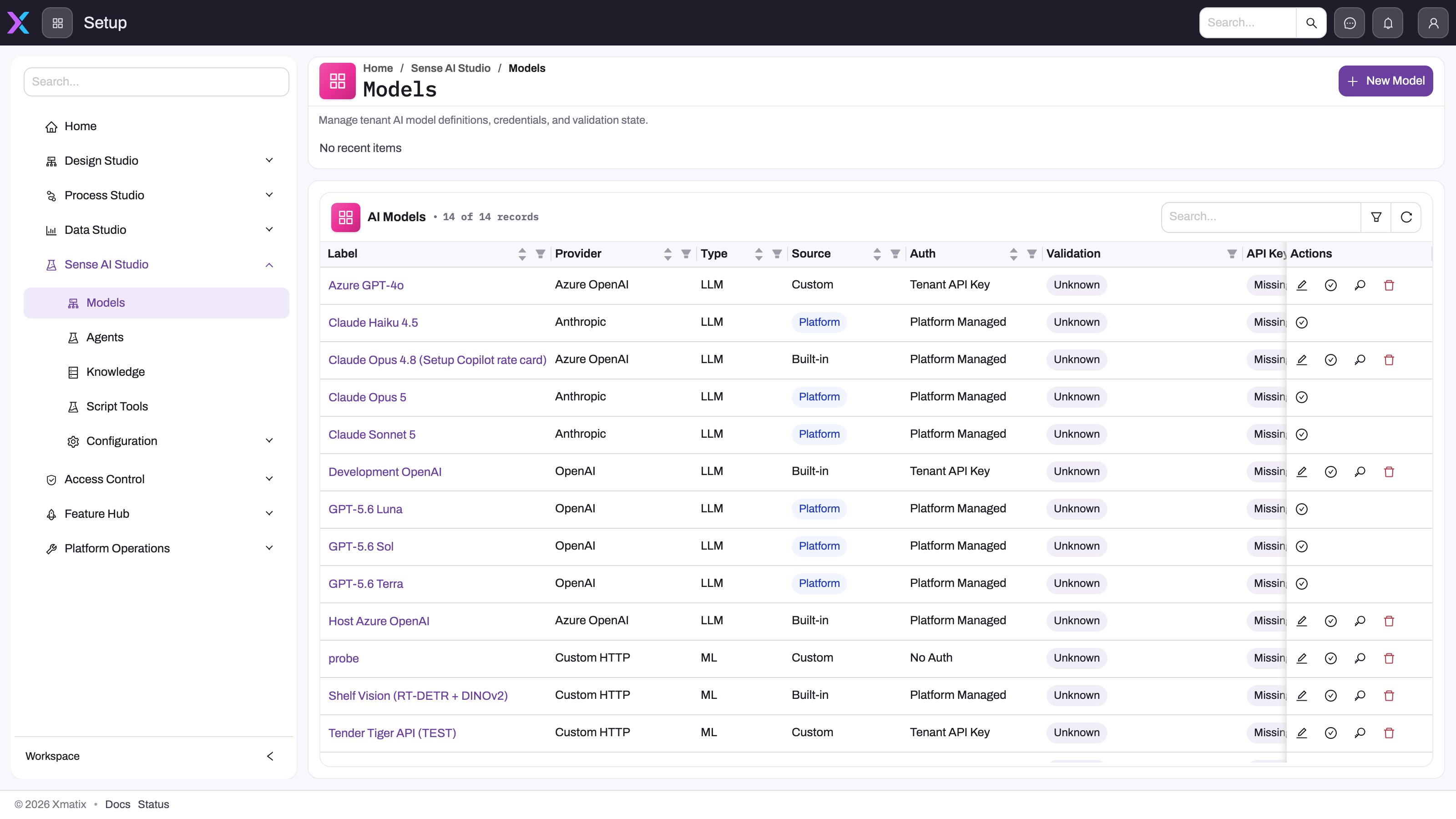
The screenshot predates the Traces and AI Mechanic menu items and the renamed Platform group; the Models screen itself is unchanged.
How the pieces fit
A model is an engine with declared abilities and credit rates. An agent combines a model with instructions, limits, an execution account, knowledge collections, capabilities and routing. Capabilities tell the planner which tools suit the agent and can become a hard allowlist when your deployment turns that enforcement on. Knowledge collections limit what the agent may cite.
When a user sends a chat message, routing picks one of the eligible active agents — a specialist whose intents match, or the fallback agent. The turn still runs as the signed-in user, whichever agent answers: routing changes the model, instructions and tools, never the identity. An agent's execution account is used only for background runs, such as scheduled or queued agent runs.
Routing readiness
The Agents screen warns "Sense AI routing is not fully configured" when either of two things is missing:
- no active agent has a routing intent mapped — map intents on an agent's detail page;
- no active agent is marked as the routing fallback — turn it on in the agent editor under Routing.
Until both exist, routed conversations fail with a configuration error.
Credits meter consumption
Each user gets a free daily tier for Sense AI chat and for the Setup Copilot, counted separately for each. By default it is 1,000,000 tokens (input plus output) per user per UTC day. The platform can set a different value for your organization, or switch the tier off. Usage inside the tier is never charged. ML Model Credits have no free tier.
Beyond the tier, each completed turn is charged credits at the invoked model's rates — per 1,000 tokens for language models, per request for other model kinds. Credits are counted per calendar month (UTC), and each credit type — AI Token Credits (Sense AI chat), Setup Copilot Credits and ML Model Credits — has its own pool.
Where those credits come from:
- The platform grant. xMatix grants your organization a number of credits per month for each credit type. This is the ceiling: your tenant pool can never be larger.
- The tenant pool. This is shared by everyone once their free tier is used. If you never set one, the first AI turn of the month creates it automatically from the platform grant.
- User assignments. Credits you give one person out of the pool. Together, all assignments may not add up to more than the pool.
Prerequisites
- The capabilities in Permissions for the screens you will use.
- The Sense AI module switched on (Configuration → Sense AI settings).
- For credits: a platform grant for the credit type. Without one you cannot create a tenant pool.
Procedure
Step 1 — Check that Sense is on
Open Setup → Sense AI Studio → Configuration → Sense AI settings and confirm the module is on. Users only see the chat surface while it is on and while their security profile holds the Sense AI product (see How Sense AI is governed).
Step 2 — Review the models
Open Models. Rows with Source Platform are ready to use and can only be validated. To add your own engine, click New model, fill the dialog and save. If its Auth needs a key, click Set API Key on the saved row — the key is stored but never shown again, and the API Key column changes to Configured. Click Validate on each model you rely on and read the Validation column.
Step 3 — Get agents in place
Open Agents. Click Agent gallery to see curated platform agents with their Description, Capabilities and Status (Not activated, Active, Customized or Update available). Click Activate to add one. The activated agent stays in sync with its template; Re-activate re-applies the latest template but keeps your model choice, active state, additional instructions, audience teams and intent priorities. To build your own, click New agent and follow Create an agent. Check that the routing-readiness warning is gone.
Step 4 — Add knowledge and tools (optional)
On Knowledge, upload documents into a named collection, then name that collection on the agents that should cite it. Register custom calculations on Script tools, outside tool servers on Configuration → MCP servers, and bundle tools into a named capability on Configuration → Capabilities. The verification pattern is in Extending Sense.
Step 5 — Set credits
Open Configuration → AI credits. The header shows Free per user / day, Granted by platform / month, Tenant pools, Assigned to users, Consumed and Remaining. Click Set allocation, then:
- Pick the Feature (credit type).
- Pick a Scope: Tenant pool (shared by everyone) or One user (assigned from the tenant pool). For one user, also pick the User.
- Enter the credits for this period and click Save.
The Allocations tab lists every pool and assignment for the current period with Allocated, Consumed and Remaining. The Usage tab shows credits, turns and each user's Tokens today against the free tier.
Step 6 — Watch the traces
Open Traces. Filter by time (Last 15 minutes to Last 30 days), user, agent, status, model, duration, cost, or a run or conversation id. Click a row's time or Open trace for the step-by-step trace of that turn. Queued and scheduled agent runs are not here; open the agent and use its Runs tab.
Business rules
- Free tier first. A turn inside the user's free daily tokens is always allowed. Beyond it, the turn is refused when the tenant pool is used up. Otherwise it is refused when the user's own assignment is used up. If neither a pool nor an assignment exists, it is refused once the free tier is used up.
- The free tier resets at 00:00 UTC. That is 05:30 India time.
- An allocation of zero is not unlimited. It is a pool that is already used up.
- The tenant pool may not exceed the platform grant, and nothing can be allocated for a credit type with no active grant.
- Assignments may not exceed the pool. If a pool exists, the total of all user assignments for that credit type may not be larger than it. If no pool exists for the period, an assignment stands on its own.
- The credit check fails open. If the credit check itself cannot read its data, the turn is allowed rather than blocked.
- A zero model rate is not always free. If a model is not in your registry or has zero token rates, your deployment's default token rates may apply instead. Nothing is charged only when both come to zero.
- Platform models are read-only. Edit, Set API Key and Delete are hidden on rows supplied by xMatix.
- Deleting a capability removes its tools from every agent granted that name on their next turn.
Example
A distributor switches Sense on for 40 sales users. The administrator confirms the module is on, validates the platform models, and activates two agents from the Agent gallery: a general assistant marked as routing fallback, and an orders specialist with routing intents. The routing-readiness warning disappears.
The platform grant shows 200,000 AI Token Credits per month. On the first chat of the month a tenant pool of 200,000 is created automatically. The sales manager uses Sense heavily and runs out of the free tier by mid-afternoon. The administrator clicks Set allocation, picks One user, selects the manager and assigns 20,000 credits. In Traces, the manager's next turn shows Completed with its credits, and the Usage tab shows the 20,000 being drawn down.
Training
Practice exercise
In a sandbox, open Setup → Sense AI Studio → Agents and note whether the routing-readiness warning shows. Open Configuration → AI credits and read the six header figures. Assign 1,000 credits to yourself with Set allocation → One user. Send three Sense chat questions, then open Traces and filter to your own user.
Expected result: your allocation appears on the Allocations tab, and three turns appear in Traces with the agent that answered each, their status, tokens and credits. Turns inside your free tier consume no credits.
Quick reference
- Path: Setup → Sense AI Studio.
- Platform models: validate only; your own models: add a key with Set API Key.
- Routing needs at least one intent-mapped active agent and one active fallback agent.
- Chat runs as the user; the execution account is for background runs only.
- Free tier: per user, per UTC day, for chat and Setup Copilot separately.
- Pool ≤ platform grant; user assignments ≤ pool; zero = used up, not unlimited.
- Traces keep 90 days of chat turns; agent runs are on the agent's Runs tab.
Permissions
| Capability (profile setting) | What it opens |
|---|---|
| Manage AI models | Models |
| Manage AI agents | Agents, Knowledge, Script tools, AI Mechanic, Traces, Capabilities, MCP servers, Nudges, External assistants |
| Licensing administration | AI credits — without it, Set allocation is disabled |
A user without the capability does not see the menu item. Sense AI settings keeps its Feature Hub capability. Grant these capabilities through security profiles under Setup → Access control → Profiles.
Configuration
| Setting | Where | What changing it affects |
|---|---|---|
| Sense AI module switch | Configuration → Sense AI settings | Whether the Sense chat surface exists at all |
| Model rows, keys and credit rates | Models | Which engines agents can use and what each turn costs |
| Agents, routing and fallback | Agents | Which agent answers which question |
| Knowledge collections | Knowledge | What agents scoped to a collection can cite |
| Script tools, capabilities, MCP servers | Script tools, Configuration | Which tools agents can call |
| Nudge sources | Configuration → Nudges | Which nudges users see and how often |
| External assistant access | Configuration → External assistants | Whether outside assistants may connect and write |
| Tenant pools and user assignments | Configuration → AI credits | How far beyond the free tier each user can go this month |
Settings controlled by your xMatix deployment rather than by these screens: the platform grant and the free daily tier, capability enforcement for built-in tools (off unless turned on), capability enforcement for MCP tools (on by default), and human approval of tool calls (off unless turned on). If you need a change, ask your xMatix platform operator.
Common problems
"No AI credits have been granted to this organization"
No active platform grant exists for that credit type, so there is nothing to allocate from. Ask your platform operator to grant credits, then set the pool.
"The tenant pool … cannot exceed the platform grant"
You entered more than the monthly grant. Allocate less, or ask for a larger grant.
"Assigning … credits would take the users' assignments to … above the tenant pool"
The user assignments would add up to more than the pool. Raise the tenant pool first or assign less.
A user sees "You have used today's free Sense AI allowance"
They used their free daily tokens and no pool or assignment is available. Assign them credits from the pool, or wait for the reset at 00:00 UTC.
A user sees "This tenant's … allowance for the current period … has been used up"
The tenant pool is empty. Raise the pool, up to the platform grant. If the message says "Your", it is the user's own assignment that is empty.
Routed conversations fail with a configuration error
Read the warning at the top of Agents. Map a routing intent on an active agent, and mark one active agent as routing fallback.
A trace shows "Stopped: AI credit limit"
The pre-flight credit check refused the turn. Check the Usage tab for that user and the pool's Remaining.
Common questions
We created an agent — why don't users see the assistant?
Agents do not grant access. The chat surface appears for every user whose security profile holds the Sense AI product (every profile does by default) while the Sense AI module switch is on. Check Configuration → Sense AI settings first. For a recently created profile, check licensing. Only then look at the agent.
Does an agent widen what users can see?
Not in chat. A chat turn always runs as the signed-in user, so Sense can read only what that person could open. Background runs use the agent's execution account instead, so keep that account narrowly profiled. See How Sense AI is governed.
What happens when credits run out?
The user can keep using Sense inside their free daily tokens. Beyond that, turns are refused with a message saying whose allowance is used up — the organization's pool or the user's own assignment — until the next month starts or an administrator raises the allocation. The refusal is visible in Traces as Stopped: AI credit limit. If turns continue despite an empty pool, check service health: the credit check lets turns through when it cannot read its own data.
Can we bring our own models and tools?
Yes. Register a model with New model and set its key with Set API Key. Add script tools, or register MCP servers. Then bundle the tools into a capability and grant it to an agent. Test that an agent without the grant cannot use the tool — see Extending Sense.