
A capability is a named bundle of tools that you grant to a Sense agent, so that agent can use your own calculations and outside systems as well as the built-in tools. You build it in three places in Sense AI Studio: Script tools for calculations that run inside xMatix, Configuration → MCP servers for tools that live on another system, and Configuration → Capabilities for the bundle itself. You then grant the bundle on the agent's Instructions & Routing tab. Before you start, read how agents are set up in Create an agent. Once the bundle is granted, users meet the result in Sense chat.
Overview
Sense agents answer by calling tools. The platform ships built-in tools, such as querying records, running reports and reading documents, and groups them into platform capabilities. A tenant capability is a bundle you write yourself. It can carry:
- built-in tools chosen from the platform's fixed list;
- script tools: small sandboxed calculations you write in Sense AI Studio, or automation scripts you publish as agent tools;
- MCP tools: tools exposed by an outside server that speaks the Model Context Protocol and that you register in Sense AI Studio.
An agent with explicit Capability Grants gets only the tools its granted capabilities carry, plus a small set of interaction tools it always keeps. An agent with no grants inherits every enabled capability, yours included.
When to use it
- An agent needs a figure that a formula over your data produces, such as a share index, a discount rule or a scoring calculation, and you want the same answer every time instead of the model working it out.
- An agent needs information that lives in another system you can reach through an MCP server.
- You want to narrow an agent to a fixed set of built-in tools, for example a read-only analyst that can query data and run reports and nothing else.
If you only need to change what an agent says or how it routes, edit the agent's instructions and routing instead. See Create an agent.
How xMatix handles it
Every turn, Sense builds the agent's tool set in this order:
- Capability grants. The tools of every granted, active capability are added up. Platform and tenant capabilities resolve in the same way. A granted capability that the organization is not licensed for adds nothing.
- Always-available tools. The agent keeps the tools it needs to talk to the user whatever it is granted: list_capabilities, ask_user, escalate_reasoning, read_nudge and the on-screen tools ui_show_me, ui_navigate, ui_read_screen, ui_invoke and ui_fill. On-screen actions are still confirmed by the user in the browser.
- Grant-only tools. Creating a record, changing a record, running a server action and viewing an attachment image are offered only when a granted capability names them.
- Denied tools. The agent's Denied tools list is removed next. The always-available tools cannot be denied.
- Approval. For an agent with Supports approvals on, tools on the approval list pause for the user's decision. By default that list includes script tool calls, MCP tool calls, fetching a web page, report and dashboard drafts, and every record change. The agent's own Approval-required tools add to the list and can never remove from it.
Some consequences of this order matter when you design a bundle:
- Script and MCP references switch on a call surface, not one tool. Naming any script tool in a capability gives the agent the two script tools list_script_tools and call_script_tool. Naming any MCP tool gives it list_mcp_tools and call_mcp_tool. The Tools column on the Capabilities list shows this effective set. Through those tools the agent can reach every active script tool that its Required capability check allows, and every tool on every active MCP server, not only the names you listed. Use Required capability on script tools to fence off the sensitive ones, and treat an MCP grant as access to all your registered servers.
- A bundle whose tools all disappear stops limiting the agent. If every capability an agent is granted is disabled or deleted, its grants resolve to no tools. The agent then falls back to the full set of read tools, while record changes and image viewing stay unavailable. Check grants before you disable or delete a capability.
- An agent without Supports approvals runs script and MCP calls without asking. Record-changing tools are removed from such an agent entirely. Script and MCP calls are not removed: they simply run without an approval card.
Prerequisites
- The Manage AI agents permission. It opens Script tools, Capabilities and MCP servers and is required by the screens' services.
- For a script tool: the calculation written as a short script that reads its inputs and returns a value.
- For an MCP server: its endpoint address, the authentication method it uses and the credential, such as an API key, bearer token or OAuth client secret.
- At least one agent you can edit, ideally a test agent, and a sandbox where you can try prompts. See Sandboxes.
Procedure
Step 1 — Write and test a script tool
- Open Setup → Sense AI Studio → Script tools and choose New script tool in the page header.
- Fill in Name (tool id), for example
share_index. The name cannot be changed after you save. Fill in Label. - Write Description (shown to the assistant) as tool documentation: what the tool returns, when to call it and what each input means. The model decides whether to call the tool from this text.
- In Parameters (JSON array of { name, type, description }), list each input as
{ "name": "amount", "type": "number", "description": "…" }. The dialog starts with one example parameter. - In Script (C#), read inputs as
Input.<name>(orArgs["<name>"]) and return the result, for examplereturn Input.amount * (1 - Input.rate);. - Set Timeout (s) between 1 and 30. It starts at 5.
- Leave Required capability (optional) blank for now, keep Active on and choose Save.
- On the new row, choose Test, enter sample inputs in Arguments (JSON object) and choose Run. A green Result shows the returned value; a red one starts with Error: and the reason.
The tool now appears in the Script tools list with the Status Active. The test run deliberately skips the Required capability check, so you can check the logic before you lock it down.
You can also publish an automation script as an agent tool from its Agent Tool tab. It then appears in the capability's script tool picker like any other script tool. See Automation scripts quickstart. If a script tool and a published automation script share a name, the script tool is the one that runs.
Step 2 — Register an MCP server (optional)
- Open Setup → Sense AI Studio → Configuration → MCP servers and choose New MCP server.
- Fill in Label, Name (system key) (letters, digits and underscores, starting with a letter; it cannot be changed later) and Endpoint (MCP JSON-RPC URL).
- Optionally list Tool names (optional, comma-separated). This only decides which server receives a call for that tool name. It does not hide the server's other tools from the agent.
- Choose Authentication: None (public endpoint), API key (custom header), Bearer token (Authorization) or OAuth 2.0 — client credentials. For an API key, set API key header name (blank means
Authorization). For OAuth, fill in OAuth token endpoint, OAuth client id and, if the server needs it, OAuth scope (optional). - Keep Active on and choose Save.
- If the method needs a credential, the Set credential dialog opens straight away. Paste the API key, token or OAuth client secret and choose Save.
The server appears in the list with its Auth method, Credential Set or Missing, and Status Active or Disabled. The credential is write-only: it is stored encrypted and is never shown again. To replace it, use the Set credential row action again. Saving rotates the stored value.
Step 3 — Create the capability
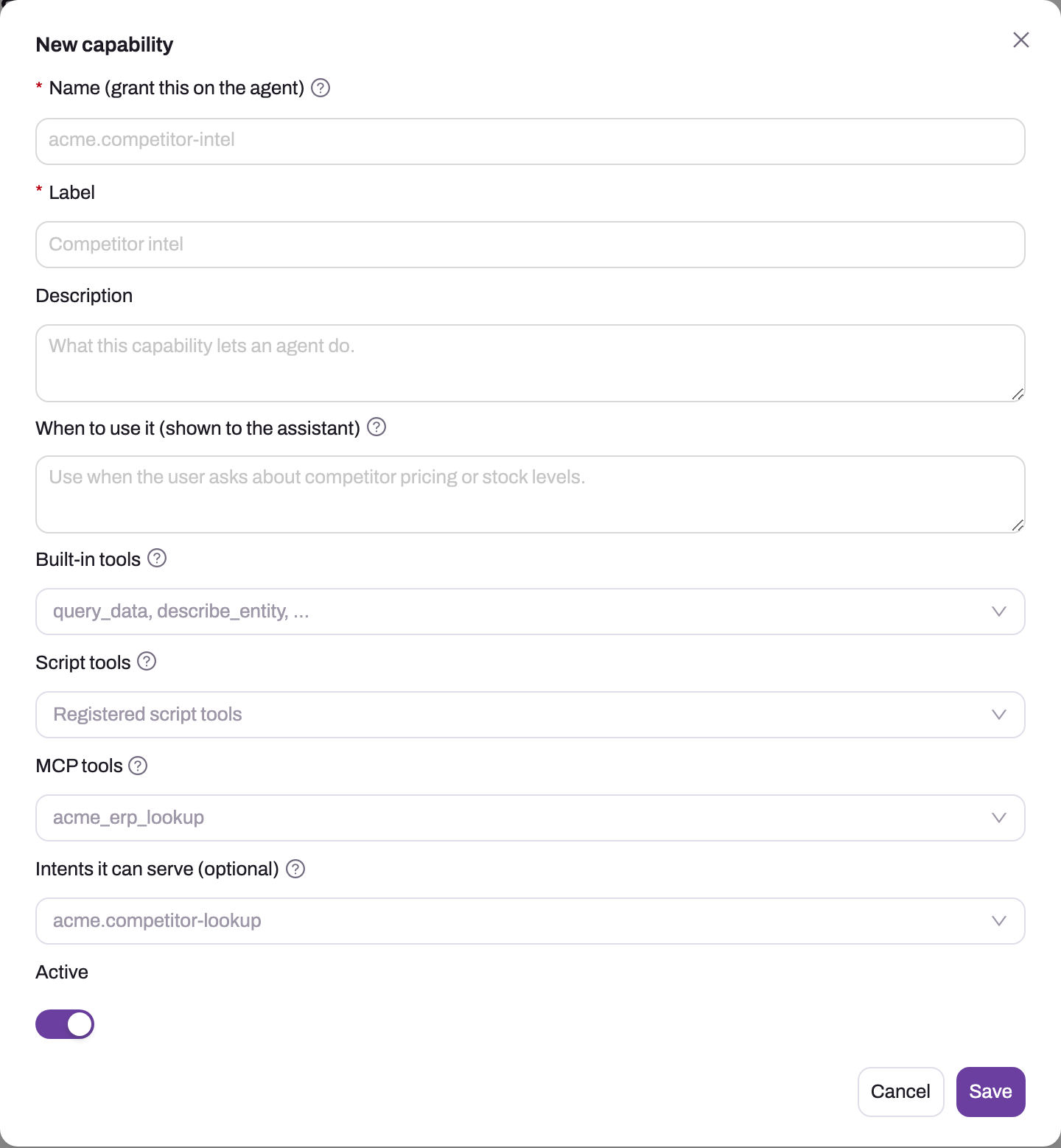
- Open Setup → Sense AI Studio → Configuration → Capabilities and choose New capability.
- Fill in Name (grant this on the agent). Use a prefix of your own, such as
ours.competitor-intel. No spaces are allowed, the name cannot match a platform capability, and it cannot be changed after you save. - Fill in Label and Description.
- Write When to use it (shown to the assistant) as concrete triggers, for example "Use for competitor pricing, share index or how-do-we-compare questions."
- Pick the tools: Built-in tools from the fixed list, Script tools from your registered tools, and MCP tools by name. MCP tool names are suggested from the servers' Tool names lists, and you can type others. When you add an MCP tool, the dialog reminds you that the agent can reach every tool on every registered server.
- Optionally add Intents it can serve (optional). This is routing vocabulary only and does not grant anything.
- Keep Active on and choose Save.
The capability appears in the list with its effective Tools, its Intents and the Status Active. Saving does not grant it to any agent.
Step 4 — Lock a script tool to the capability
- Go back to Script tools and choose Edit on the tool.
- Set Required capability (optional) to the capability's name, exactly as you saved it, and choose Save.
From now on the tool is listed to, and runs for, an agent only when that agent is granted the capability or the effective user's security profile holds a capability of that name. Otherwise a call is refused with not authorized: requires the '…' capability.
Step 5 — Grant the capability to an agent
- Open Setup → Sense AI Studio → Agents, open the agent and go to the Instructions & Routing tab.
- Add the capability to Capability Grants. Also grant the platform capabilities the agent still needs, for example data query. Once an agent has explicit grants, it loses every tool that is not in them.
- In Additional Instructions, say which tool answers which question, for example "Always use the share index tool for any index figure."
- If script or MCP calls should pause for the user's approval, turn on Supports approvals for the agent.
- Save. The agent's validation status becomes Pending again (see Create an agent).
Step 6 — Test granted and ungranted behaviour
In a sandbox, start a fresh Sense conversation and try:
- a prompt that should use the tool: the agent calls it, and with Supports approvals on you see an approval card first;
- a prompt that should not use it: the agent answers without the tool;
- the same matching prompt on an agent without the grant: a tool with a Required capability is not offered;
- a user whose profile does not hold the capability, on the granted agent: the grant alone is enough, so the tool still works; if that is not what you want, scope the agent's audience instead;
- approving and then declining the approval card.
Check what happened on Setup → Sense AI Studio → Traces, which lists the tools each chat turn called.
Fields
New capability
| Field | What it means | Notes |
|---|---|---|
| Name (grant this on the agent) | The name you add to an agent's Capability Grants | Required; up to 200 characters; no spaces; must not match a platform capability or another of yours; read-only after save |
| Label | The display name in the list | Required |
| Description | What the capability lets an agent do | Optional |
| When to use it (shown to the assistant) | Guidance the planner reads when it decides whether the capability fits a request | Optional, but the strongest lever on tool choice |
| Built-in tools | Platform tools in the bundle | Only names from the fixed list are accepted |
| Script tools | Your script tools and published automation scripts | Each must already exist; adds the whole script call surface |
| MCP tools | Tool names on your MCP servers | Free text, not checked against the servers; adds the whole MCP call surface |
| Intents it can serve (optional) | Routing intents that should prefer this capability | Vocabulary only; grants nothing |
| Active | Whether the capability takes part in agent turns | On by default; a disabled capability contributes no tools |
A capability must name at least one built-in, script or MCP tool.
New script tool
| Field | What it means | Notes |
|---|---|---|
| Name (tool id) | The name the agent calls the tool by | Required; read-only after save |
| Label | The display name | Required |
| Description (shown to the assistant) | Tool documentation the model reads | Write it like an API description |
| Parameters (JSON array of { name, type, description }) | The inputs the tool accepts | Must be valid JSON; every declared input is passed, empty when the agent leaves it out |
| Script (C#) | The calculation | Required; reads Input.<name>; the returned value is the result |
| Timeout (s) | Longest run time | 1–30; default 5 |
| Required capability (optional) | A capability name the agent's grants or the effective user must hold | Blank means no check; data.script.read also gives the script read-only data access |
| Active | Whether agents can list and call it | Status shows Active or Disabled |
New MCP server
| Field | What it means | Notes |
|---|---|---|
| Label | The display name | Required |
| Name (system key) | The server's stable key | Required; letters, digits, underscore, starting with a letter; read-only after save |
| Endpoint (MCP JSON-RPC URL) | Where calls are sent | Required; must be a valid URL |
| Description | What the server exposes | Optional |
| Tool names (optional, comma-separated) | Which tool names should be sent to this server | Used to pick the server for a call; does not limit what the agent can list |
| Authentication | How xMatix signs in to the server | None, API key, Bearer token or OAuth 2.0 client credentials |
| API key header name | The header the API key is sent in | API key only; blank means Authorization |
| OAuth token endpoint, OAuth client id, OAuth scope (optional) | Client-credentials settings | OAuth only; the client secret is set with Set credential |
| Active | Whether agents can reach the server | Disabled servers are skipped |
Business rules
- Name checks on save. A capability name must be unique in your organization, must not match a platform capability name and cannot contain whitespace. Built-in tool names must come from the fixed list, and script tool names must belong to a registered script tool or a published automation script.
- Effective tools. Built-in tools count as listed. Any script tool adds list_script_tools and call_script_tool, and any MCP tool adds list_mcp_tools and call_mcp_tool.
- Script tools are organization-wide. Through the script call surface an agent can reach every active script tool whose Required capability its grants or its effective user satisfy. There is no per-agent list of scripts beyond that check.
- Required capability is checked twice, once when the agent lists tools and again when it calls one. Either source satisfies it: the agent's grant of that name, or the effective user's own capability. When an agent runs as an execution account, that account is the effective user.
- Script data access. Only a script tool whose Required capability is
data.script.readgets read-only data access. It can query records, read one record and summarize a field, under the effective user's record and field permissions. Scripts cannot write data. - MCP calls. When an agent lists MCP tools, every active server is asked for its tools. A call goes to the server the agent names. Otherwise it goes to the servers whose Tool names include the tool, and when none do, every active server is tried in turn until one returns content.
- Approval. With Supports approvals on, script tool and MCP calls pause for the user's decision, as do the other approval-list tools. An unanswered live approval card is treated as declined after 10 minutes. See How Sense AI is governed.
- Disabling or deleting a capability takes effect on each agent's next turn. Agents keep the grant name and get no warning. An agent whose grants all resolve to nothing falls back to the full read tool set, as described above.
- Platform capabilities are not on this screen and cannot be edited. Your organization's list may already hold capabilities that shipped with it, such as Document read, Fulfilment planning and Script data read. Shipped agents may be granted them, so check grants before you change one.
Example
A distributor wants Sense to answer "how do we compare against the competitor on this account?" from an internal pricing service and an in-house share index.
- The administrator registers the pricing service on MCP servers as
pricing_service, with API key (custom header), then sets the key with Set credential. The Credential column shows Set. - On Script tools they create
share_indexwith inputsourPriceandmarketPrice, a script that returns the index, and a 5-second timeout. Test with{ "ourPrice": 95, "marketPrice": 100 }returns the expected figure. - On Capabilities they create
ours.competitor-intel, labelled "Competitor intel". It bundles query_data, describe_entity, theshare_indexscript tool and the pricing service'scompetitor_priceMCP tool. When to use it reads "Use for competitor pricing, share index or how-do-we-compare questions." The Tools column shows the two built-ins plus the script and MCP call surfaces. - They set
share_index's Required capability toours.competitor-intel. - On a "Competitor Analyst" agent, they grant
ours.competitor-inteland turn on Supports approvals. They add instructions to use the share index tool for every index figure and routing keywords such as competitor, price and compare. - In a fresh conversation a sales manager asks the question. Sense routes it to Competitor Analyst, an approval card appears for the pricing call, and after Approve the agent answers with the index. On the general assistant, which is not granted the capability, the share index tool is not offered.
Training
Practice exercise
In a sandbox, create a script tool discount_price with inputs amount and rate and the script return Input.amount * (1 - Input.rate);. Test it with { "amount": 200, "rate": 0.1 }; the expected result is 180. Create a capability training.pricing that carries only that script tool, set the tool's Required capability to training.pricing, and grant the capability to a test agent that also has the data query capability. Ask the test agent "What is 200 after a 10% discount? Use the discount tool." The expected result is a call to discount_price, after an approval card if Supports approvals is on, and the answer 180. Then ask the same question on an agent without the grant. The expected result is that the tool is not offered.
Quick reference
- Script tools: Setup → Sense AI Studio → Script tools. MCP servers and Capabilities are under Configuration.
- All three need Manage AI agents.
- A capability does nothing until it is in an agent's Capability Grants.
- Explicit grants replace inheritance, so grant the platform capabilities the agent still needs.
- One script or MCP name opens the whole script or MCP surface. Fence off sensitive script tools with Required capability.
- An MCP grant reaches every tool on every active server.
- Test on a script tool skips the Required capability check.
- MCP credentials are write-only. Rotate them with Set credential.
- Turn on Supports approvals if script and MCP calls should wait for the user.
- Check grants before you disable or delete a capability.
Permissions
| Action | What controls it |
|---|---|
| See and use Script tools, Capabilities and MCP servers | Manage AI agents |
| Grant a capability to an agent | Manage AI agents (the agent's detail page) |
| Have a script tool listed and run in chat | The agent's grant of the tool's Required capability, or the effective user's own capability of that name |
| Approve a script or MCP call | The user in the conversation, when the agent has Supports approvals on |
| See which tools a chat turn used | Manage AI agents (Traces) |
A user without Manage AI agents does not see these screens in Setup. In chat, users never see capabilities, only the tools' results and any approval cards.
Configuration
| Setting | Where | What changing it affects |
|---|---|---|
| Tenant capabilities | Setup → Sense AI Studio → Configuration → Capabilities | Which tool bundles exist to grant; disabling one removes its tools from every granted agent on their next turn |
| Script tools | Setup → Sense AI Studio → Script tools | The calculations agents can call; Active, Timeout and Required capability apply on the next call |
| Automation scripts as agent tools | Setup → Process Studio → Scripts → (script) → Agent Tool | Adds a published script to the script tool picker |
| MCP servers | Setup → Sense AI Studio → Configuration → MCP servers | Which outside tools agents can list and call; Active off removes the server from every agent |
| MCP credential | Set credential row action | Rotates the stored key, token or secret |
| Capability Grants | Agent → Instructions & Routing | The agent's whole tool budget |
| Denied tools, Approval-required tools | Agent → Instructions & Routing | Removes tools, or adds approvals, for that agent only |
| Supports approvals | Agent → Behaviour flags | Whether approval-list tools pause for a decision on that agent |
| Audience teams | Agent → Routing | Which users can be routed to the agent |
Common problems
"A capability needs tools" when I save
The dialog says Reference at least one built-in tool, script tool, or MCP tool. Add at least one tool to one of the three pickers.
"is a platform capability name — choose a different name"
The name you typed is already used by a platform capability. Add your own prefix, for example ours.. The related message A capability named '…' already exists. means one of your own capabilities already uses it.
"Unknown script tool(s)" when I save a capability
The script tool name is not registered. Create it on Script tools, or publish the automation script from its Agent Tool tab, then pick it from the list. A message beginning Unknown built-in tool name(s) means a built-in name is not in the fixed list, and the message lists the valid names.
The agent says the tool requires a capability
The answer quotes not authorized: requires the '…' capability. Neither the agent's grants nor the effective user hold the script tool's Required capability. Grant the capability to the agent, or correct a typo in the Required capability. A misspelled name hides the tool from every agent.
The agent answers from general knowledge instead of calling my tool
Either the question was routed to another agent, or the agent was not told firmly enough to use the tool. Open Traces to see which agent answered and which tools it called. Sharpen the agent's routing description, keywords and examples, make When to use it concrete, and state the requirement in Additional Instructions.
The agent lost its other tools after I granted my capability
Explicit grants replace inheritance. Add the platform capabilities the agent still needs, such as data query, to Capability Grants.
The MCP server shows "Missing" under Credential
The authentication method needs a credential that has not been set. Use Set credential on the row. Until a credential is set, calls to that server are sent without one, and a server that requires sign-in refuses them.
A script tool fails or returns nothing
Run it with Test using the same arguments. A result that starts with Error: names the problem. A long calculation stops at its Timeout (s), which is 30 at most. If the script needs data, set its Required capability to data.script.read.
Common questions
Does creating a capability change what my other agents can do?
Creating it grants nothing by itself, but two cases can widen access. An agent with an empty Capability Grants inherits every enabled capability, so it gets yours as soon as it is active. And because one script or MCP name opens the whole call surface, any agent granted any script- or MCP-bearing capability can reach other active script tools and every registered MCP server. Give sensitive script tools a Required capability, and give agents explicit grants.
Can I restrict an MCP server to one agent?
Not per server. A capability that names any MCP tool gives the agent every tool on every active MCP server. To keep an outside system away from most agents, grant MCP-bearing capabilities only to the agents that need them, give every other agent explicit grants without them, and switch a server off with Active when it is not in use.
Does a capability widen what users can see or change?
It can. A script tool with data.script.read reads data under the effective user, which is the agent's execution account when it has one. An MCP tool acts with the credential you stored for its server. The agent's grant alone satisfies a script tool's Required capability, so the asking user's own profile is not a ceiling. Scope execution accounts and outside credentials narrowly, and set Audience teams on the agent. See How Sense AI is governed.
Can a script tool change records?
No. A script tool only receives its inputs and, with data.script.read, read-only access to query records, read one record and summarize a field. To let an agent change records, grant the platform data-write capability, which uses the approval-gated record tools.