
An expense policy is a set of rules (category caps, receipt thresholds, blocked categories, late-submission and duplicate checks) that xMatix checks an expense claim against when someone chooses Evaluate Policy on the claim. Policies are master data that an administrator maintains. Claimants and approvers see the results as policy violations on the claim and, for auto-disallow rules, as a reduced reimbursable amount. The claim side is covered in Submit and approve expense claims. This page covers building the policies and what each rule does.
Overview
A policy has two levels:
- The policy says whose claims it checks: one company (Partner Account), one employee Grade, and an optional Effective From / Effective To window.
- Its rules say what is checked: a Rule Type, an Expense Category, a Threshold and an Action.
Every breach is recorded as a violation on the claim with the rule, the line, a message, a severity and any excess amount. Only auto-disallow rules change money. Every other outcome is information for the approver: no submission, approval or posting step reads it.
When to use it
- You have a written expense policy (meal caps, hotel limits per seniority, "receipts above 1,000", banned categories) and want claims checked against it.
- Approvers need to see at a glance which claims break policy (the claim's Has Policy Violation flag).
- You want amounts over a cap trimmed automatically, so they are neither posted nor reimbursed.
How xMatix handles it
Which policies apply. When Evaluate Policy runs, xMatix collects every policy that meets all of these conditions:
- its Partner Account is the same as the claim's Partner Account. A policy with no Partner Account never applies, and a claim with no Partner Account is checked against no policy;
- its Grade is the grade on the claimant's employee record. A claimant whose employee record has no grade gets no policy checks;
- the claim's Claim Date (today, if the claim has none) falls between Effective From and Effective To, both inclusive, where an empty date means no limit;
- the policy is not switched off. Only an explicit untick of Is Active removes it, and the same applies to each rule.
All rules of all matching policies are checked together. There is no ranking between policies and no "first match wins".
What each rule type checks. The Rule Type box is free text. It must hold one of these codes exactly, with no spaces and the same capital letters:
| Rule Type (type exactly) | Fires on a line when | Threshold means | Category scope |
|---|---|---|---|
CategoryLimit | line amount plus tax is above the threshold | the cap | the rule's category only |
GradeHotelLimit | line amount plus tax is above the threshold (identical to CategoryLimit; use it in a grade policy on your hotel category) | the cap | the rule's category only |
ReceiptMandatoryAbove | line amount plus tax is above the threshold and no receipt is attached | the amount above which a receipt is needed | the rule's category only |
BlockedCategory | always, for any line in the category; the excess is the whole line | not used | the rule's category only |
LateSubmissionDays | the line's expense date is more than the threshold in days before the claim date | a number of days | ignored: every line |
DuplicateDetection | another line of this claim, or a line on any earlier claim of the same employee, has the same merchant, invoice number and amount | not used | ignored: every line |
Any other text is saved without complaint and checks nothing. That includes Category Limit with a space, and the codes CityClassLimit, ForeignTravelCap and MileageRate, which are recognised names but have no check behind them. An amount or day rule with an empty Threshold never fires.
What each action does. The Action is matched exactly as typed:
| Action (type exactly) | Recorded severity | Effect on the money |
|---|---|---|
HardBlock | Block | None. Nothing stops submission, approval or posting |
RequireHigherApproval | Warning | None. No approval step is added |
Warn | Warning | None |
AutoDisallow | Warning | The excess over the threshold is added to the line's Disallowed Amount, so it is neither posted nor reimbursed |
| empty or anything else | Warning | None |
Two consequences matter in practice:
- The standard rule forms have no Action field. A rule created from them therefore records Warning findings only and never deducts anything. To use hard block, higher approval or auto-disallow, add Action to the rule's form first (see Configuration).
- Overlapping rules add up. When several auto-disallow rules hit the same line (for example a 2,000 cap and a 1,500 cap on the same category, from one policy or two), each deducts its own excess in turn. The total is capped only by the line's amount plus tax. A receipt or duplicate finding has no excess, so auto-disallow on it records the finding without reducing the line.
One check needs no policy. A line whose expense category has been deactivated always gets a Block violation ("Expense category '…' is deactivated and cannot be used on a new claim line."), and posting refuses such a claim too.
Re-running is safe. Each evaluation replaces the previous one. Earlier violations are withdrawn (they stay in the database for audit but no longer appear in any list or on the claim's flags), the deductions they made are released, and this run's deductions are recorded instead. Evaluating an unchanged claim twice therefore gives the same result. A rule that is switched off or deleted stops deducting at the next evaluation. A reduction a reviewer entered in a line's Approved Amount, or directly in Disallowed Amount, is kept.
Prerequisites
- The Expense List app in your security profile, with access to Expense Policy and Expense Policy Rule (see Permissions).
- Expense categories and the grades you want to scope policies by.
- Employee records for claimants with their Grade filled in, and claims that carry the company as their Partner Account.
Procedure
Step 1 — Create the policy
- Open the Expense List app from the App Launcher and choose Expense Policies.
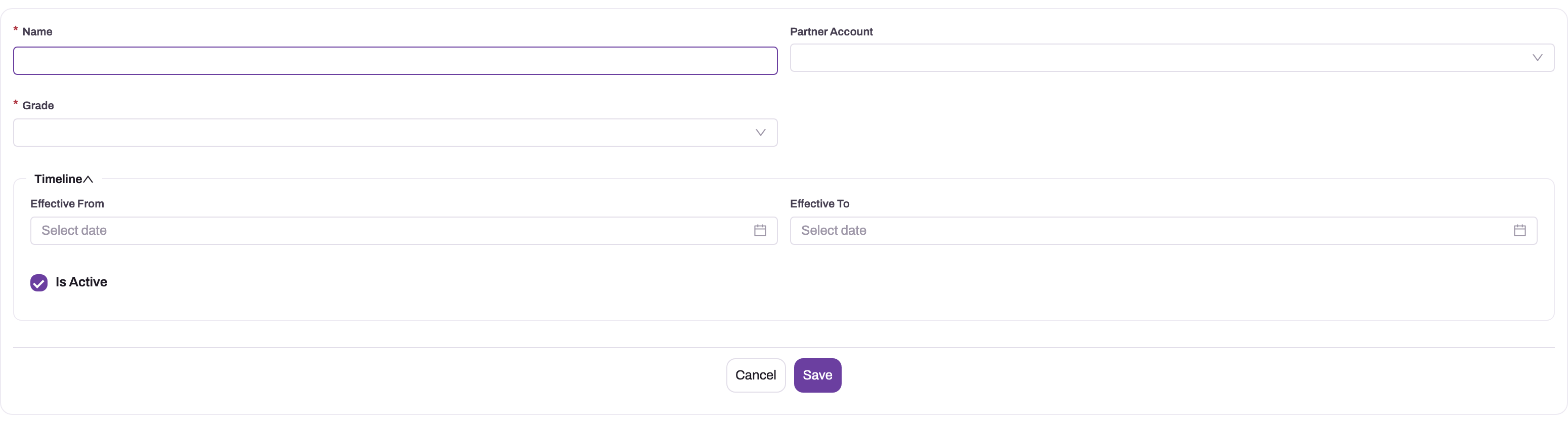
- Choose New. The New Expense Policy form opens.
- Fill in Name. The form requires it, but the text is not kept: the saved policy is numbered automatically (series
EP). You describe the policy in Step 2. - Choose the Partner Account: the company whose claims the policy checks. The list offers partner accounts only. Do not leave it empty, or the policy never applies.
- Choose the Grade (required). Each policy covers one grade, so a three-grade hotel ladder needs three policies.
- In Timeline, set Effective From and Effective To if the policy applies only for a period. Leave Is Active ticked.
- Choose Save. The policy's record page opens with two tabs, Rules and Details.
Step 2 — Describe the policy
On the Details tab, click Description and enter what the policy is for, for example "Hotel and meal caps for managers, FY 2026-27". Because the policy's name is a number, this text is how other administrators recognise it. Effective From, Effective To, Is Active and Grade can also be changed here in place.
Step 3 — Add the rules
- Open the Rules tab and choose New. A new-rule card opens with Rule Type, Expense Category, Threshold, City Class and Country. The rule is linked to this policy automatically.
- Type the Rule Type code exactly as in the table above, for example
CategoryLimit. - Choose the Expense Category (required). For a check you want on several categories, add one rule per category. For
LateSubmissionDaysandDuplicateDetectionthe category is required but ignored, so pick any. - Enter the Threshold: an amount for the cap and receipt rules, a number of days for
LateSubmissionDays, and nothing for the blocked-category and duplicate rules. The box shows a$sign whatever your currency and whatever the threshold means. - Leave City Class and Country empty. Evaluation does not read them.
- Save the card. The rule gets an automatic number and appears in the list.
If you have added Action to the form, set it on the same card. Without it the rule only warns.
Step 4 — Check or change a rule
Select a rule's name in the Rules list to open its record page. Key Information shows Rule Type, Expense Policy, Expense Category and Is Active, and Additional Information shows Threshold, City Class and Country. Click a field to change it in place, or use Edit on the page or on the list row. Changes apply from the next time someone runs Evaluate Policy. Claims evaluated earlier keep their findings until they are evaluated again.
Step 5 — Retire a rule or a policy
To stop a rule, open it and untick Is Active. To stop a whole policy, untick Is Active on its Details tab, or set Effective To. Prefer this to deleting. Violations raised earlier keep pointing at the rule, so the history stays readable. Deleting a rule (Delete on the row or the record page) also stops it. In both cases its deductions are released the next time each affected claim is evaluated.
To change a cap from a given date, set Effective To on the current policy and create a new policy (with its rules) whose Effective From is the next day. Claims are matched by their claim date, so each one is checked against the policy that was in force for it.
Step 6 — Test the policy on a claim
Create a draft claim in the same company for an employee with the policy's grade, with a line that breaks one rule. Choose Evaluate Policy on the claim and check the violation it records. Then fix the line, evaluate again, and check that the violation disappears. The claim-side steps are in Submit and approve expense claims.
Step 7 — Review the policy violations
Every finding of the latest Evaluate Policy run is a Policy Violation record. Approvers and administrators review them in one list:
- Open the Expense List app from the App Launcher (in the Expenses app, Settings opens it) and choose Policy Violations in the Policy group.
- The All Policy Violation view lists each violation with Name, Partner Account, Rule Type, Severity, Excess Amount, Created By, Created and Modified Date. Use the toolbar search and filters to narrow it, for example to Severity
Block, or to one claim by filtering on Expense Claim. - Select a violation's name to open its record page. Key Information shows Expense Claim, Expense Policy Rule, Overriden By and Override Reason. Additional Information shows Rule Type, Severity and Excess Amount. The header carries Edit and Delete.
The violation's Message and its Expense Claim Line are stored on every record but are not on the standard list or record page. If your approvers need them, an administrator adds them (see Configuration).
Only the latest evaluation of each claim is listed. When a claim is evaluated again, its earlier violations leave the list and the new ones take their place.
Step 8 — Record an override
When an approver accepts a claim despite a finding, you can note that on the violation:
- Open the violation and choose Edit.
- Choose the person who approved the exception in Overriden By and enter the justification in Override Reason.
- Choose Save.
An override is a note for the audit trail only. It does not clear Has Policy Violation, does not release an auto-disallow deduction, and nothing in submission, approval or posting reads it. The next Evaluate Policy on the claim withdraws the violation together with its override and records fresh ones without overrides, so record overrides after the claim's final evaluation.
Do not create violations by hand with New. Evaluation does not keep them: the next run on the claim withdraws every violation linked to it, including hand-made ones.
Fields
Expense policy
| Field | What it means | Notes |
|---|---|---|
| Name | Shown on the New form | Required on the form but not kept. The policy is numbered automatically (series EP) |
| Partner Account | The company whose claims the policy checks | Must equal the claim's Partner Account. Empty means the policy never applies. Partner accounts only |
| Grade | The employee grade the policy applies to | Required. Compared with the grade on the claimant's employee record |
| Effective From | First claim date the policy covers | Inclusive. Empty means no start limit |
| Effective To | Last claim date the policy covers | Inclusive. Empty means no end limit |
| Is Active | Whether the policy is checked | Ticked by default on the New form. Only an explicit untick switches it off |
| Description | What the policy is for | Details tab of the record page |
Expense policy rule
| Field | What it means | Notes |
|---|---|---|
| Rule Type | Which check runs | Free text. Must be one of CategoryLimit, GradeHotelLimit, ReceiptMandatoryAbove, BlockedCategory, LateSubmissionDays, DuplicateDetection, typed exactly. Anything else checks nothing |
| Expense Category | The category the rule checks | Required. Ignored by LateSubmissionDays and DuplicateDetection |
| Threshold | The cap, receipt amount or number of days | Compared with line amount plus tax for the amount rules. Empty means the amount and day rules never fire |
| City Class | Not used | Not read by evaluation |
| Country | Not used | Not read by evaluation |
| Expense Policy | The policy the rule belongs to | Filled automatically from the Rules tab. Record page only |
| Is Active | Whether the rule is checked | Record page only. Empty counts as active |
| Action | What a breach does | HardBlock, Warn, RequireHigherApproval or AutoDisallow, typed exactly. Not on the standard forms. Empty means Warning, no deduction |
| Name | The rule's number | Assigned automatically on save |
Policy violation
All of these are written by Evaluate Policy. Only the two override fields are meant to be filled in by people.
| Field | What it means | Notes |
|---|---|---|
| Name | The violation's number | Assigned automatically on save (see Configuration) |
| Partner Account | The company of the claim | Copied from the claim |
| Expense Claim | The claim the finding belongs to | Always filled |
| Expense Claim Line | The line that broke the rule | Filled for every finding the standard checks raise. Not on the standard pages |
| Expense Policy Rule | The rule that was broken | Empty for the deactivated-category check, which needs no rule |
| Rule Type | Which check fired | The rule's code, for example CategoryLimit, or InactiveCategory for a deactivated category |
| Severity | How serious the finding is | Block for a HardBlock rule and for a deactivated category; Warning for everything else. Info is a recognised value but evaluation never writes it |
| Message | What was found, in words | For example "CategoryLimit: line 2600 exceeds limit 2000.". Not on the standard pages |
| Excess Amount | The amount over the threshold | Filled for cap rules (amount plus tax minus threshold) and blocked categories (the whole line). Empty for receipt, late-submission, duplicate and deactivated-category findings |
| Overriden By | Who accepted the claim despite the finding | Filled in by hand. Read by nothing |
| Override Reason | Why the finding was accepted | Filled in by hand, up to 500 characters. Read by nothing |
Field-by-field reference: Expense Policy · Expense Policy Rule · Policy Violation.
Business rules
- A policy applies only when its Partner Account equals the claim's, its grade equals the claimant's grade, the claim date is inside its window, and neither it nor the rule has been switched off.
- Amount rules compare the line's amount plus tax with the threshold. A line exactly at the cap is not a breach.
LateSubmissionDaysmeasures from each line's expense date (the claim date if the line has none) to the claim's Claim Date, not to the day the claim is submitted. A line exactly the threshold number of days old is not a breach.DuplicateDetectionskips lines with neither a merchant nor an invoice number. It compares with every earlier claim of the same employee, including cancelled and rejected claims (deleted claims are ignored), and marks the line as a duplicate.BlockedCategorywith auto-disallow removes the whole line.- Auto-disallow deductions stack across rules up to the line's total. Each violation records the amount it actually took.
- Every evaluation sets Has Policy Violation on the claim (ticked when anything was found, cleared when nothing was) and flags each affected line.
- Evaluation never runs by itself. Submitting, approving and posting do not run it, and none of them reads Block or higher-approval findings.
- Policies and rules are numbered automatically when saved.
- Each finding becomes one policy violation linked to the claim, the line and (except for a deactivated category) the rule. Its message reads, depending on the check: "CategoryLimit: line … exceeds limit ….", "Receipt required above … (line …, no receipt attached).", "Expense category is blocked by policy.", "Expense dated … submitted after … days.", "Possible duplicate: merchant / invoice / amount." or "Expense category '…' is deactivated and cannot be used on a new claim line.".
- A violation keeps the rule's action as it stood when it was raised, and the amount it actually took off its line. The next evaluation gives back exactly that amount, even if the rule has since been edited or deleted.
- Re-evaluating a claim withdraws all of its current violations, whether evaluation or a person created them, along with any override recorded on them.
Example
A company caps meals for its Manager grade at 2,000 per line (tax included) and wants receipts for anything over 1,000.
- The administrator creates a policy: Partner Account set to the company, Grade Manager, Effective From 1 April, Is Active ticked. On Details they enter the description "Manager meal and receipt rules".
- On Rules they add two rules:
CategoryLimiton Meals with Threshold 2,000, andReceiptMandatoryAboveon Meals with Threshold 1,000. - An employee whose employee record has grade Manager raises a claim with a Meals line of 2,200 plus 400 tax and no receipt, then chooses Evaluate Policy.
- Two violations are recorded: "CategoryLimit: line 2600 exceeds limit 2000." with an excess of 600, and "Receipt required above 1000 (line 2600, no receipt attached).". Both have severity Warning, because the standard form left Action empty. Has Policy Violation is ticked.
- Later the administrator adds Action to the rule form and sets the meal cap's action to
AutoDisallow. The employee attaches the receipt and evaluates again. The receipt finding is gone, the cap finding remains, and the line's Disallowed Amount becomes 600. Only 2,000 of the line is posted and reimbursed.
Training
Practice exercise
In a sandbox:
- Create a policy for your own company and the grade on your employee record. Add a
CategoryLimitrule on any category with Threshold 500. - Create a draft claim with a 700 line in that category (no tax) and choose Evaluate Policy.
- Expected result: one violation, "CategoryLimit: line 700 exceeds limit 500.", severity Warning, excess 200. Has Policy Violation is ticked, and the line's Disallowed Amount is unchanged.
- Change the rule's Rule Type to
Category Limit(with a space) and evaluate again. Expected result: no violation, and Has Policy Violation is cleared. Then set it back.
Quick reference
- Policy = company + grade + dates. Rules = type + category + threshold + action.
- Partner Account must match the claim's; an empty one never applies.
- One grade per policy; claimants without a grade are never checked.
- Type rule codes exactly:
CategoryLimit,GradeHotelLimit,ReceiptMandatoryAbove,BlockedCategory,LateSubmissionDays,DuplicateDetection. - Amounts are compared tax-inclusive; late days are counted to the claim date.
- Without an Action field on the form, every rule only warns.
- Only
AutoDisallowchanges money; nothing blocks submission. - Overlapping auto-disallow caps add up.
- Evaluation runs only on Evaluate Policy, and re-running is safe.
- Review findings in Expense List → Policy Violations; only the latest run is listed.
- Overrides are notes; re-evaluating discards them.
Permissions
Creating, editing and deleting policies and rules follow the entity access in the user's security profile, and the Expense List app must be in the profile. In the seeded profiles, Standard User and System Admin have the Expense List app, and Standard User, System Admin and one sales profile have full access to Expense Policy, Expense Policy Rule and Expense Policy Violation. Restrict policy editing to administrators by removing create, edit and delete on the two policy entities from the profiles your claimants use.
Reviewing violations and recording overrides needs read and edit access to Expense Policy Violation, plus the Expense List app. The seeded Standard User and System Admin profiles have both. To let approvers read violations without changing them, give their profile read access only; to stop anyone deleting the audit record, remove delete.
Running Evaluate Policy on a claim needs the action grant on the profile's Actions tab. It is seeded for Standard User and System Admin. A user without the grant does not see the button.
Configuration
- Menu — App Launcher → Expense List → Expense Policies. Rules are reached through a policy's Rules tab and have no menu entry of their own.
- Action on the rule form — to use hard block, higher approval or auto-disallow, add the Action field to the Expense Policy Rule create layout. That is the form behind both New on the Rules tab and Edit. Add it to the rule's record layout as well if you want to see it there. See Design a form layout. Until you do, every rule warns only.
- Extra sign-off for flagged claims — policy findings never change approval routing. To route flagged claims to an extra approver, add an approval step whose entry condition checks Has Policy Violation on the claim. See Approval processes and Configuring Expense Management.
- Grades — maintain grades and set them on employee records; see Grades.
- Retiring a category — deactivate the category rather than writing a blocked-category rule for it. The deactivated-category check applies to every company with no policy needed.
- Numbering — policy and rule numbers come from their document-name settings: Design Studio → Entities → Expense Policy (or Expense Policy Rule) → Logic → Document Settings.
- Violation numbering — Policy Violation ships with two active document-name settings that both write Name: Policy Violation Settings (series
PV) and Policy Violation Name Setting (seriesPOV), each numbering as series, date ({DD}{MM}{YYYY}) and a six-digit counter joined by hyphens, for examplePV-26102026-000001. Only one of them can name a record, and which one wins is not something you choose. Deactivate the one you do not want under Design Studio → Entities → Policy Violation → Logic → Document Settings. Because the date is part of the number, the counter restarts every day; see Document numbering. - Showing the message and the line — add Message and Expense Claim Line to the Policy Violation record layout (Policy Violation View) and, if useful, as columns of the All Policy Violation view. See Design a form layout.
- Running evaluation automatically — Evaluate Policy is a standard entity action on the claim, so an automation you build can run it. Nothing in the standard setup does.
Common problems
Evaluate Policy finds nothing although a line is over the cap
Work through the matching conditions in order:
- Rule Type must be one of the six codes, typed exactly.
- The rule's Expense Category must be the line's category.
- Threshold must be filled in.
- The policy's Partner Account must be the claim's Partner Account.
- The policy's Grade must be the grade on the claimant's employee record.
- The claim's Claim Date must fall inside the policy's effective dates.
- Neither the policy nor the rule may be unticked.
Remember the comparison is amount plus tax, strictly above the threshold.
Every finding shows as Warning and nothing is deducted
The rule has no Action. The standard rule forms do not include the field, so add it to the rule's form (see Configuration), set AutoDisallow, HardBlock or RequireHigherApproval, and evaluate the claim again.
The claim was submitted and approved despite a hard-block finding
That is expected. A hard block records a Block-severity violation and nothing reads it. If flagged claims must not pass unchecked, add an approval step conditioned on Has Policy Violation.
More was disallowed than the excess over the cap
More than one auto-disallow rule hit the line, either two caps in one policy or rules from two matching policies. Their excesses add up. Remove or narrow the overlapping rule and evaluate again; the deductions are recalculated from scratch.
The name I typed for the policy is gone
The Name box on the New form is not stored. Policies are numbered automatically. Use Description on the Details tab to say what the policy is for.
The rule form will not save without an Expense Category
Expense Category is required on rules. Create one rule per category you want checked. For late-submission and duplicate rules, any category will do, because they check every line.
A line is flagged as a duplicate of a cancelled claim
Duplicate detection compares against all of the employee's earlier claims, whatever their status. If the earlier claim really was cancelled, the approver can disregard the finding. The finding is information only unless the rule's action is auto-disallow, and a duplicate finding never deducts.
The override I recorded has disappeared
Someone ran Evaluate Policy on the claim after you recorded it. Each evaluation withdraws the claim's violations, overrides included, and writes new ones. Record the override again on the new violation, and make overriding the last step after the final evaluation.
Violations I saw earlier are no longer in the list
The claim was evaluated again. Only the latest evaluation's violations are listed; the earlier ones are withdrawn. If the new run found nothing, the claim has no violations and Has Policy Violation is cleared.
The violation does not say what was wrong or which line
Message and Expense Claim Line are recorded but are not on the standard list or record page. Ask your administrator to add them (see Configuration).
Late-submission findings appear on a claim submitted on time
Days are counted to the claim's Claim Date, not to the submission date. Check the claim date and each line's expense date.
Common questions
What is the practical difference between a hard block and everything else?
Only the severity on the recorded violation: hard block is recorded as Block, while higher approval and warn are recorded as Warning. None of them stops submission, approval or posting, and higher approval adds no step to the route, so approvers act on what they see. Auto-disallow is the only action that changes what is posted and paid. If you need an extra sign-off for flagged claims, build it into the approval process with an entry condition on Has Policy Violation. Note that a rule created from the standard forms has no action at all, which behaves like a warning.
How do I give different seniority levels different caps?
Create one policy per grade, each with the same Partner Account, and put that grade's caps in its rules. Use GradeHotelLimit or CategoryLimit on your hotel category; the two behave the same. The grade comes from the claimant's employee record, so the claimant never chooses which limits apply. Every claimant needs a grade on their employee record: someone without one is checked by no policy at all. Avoid putting the same cap in two policies that match the same claimant, because overlapping auto-disallow rules add up.
Can one policy cover every grade or every company?
No. Grade is required on a policy, and a policy without a Partner Account applies to no claim. Each policy covers exactly one company and one grade. For a rule that should apply to everyone, such as a receipt threshold, add it to each grade's policy. When you run several companies, repeat the policies for each company, since expense claims are checked only against policies of their own company.
Does a warning stop reimbursement?
No. Warnings, hard blocks and higher-approval findings are recorded for the approver and do not stop approval, posting or payment. Only an auto-disallow rule reduces the reimbursement, through the line's Disallowed Amount, and a reviewer can reduce a line further through Approved Amount. When both apply, the tighter of the two binds; they are not subtracted twice.
Do policy changes affect claims already evaluated?
Not until those claims are evaluated again. Findings and deductions are recorded at evaluation time. The next Evaluate Policy on a claim uses the rules as they stand then, releases deductions made by rules that no longer apply, and records the new result. Already posted claims are not re-posted. To change a policy from a date, use the effective dates rather than editing the live policy.