
This page maps developer-surface symptoms to their cause and fix. It covers the xMatix CLI, the data API and promotion pipelines. Most failures fall into five groups: sign-in, workspace, permission, push behaviour and drift. Each group has its own tell-tale message. Find your message below. Each entry gives the short fix and links to the page that owns the command, which has the full explanation.
Start here
- Run
xmatix doctorfor anything CLI-shaped. It checks, in order: workspace (the resolved root), config (tenant and API URL), authority, clientId, scopes, each canonical folder, token (whether a token can be acquired silently) and api. If the workspace or config check fails, it stops there. - Read the lines, not the exit code. In the current release,
doctorends in "problem(s) detected" and exits 1 even on a correct setup. The api check always fails with a 404, and the scopes check fails wheneverscopesis empty (see Sign-in and token problems). The token line is the one that tells you whether you are signed in. - Prove an API round trip with a read-only command, such as
xmatix scripts list. - Look up the exact message in the sections below.
Sign-in and token problems
"No cached account; run xmatix login first."
This tenant slug has no sign-in on this machine. That happens on first use, after logout, and on a new machine or pipeline runner. Run xmatix login; the saved config supplies everything except your credentials. Device-code sign-in is the only method the CLI offers, so a new runner needs one sign-in completed on that machine. Doctor reports the same situation as "could not acquire silently — run xmatix login". See CLI authentication and CI recipes.
whoami, or doctor's api check, fails with a 404
In the current CLI release, the identity call is sent without the API version segment, and the API does not serve that address. This tells you nothing about your sign-in. Read doctor's token line instead, and run xmatix scripts list to prove the API accepts your token.
Doctor flags scopes as missing
The check fails whenever scopes is empty. An empty value still works, because the CLI then asks for the API base URL followed by /.default. To clear the warning, set scopes to that value explicitly. If doctor flags authority or clientId, config.json was never fully written. Run one complete xmatix login with the tenant, API base URL, authority and client id flags.
"Missing config." when running login
The tenant, API base URL, authority or client id is missing from both your flags and .xmatix/config.json. Check that you are in the right workspace, then run the full login with all four flags once. Flags are saved before sign-in starts, so a mistyped value from a failed attempt stays in config.json until you correct it.
Login succeeds but API calls return 401
The token was issued for a different audience than the API you are calling. When scopes is empty, the CLI derives it from apiBaseUrl, so editing the base URL silently changes the audience too. After you change apiBaseUrl or authority, run xmatix logout and then xmatix login to get tokens for the new values.
Commands act as the wrong user or organization
There are three causes:
- Another workspace. The CLI uses the nearest
.xmatix/folder above the current directory, so you may be in a different workspace than you think.xmatix doctorprints the resolved root. - Two cached accounts. A second user signed in without running
xmatix logoutfirst. The cache now holds both accounts, and commands use the first one. Log out, then log in as the user you want. - Another organization's API. The API base URL decides which organization a command acts on; the slug only names the token cache. Correct
apiBaseUrl, then log out and back in.
Workspace and version problems
"No xMatix workspace found. Run xmatix init in your repository root first."
No folder from the current directory upwards contains .xmatix/. Either you are outside the repository, or the repository was cloned without the workspace. That happens when .xmatix/ is ignored in git as a whole rather than only its cache/ and tokens/ folders. Run the command from inside the repository, or run xmatix init and xmatix login in the repository root.
"Workspace exists but …/.xmatix/config.json is missing or unreadable"
The CLI found a .xmatix folder with no readable config.json. Most often this is the token cache in your home folder. The CLI finds it when you run a command outside any repository, because after your first sign-in your home folder also contains .xmatix/. Change to the repository. If the path really is your repository, run xmatix login there or fix the JSON. A scopes value written as a list in square brackets also makes the file unreadable; write it as one text value. See Workspace layout.
Commands behave differently on two machines
Compare xmatix --version on both. An outdated global tool is the usual cause. Pin one CLI version in pipeline images, so that pipelines and laptops agree on file formats and commands.
Script push problems
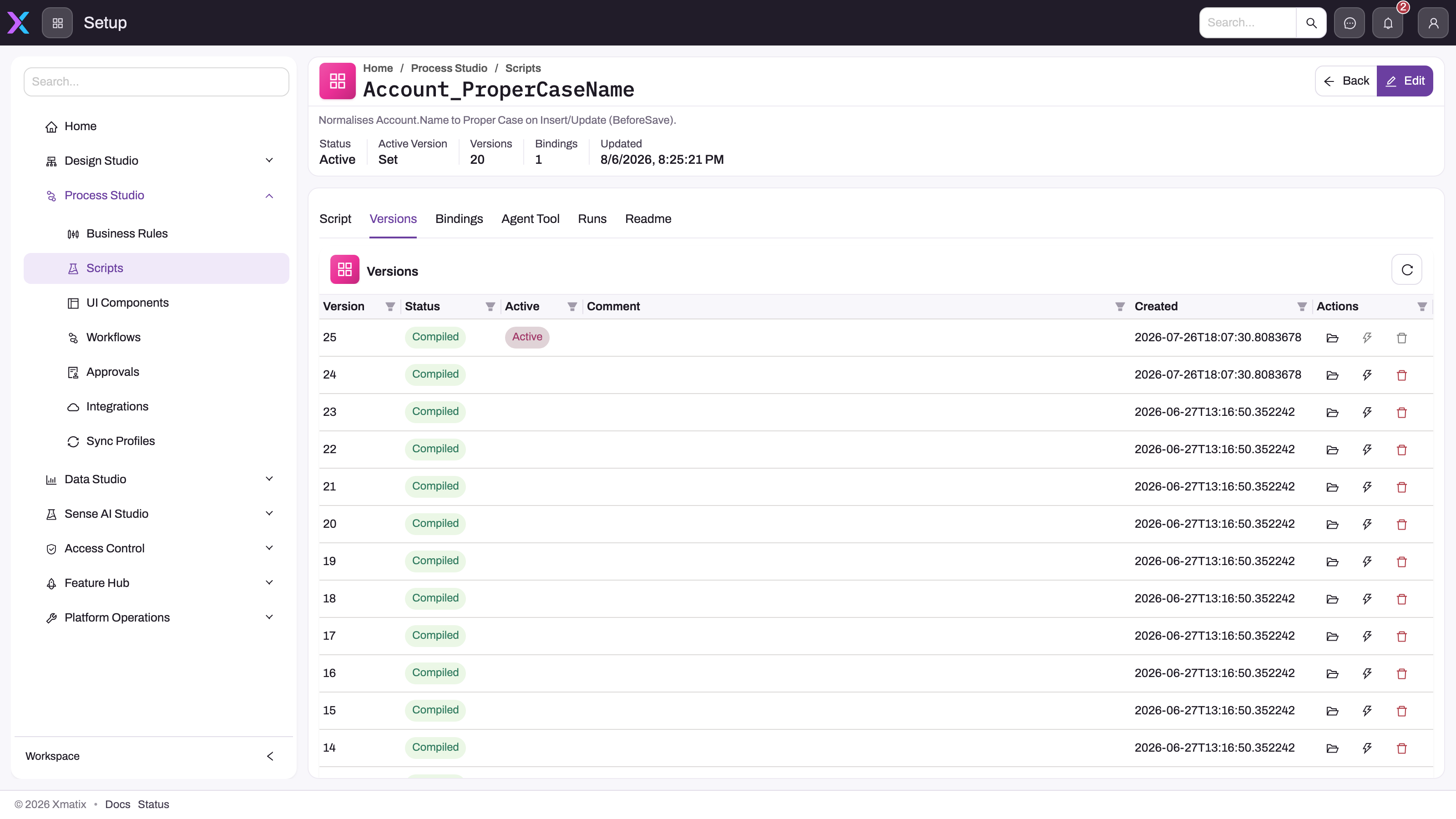
Before you debug a script's behaviour, check its deployment state in the product. Open the script under Setup → Process Studio → Scripts and read the statistics bar (Status, Active Version, Versions, Bindings) and the Versions tab. Every push stores a version row with its own compile result. Only the row tagged Active handles work, and the lightning action on a row activates that version.
"Server has a newer current version than your local copy."
scripts push exits with code 2. Someone activated a different version since your last pull, either in the product or from another workspace. Pull the script, compare it with your change in git, merge, and push again. Use --force only when you have decided that your file should win. Treat this as a merge conflict, not an obstacle.
"compileOk=no" and exit code 3
The body doesn't compile. The server still stores the attempted version, with its errors, and leaves the active version unchanged, even if you passed --activate. The CLI prints the errors with file, line and column. Fix the .csx file and push again.
A push said "Created vN" but behaviour didn't change
You pushed without --activate, so the previous version is still active. On the Versions tab the new row is there but the Active tag stays on the older row. Push again with --activate, or activate version N in the product. xmatix watch never activates.
Every push creates another version
A push without --activate leaves the local record of the active version untouched, so the next push of the same file is not recognised as "nothing to push". The extra versions are harmless and stay inactive unless you activate them.
"No sibling .meta.json next to …"
You pushed a .csx file that scripts pull didn't write, or its .meta.json was moved or deleted. Pull the script again and copy your body into the new file. A script can't be created from the CLI; create it in the product first.
"Script … no longer exists on the server."
The .meta.json names a script that isn't on this tenant. Either it was deleted, or the file was pulled from another tenant (a script's id belongs to the tenant it came from). Pull the script from the target tenant, or create it there first. See Scripts and CI recipes.
Rule, workflow and analytics push problems
"Entity not found" for a rule's entity, or a pull creates an _unknown folder
The server returns at most 250 entities to the CLI. Rules on entities outside that set can't be looked up. Their files land in _unknown/, and those files can't be pushed. Check the name and its case first. If both are right, edit those rules in the product, and keep _unknown/ out of source control. See Business rules from the CLI.
A rule runs in the wrong place, or no longer waits, after a push
Push sends neither Sequence nor Delay. An update clears Sequence, and a newly created rule runs immediately. Set both again in the rule editor after the push.
"[STANDARD_METADATA_LOCKED]" on a rule push
The rule ships with the platform, and only its Active switch can change. Turn it on or off in the product, or clone it and keep the copy in git.
A pushed workflow doesn't run
The pushed version is a draft: either the file had "isPublished": false or you pushed with --no-publish. Triggers only register from the published version. Publish it under Setup → Process Studio → Workflows, or push with --publish.
Each push creates another copy of a workflow
The file's definition id doesn't exist on the tenant, so each push creates a new workflow and the file keeps the old id. Delete the extra copies in the product, then pull the workflow and commit the file. See Workflows from the CLI.
Dashboard or report pull says "Pulled 0" with a 404 for each one
In the current release, dashboards and reports pull and push don't reach the server's definitions. Pull writes nothing but exits 0, and push exits 1. Keep both kinds out of snapshots with --skip dashboards,reports. See Dashboards and reports from the CLI.
Metadata, snapshot and promotion problems
Standard entities, fields or layouts disappeared after a metadata push
The file was a full pack ("mode": "full"), which is what metadata pull and snapshot export write. On import, a full pack deletes every row an earlier pack delivered that is missing from the file. A TenantOwned file holds only custom rows, so the standard metadata goes. The import also records every row in the file as tenant-owned, whatever its origin. Restore the standard metadata through your platform administrator or support channel. From then on, push only delta packs. See Metadata from the CLI.
Metadata, snapshot or migrate commands fail with 403
The signed-in identity lacks the Manage metadata packages capability (setup.metadata.packages.manage). Grant it through the identity's security profile. In the same way, every scripts command needs setup.automation.scripts.manage, and every rules command needs setup.automation.businessrules.manage.
A metadata push stops at "Continue?" in a pipeline
metadata push asks for confirmation. Add --yes. snapshot import and migrate apply don't pass it, so push metadata as its own step in pipelines.
"Snapshot export finished with 1 failure(s)." or migrate plan always aborts
The scripts step of snapshot export runs scripts pull without --all, so it fails on every export in the current release. Export with --skip scripts,dashboards,reports and run xmatix scripts pull --all separately. migrate plan can't pass --skip, so it can't be used to compare a tenant in this release. See Snapshots and Migrations.
The drift gate fails every night, or on every pull request
Every pull rewrites the export time in the metadata pack and the pull time in each script's .meta.json, so a plain git diff or file-hash check never passes. Ignore those two lines with git diff -I, as in CI recipes. Run the gate on a schedule against the last applied commit, not on pull requests, because a pull request that changes an artifact always differs from the tenant. When the gate does fail for real, someone changed the tenant in the product. Keep the git diff output as a build artifact, and commit a fresh export through review rather than applying over it.
metadata diff reports drift right after a pull
diff matches rows by exact text. A pulled file is indented and the server's export isn't, so every row looks changed. Compare the tables with jq -S instead, as Metadata from the CLI shows.
A pull created duplicate-looking files
An artifact was renamed in the product. Pulls write files by name and never delete, so the new name arrives as a new file and the old file goes stale. Delete the stale file in the same commit. Otherwise a later import pushes the old artifact back.
Data API problems
400 about the version
The route uses v1 or 1. The version segment is 1.0, as in /api/1.0/data/Account.
401 on every call
The response code is not_authenticated: the bearer token is missing or expired, or was issued for a different API address. Get a new token for the API host you are calling and retry. If a fresh token still gets a 401, the client registration or authority is wrong.
403 before any data is touched
The code tenant_forbidden means the token's user is not a member of the organization behind the API host you called. Use an account from that organization. The code tenant_readonly means the organization is currently read-only, so reads work and writes are refused.
423 "tenant_locked"
The organization is locked, and every call is refused until it is unlocked. Contact your xMatix administrator.
Records are missing, or a record returns 404
The API enforces the caller's permissions identically to the product: security profiles, record security and restriction rules all apply. A record the integration can't see is a record its user can't see. Sign in to the product as that user and look, then fix the account's access, not the query. See the security model.
415 naming the entity
The route takes the entity's logical name, not its display label, so use Account, not "Accounts". Check the name in Setup → Design Studio → Entities, with metadata pull, or with the MCP endpoint's describe_entity tool.
409 when updating or deleting
Read the code in the response:
record_locked: another user is editing the record in the product. The message names them. Retry after they finish.record_processing: a background job is working on the document.DUPLICATE_VALUE: a unique value already exists.REFERENCE_CONSTRAINT_VIOLATION: other records still refer to the record you are deleting.
An action call returns 404 or 409
A 404 with ENTITY_MEMBER_NOT_FOUND means the action name doesn't match any of the entity's actions. The name must match exactly. A 409 means the action exists but is inactive, or isn't a server action that the API can run. Check the action under Setup → Design Studio → Entities → Actions.
An action call succeeds but nothing happens
The action is set to run in the background, so the call returned a job handle. Follow it with GET /api/1.0/data/{entity}/{id}/job and read the record once the job finishes. If no job was returned, the action may have no behaviour behind it, such as an automation script bound to it or built-in handling. An action with no behaviour completes without changing anything. All other data API error codes are covered on the data API page.
Training
Quick reference
xmatix doctorfirst, but read its token line, not its exit code.xmatix scripts listproves an API round trip.- Signing in as someone else?
logoutfirst, thenlogin. - Changed
apiBaseUrlorauthority?logout, thenlogin. - A script push changes nothing until the version is Active.
- A workflow push changes nothing until the version is published.
- Never push a full metadata pack to a tenant you care about; push delta packs.
- Export with
--skip scripts,dashboards,reports, thenscripts pull --all. - Data API routes use
/api/1.0/, and entity names are logical names.
Common questions
Why does doctor fail when everything works?
Two checks fail on a correct setup in the current release. The api check uses the identity call that the API doesn't serve without a version segment, so it always gets a 404. The scopes check fails whenever scopes is empty, even though an empty value works. Set scopes to your API base URL followed by /.default to clear the second. The first remains, so doctor still exits 1. Don't gate a pipeline on its exit code. Read the token line, or gate on a read-only command such as xmatix scripts list, which fails cleanly when sign-in or the API is wrong.
How do I tell whether a problem is the CLI or my permissions?
Look for the HTTP status in the error. The CLI prints the server's status code in its failure lines, for example "Push failed: … returned 403". A 403 means the signed-in identity lacks the capability for that command group. Scripts, rules and metadata each need their own Setup capability, so grant it through the identity's security profile. A 401 means the token itself is wrong. A 404 on a lookup usually means the name doesn't match exactly, because names are case-sensitive. Errors without a status code, such as a missing workspace or missing .meta.json, come from the CLI before it calls the server.
Can an integration see more than its user can?
No. The data API, the CLI and the MCP endpoint all act as the signed-in user, and they apply the same security profile, record security and restriction rules as the product. An integration that needs to see more needs an account with more access, set up by an administrator, not a different query. Give each unattended integration its own dedicated user with exactly the entities, fields and actions it needs, so that its access can be reviewed and revoked separately.