
xMatix Rewards pays people for performance: an Incentive Plan names who takes part, sets each member a target for each period, and defines in slabs what each level of achievement earns, and the incentive engine turns captured performance into Compensation lines that you review and mark as paid.
Rewards sits after selling. Orders and invoices produce the performance, Rewards measures it against each member's quota, and the payout itself happens outside the module. Nothing in Rewards posts to Payroll or Finance.
Overview
Rewards is the counterpart to trade schemes, and the difference matters. A trade scheme rewards the buyer on a document: a discount or free goods applied to an order or invoice when it qualifies. An incentive plan rewards a member of the plan for accumulated performance over a period, measured against a target set for that member. Schemes discount transactions; incentives compensate people. The two can meet, because an incentive slab can hand out a trade scheme or a discount group as its reward.
The module is built from these records:
| Record | What it is | Covered on |
|---|---|---|
| Incentive Plan | The programme: member type, period type, dates, scope and status | Incentive plans |
| Incentive Period | One time slice of a plan, generated when the plan is first saved | Incentive periods |
| Incentive Resource | One member of a plan | Plan members |
| Incentive Line | A reward rule: which members qualify and how its slabs apply | Incentive lines |
| Incentive Target | What is measured, such as sale amount, number of orders or a KPI configuration | Incentive targets |
| Incentive Resource Target | One member's quota for one target and period | Member quotas |
| Compensation Slab | One band of achievement and what it pays | Compensation slabs |
| KPI Configuration | A custom measure that targets can reference | KPI configurations |
| Performance KPI | The running totals written from orders and invoices | Performance KPI records |
| Compensation and Compensation Line | The period's payout header and each member's result | Compensation records |
When to use it
Use Rewards whenever pay or a reward depends on measured performance over a period: a monthly sales-value incentive for field reps, a quarterly volume target for partner accounts, or a contest between branches. If the benefit goes to a customer because of what they buy on one document, use a trade scheme instead.
How xMatix handles it
The cycle has five stages. The first two are set up once per plan; the last three repeat every period.
- Define the plan. Create an Incentive Plan with its Member Type (Resource, Partner or Branch), Period Type and Period Start Date and Period End Date. The first save generates the plan's Incentive Periods between the dates. This happens only once, so extending the end date later adds no periods. Member Type, Period Type and the partner scope lock as soon as the plan has members or targets.
- Enrol members and set targets. Resource, Partner and Branch plans enrol their members automatically after saving. You then add Incentive Lines with their slabs and Incentive Targets. A target whose Target Value Type is Fixed Value, Value Across Periods or Value Across Resources generates each member's quota for each period; you can adjust quotas in the plan page's Targets by Resources grid. Finally, set the plan's Status to Approved.
- Capture performance. Targets linked to a KPI configuration read that configuration's KPI Data. All other targets read Performance KPI records, which are written only when someone runs Perform KPI Calculation on an order or invoice. Saving the document writes nothing.
- Evaluate. Run Process Compensation on the period. It creates the period's Compensation record (or reuses it), creates or refreshes one Compensation Line per member, scores every line against the member's quota and slabs, totals the header and sets the period's Status to Calculated.
- Review and pay. Review the totals and lines on the compensation record, the dashboard and the reports, enter an override where a figure must change, and tick Is Compensation Received on each line once it is paid. There is no approval process for compensation and no hand-off to Payroll or Finance.
Saving a single Compensation Line also scores that line, but it does not change the Compensation's Total Incentive Amount. Only Process Compensation writes the total, so run it again after late performance or a quota correction.
Prerequisites
- Access to the Rewards app. The shipped Sales Executive, Sales Manager, Standard User and System Admin profiles have it.
- Active resources, partner accounts or branches for the people or units you plan to reward.
- An administrator who has added the buttons the shipped pages leave out: Process Compensation on the incentive period page and, if you capture performance from documents, Perform KPI Calculation on orders and invoices. See Configuration reference.
Procedure
Step 1 — Open the Rewards app
Open the App Launcher (the grid icon next to the logo), search for Rewards and select it. The app is a web app, and its menu holds:
| Entry | What it holds |
|---|---|
| Home | The landing page |
| Schemes | Trade schemes, shared with Sales and usable as incentive rewards |
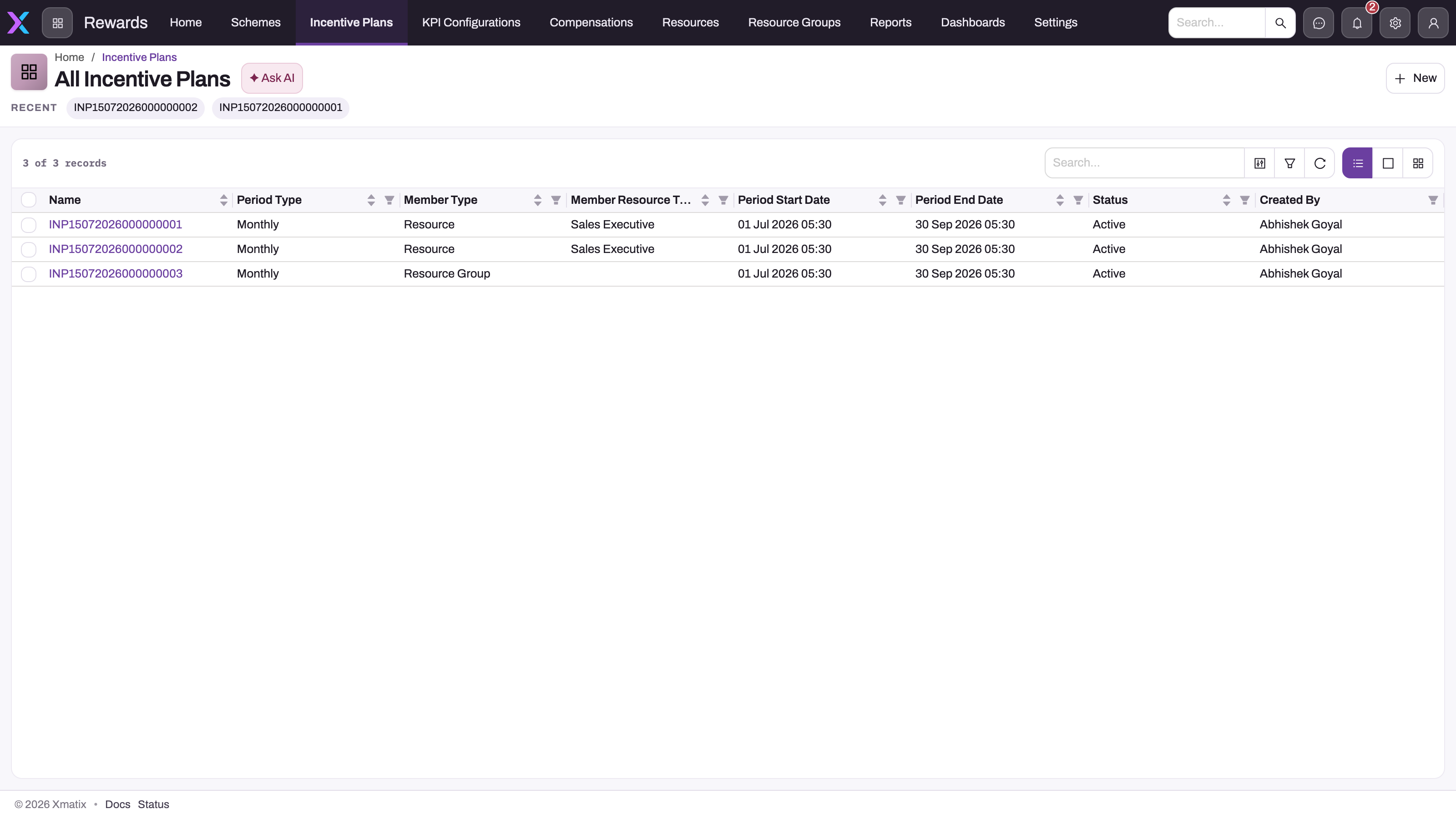
| Incentive Plans | Plans, with their periods, members, lines, targets and slabs on a designed plan page |
| KPI Configurations | Definitions of measures that targets can reference |
| Compensations | Compensation records and their lines, the evaluated results |
| Resources, Resource Groups | The people, and groups of people, that plans enrol as members |
| Reports, Dashboards | The seeded Rewards reports and the Incentives & Targets dashboard |
| Settings | Shown to System Admin only, and ships with no settings tiles |
If Rewards is missing from the App Launcher, your security profile is not granted the app. Ask your administrator.
Step 2 — Build and approve a plan
Follow Incentive plans to create the plan, check its members on Plan members, and add lines, targets and slabs. Check every member has a quota on Member quotas, then move the plan to Approved with the status bar under the page header. Until then the plan accrues nothing and pays nothing.
Step 3 — Run each period
At the end of each period, follow Running an incentive cycle: make sure performance has been captured, run Process Compensation on the period, review and adjust the lines, mark them paid and, if your administrator has set it up, close the period.
Step 4 — Track results
Follow progress on the plan page grids, the Compensations list, the Incentives & Targets dashboard and the Rewards reports. See Tracking incentives.
Business rules
- Only Approved plans count. Performance capture and the incentive engine read only plans whose Status is Approved. A Draft or Pending Approval plan pays nothing, however complete it is.
- Periods are generated once. They are created on the plan's first save and never added later.
- Member types. The engine recognises Resource, Partner, Branch and Customer. The Member Type picklist also offers Dealer and Role; a plan with either enrols no one and scores nothing. Customer is not in the shipped picklist, Customer members are added by hand, and only targets linked to a KPI configuration are scored for them.
- Process Compensation refuses a period that is not linked to a plan, a period whose Status is Approved or Posted, a plan that is not Approved, and a plan with no members.
- Paid lines are never re-scored. Process Compensation skips any line whose Is Compensation Received is ticked, but still counts it in the header total.
- The total is the agreed payout. Total Incentive Amount adds each enrolled member's override amount where one is entered, and the computed Incentive Amount otherwise. On the line form the override field is labelled Overre Incentive Amount.
- Lines for removed members stay. A line whose member is no longer enrolled is left in place and is not counted in the total.
- Numbering. Plans, members, targets, quotas, lines, compensations and slabs are numbered from their document settings. See the numbering table.
Example
A distributor pays its six field reps a monthly incentive on invoiced sales. An administrator creates a Monthly Resource plan from April 2026 to March 2027; saving it generates twelve periods and enrols the six reps. The administrator adds one Sale Amount target with Target Value Type Fixed Value and a value of 500,000, so every rep gets a 500,000 quota each month, and one line with three Percentage On Value slabs: 1% of sales from 80% achievement, 1.5% from 100% and 2% from 120%. The sales head moves the plan to Approved.
Through May, each invoice gets Perform KPI Calculation after it is raised. On 2 June the sales operations lead runs Process Compensation on the May period: one Compensation record appears with six lines, the period becomes Calculated, and the header shows the total. One rep's line is corrected with an override, the lead runs Process Compensation again so the total picks up the override, and once finance pays on 10 June the lead ticks Is Compensation Received on all six lines.
Training
Practice exercise
In a sandbox, create a Monthly Resource plan with one member, one Sale Amount target (Fixed Value, 10,000), one line and one slab with Compensation Type Fixed Amount whose From % is 50. Approve the plan. Record an invoice for the member for 6,000, dated in the first period, run Perform KPI Calculation on it, then run Process Compensation on the first period. Your sandbox needs both buttons added (see Prerequisites).
Expected result: the period's Status is Calculated, one Compensation record exists for the period with one line, the line's Sale Amount is 6,000, and the slab's fixed amount appears as the Incentive Amount and in the header's Total Incentive Amount.
Quick reference
- Only Approved plans capture performance and pay.
- Periods are generated once, on the plan's first save.
- Dealer and Role member types score nothing.
- Saving an order or invoice captures nothing; run Perform KPI Calculation.
- Process Compensation is the only thing that writes the period total.
- Re-run Process Compensation after late performance, quota fixes or overrides.
- Paid lines (Is Compensation Received) are never re-scored.
- Nothing flows to Payroll or Finance; payment is recorded by hand.
Permissions
The shipped Sales Executive, Sales Manager, Standard User and System Admin profiles are granted the Rewards app and full access to every Rewards record, so out of the box a sales rep can edit their own quota. Reduce Incentive Plan, Incentive Target, Incentive Resource Target and Compensation Line to read-only on profiles that should only look. No seeded approval process or permission controls who can set a plan to Approved: anyone who can edit the plan can approve it.
Process Compensation and Perform KPI Calculation are granted to System Admin only; grant them to the profiles that run incentives. A user without the app does not see Rewards in the App Launcher, and a user without an action does not see its button. See Configuration reference.
Configuration
Rewards has no settings screen: Setup → Feature Hub → Rewards is empty and the app's Settings tab ships with no tiles. An administrator tailors the module through security profiles, picklist values (for example Customer as a member type, or Approved and Posted to close periods), document numbering, the record-page buttons the shipped layouts leave out, and the background jobs that enrol members, generate quotas and accrue KPI configurations. The full checklist is on Configuration reference.
Common problems
The Rewards app is not in the App Launcher
Your security profile is not granted the Rewards app. An administrator grants it under Setup → Access Control → Profiles.
"The incentive plan must be Approved before its compensation can be processed."
Process Compensation was run on a period of a plan that is not Approved. Move the plan to Approved, then run it again.
"The incentive plan has no members (Incentive Resources) to compensate."
The plan has no members. Check the Member Type is Resource, Partner or Branch, or add Customer members by hand. See Plan members.
A line shows zero achievement
Usually no performance was captured: Perform KPI Calculation was not run on the period's orders or invoices, or the plan was not Approved when it ran. The Troubleshooting page walks every cause.
The total did not change after I fixed a line
Saving a line rescores that line only. Run Process Compensation on the period again to rewrite the Total Incentive Amount.
Common questions
How is an incentive plan different from a trade scheme?
A trade scheme evaluates one document and gives its benefit to the customer on that document. An incentive plan evaluates a member's accumulated performance over a period against a target set for that member, and writes what they earned to a compensation line. "5% off orders over 50,000" is a trade scheme; "reps who hit 120% of their monthly quota earn a bonus" is an incentive plan. A slab of an incentive plan can still award a scheme or a discount group as its reward.
Who can an incentive plan reward?
The plan's Member Type decides. Resource covers your own people, optionally narrowed by Member Resource Type or a resource group. Partner covers partner accounts and Branch covers branches. Customer plans work once an administrator adds Customer to the picklist; their members are added by hand, and only targets linked to a KPI configuration are scored for them. Dealer and Role are not recognised, so such a plan enrols and scores no one. A Partner plan also feeds the partner portal's targets while it is Approved.
Does an incentive plan need approval before it runs?
Yes. Only plans whose Status is Approved capture performance and are scored. No approval process is seeded, though: you move the plan through Draft, Pending Approval and Approved with the status bar on the plan page, and anyone who can edit the plan can approve it. To restrict that, limit edit access in the security profiles. See Incentive plans.
Does anything run automatically at the end of a period?
No. Member enrolment and quota generation run in the background after you save a plan or target, and a KPI configuration can accrue on a schedule if an administrator sets one up, but nothing scores a period on its own. Someone runs Process Compensation on each period, and runs it again whenever late performance, a corrected quota or an override should change the result.
Where do people see what they've earned?
On the plan page (targets and periods in the grids, results under its Compensations tab), on the Compensations list and records, on the Incentives & Targets dashboard and in the seeded Rewards reports. See Tracking incentives.