
You track incentives in four places: the incentive plan's record page, the Compensations list and its records, the Incentives & Targets dashboard, and the reports in the Rewards report folder. Each one answers a different question. The plan page shows quotas and results for one plan. The Compensations list shows what each period pays. The dashboard compares performance with quotas across reps and branches. The reports list the underlying figures row by row. This page explains what each one shows, where its numbers come from and what makes them change. Producing the numbers in the first place is covered in Running an incentive cycle.
Overview
| Where | Question it answers | Where its numbers come from |
|---|---|---|
| Incentive plan page | What are the quotas, and what did each period produce, for this plan? | Member quotas, incentive periods and compensation records of the plan |
| Compensations list and records | What does each period pay, and to whom? | Compensation records and their lines, written by Process Compensation |
| Incentives & Targets dashboard | How are reps and branches doing against quota, and what is payable? | Performance KPI records, compensation lines and records, plans, KPI Data and schemes |
| Rewards reports | Which figures sit behind a target or a period? | Performance KPI records, incentive targets, periods, plans and schemes |
Two facts shape how you read all of them:
- Actual versus quota and earnings are separate. The dashboard's attainment figures come from Performance KPI records. What a member earns comes from compensation lines. A rep can be over quota and earn nothing if no slab pays out, so read earnings from compensation, never from attainment.
- Numbers move only when something runs. Performance KPI records change when Perform KPI Calculation runs on an order or invoice. Compensation lines and the period total change when Process Compensation runs on the period. Nothing recalculates on a schedule, and no notification is sent when a quota is reached.
When to use it
- During a period, to see which reps are on track against their quota.
- At the end of a period, to review what the period pays before payout.
- When a member asks what they earned and why.
- When an administrator checks that performance capture and compensation runs are complete.
How xMatix handles it
- The plan page is a designed record page. It ships with purpose-built widgets: the line builder on Related, the quota grid on Targets by Resources and Targets by KPI, and the period and compensation lists on Compensations. Nothing needs to be built.
- The dashboard and reports are live. They query the records as they are now, so a run or a captured document shows up as soon as you refresh.
- The dashboard reads Performance KPI records only for attainment. Targets measured through a KPI configuration accrue KPI Data instead, and those are counted on the dashboard only as KPI Records and KPI Value by Month, never in attainment.
- No achievement percentage is stored. The incentive engine works out achievement when it scores a line and does not keep the percentage. The dashboard's attainment percentage is calculated each time it loads.
- No payout leaves xMatix. Compensation records create no journal, payment or payroll entry. Payment is recorded only by ticking Is Compensation Received on each line.
Prerequisites
- Access to the Rewards app, and read access to Incentive Plan, Compensation and Compensation Line.
- For the dashboard: the Incentives & Targets dashboard shared with you (see Configuration).
- Figures to track: an Approved plan, performance captured with Perform KPI Calculation (or accrued KPI Data), and at least one Process Compensation run for earnings.
Procedure
Step 1 — Check quotas on the plan page
- Open the Rewards app (App Launcher → search Rewards), select Incentive Plans and open the plan.
- Select the Targets by Resources tab. The grid shows members as rows and incentive periods as columns. Pick a KPI configuration in the drop-down in the card header to choose which quotas you are looking at. Use Search resources to narrow the rows and the refresh button to reload.
- A cell shows the member's quota for that period. A cell showing — has no quota.
- To change a quota, click the cell, type the new value and press Enter. Changed cells are highlighted. Click Save (n) to save them all together. The message Saved n change(s) confirms the save; Failed to save some changes means at least one did not save, so refresh and check.
- To read one member's quotas across the timeline, select the Targets by KPI tab and pick the member in the drop-down. The card title becomes Incentive KPI Target: followed by the member's name, with KPI configurations as rows and periods as columns.
The grid only updates quotas that exist. It cannot create a quota in a — cell; generate or import it instead (see Member quotas). An edit to a generated quota is overwritten the next time the target's quotas are regenerated.
Step 2 — Follow results on the Compensations list
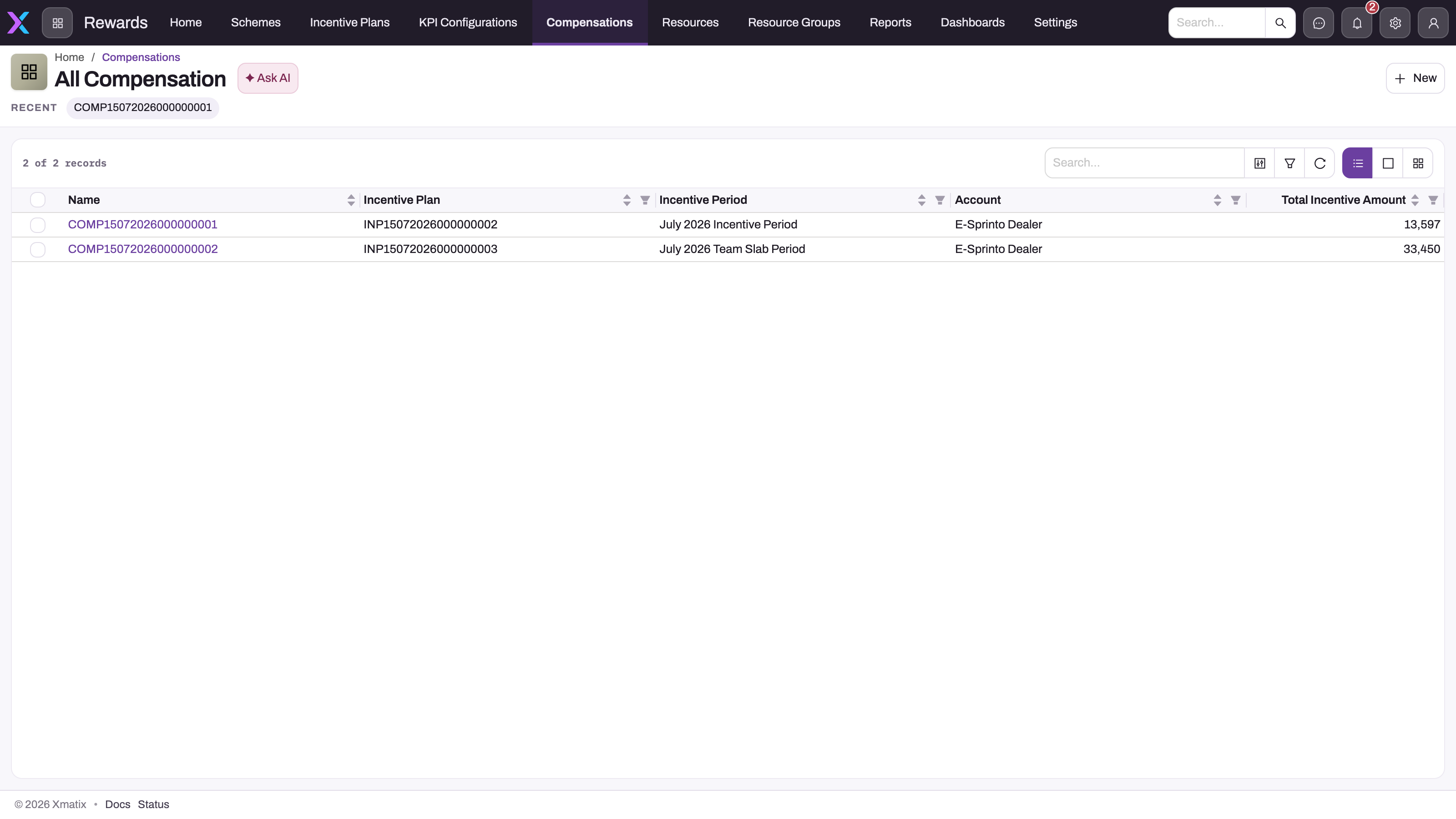
- In the Rewards app, select Compensations. The All Compensation list shows Name, Incentive Plan, Incentive Period, Account and Total Incentive Amount.
- Filter the Incentive Period column to the period you want. There is normally one record per plan and period. The record is named from the COMP numbering series, not after the period.
- Open the record. Its Compensation Line list has one line per member, with the achieved figures the engine counted, the Incentive Amount, any override, gifts and points, the line Status and Is Compensation Received.
- Compare the number of lines with the plan's members (the Incentive Resource list on the plan's Related tab).
The header's Total Incentive Amount is the sum, over the current members' lines, of the override where one is entered and the Incentive Amount otherwise. Only Process Compensation writes it, so after you edit a line the total is stale until the period is processed again. The same records appear on the plan's Compensations tab, below the Incentive Period list. The full review routine is on Compensation records.
Step 3 — Read the Incentives & Targets dashboard
- In the Rewards app, select Dashboards and open Incentives & Targets.
- Set the Period filter (it opens on this quarter) and, if you need to, the Branch filter.
- Use the dashboard's three pages:
- Targets — the tiles Target Achievement, Reps vs Target, Incentive Payable, Active Plans, KPI Records and Scheme Budget Utilised; the charts Attainment by Rep (% of target, with a 100% target line and above, near and below bands), Target vs Actual by Branch, Targets (Plan → Rep) and Attainment Spread by Branch; and the Actual (Rep × Period) table.
- Payouts & KPIs — Incentive Payable by Period, Compensation Lines by Status, KPI Value by Month, and the embedded Periods wise Incentive and KPIs with Incentive Plan Report reports.
- Schemes & earnings — Scheme Budget, Budget Utilised, Actually Earned and Resources Enrolled, the scheme charts and tables, Compensation by Status, KPI Configurations by Reward Function and Targets Set per KPI.
- Refresh after a Perform KPI Calculation or Process Compensation run to see the new figures.
How to read the main figures:
- Target Achievement, Reps vs Target, Attainment by Rep and Actual (Rep × Period) compare Total Sale Invoice Amount with Target Value on incentive Performance KPI records that are not item-level. Reps vs Target counts reps at or above 100% as Above, 85% to 100% as Near and the rest as Below.
- Incentive Payable adds up the lines' computed Incentive Amount and ignores overrides. Actually Earned adds up the records' Total Incentive Amount, which includes overrides. When the two differ, an override or a line edited after the last run is the reason.
- The Branch filter applies only to the attainment tiles, charts and table on the Targets page.
- The Period filter reads different dates for different widgets: the incentive period's start date for attainment, the creation date for compensation lines and records, and the document date for KPI Data.
Step 4 — Run a Rewards report
- In the Rewards app, select Reports.
- Open the Sales Manager folder and then Rewards. (Scheme Master Report is filed under Standard User → Rewards.)
- Open a report, then filter, group and export it as you would any report. See Reports.
| Report | What it lists |
|---|---|
| New KPIs Report | Performance KPI records grouped by partner account: KPI Name, Incentive Period, Total Amount and Target Value. The most direct actual-versus-quota list |
| New KPIs with Incentive Target Report | The same records with the incentive target they feed: its name, its Value, the period and the scheme period |
| Periods wise Incentive | Performance KPI records with their target's name, Total Amount and Target Value per partner account |
| Quartely Incentive Report | Performance KPI records with the plan name, Total Amount and Target Value, grouped by partner account. Despite its name, its saved filter keeps only plans whose Period Type is Monthly |
| KPIs with Incentive Plan Report | Incentive periods with their plan and their Performance KPI records: KPI Name, Total Amount and Total Quantity |
| Incentive Target with Incentive Plan | Plans with their incentive targets and Performance KPI records: target Value next to Total Amount, grouped by partner account. Both joins multiply rows, so do not add its totals up |
| DMS Incentive Target with Account | Incentive targets with their account, plan, Incentive Target Type and Value. Configuration only, no actuals |
| Scheme Master Report | Trade schemes with budget, utilised amount, quota, claim settings, validity and status |
None of these reports lists compensation lines or earnings. For what was earned, use the Compensations list or the dashboard's Actually Earned and Incentive Payable.
Mobile
The field app renders the same plan page with the same quota grid and line builder. The grid has a frozen first column and scrolls sideways; cell edits collect and save together with Save (n), exactly as on the web, so a quota entered on a phone is the record a manager sees in the web grid. Compensation records and lines also open in the field app's Rewards app (see Compensation records). See Using the mobile app.
Business rules
- Attainment uses the quota stamped on the record. Perform KPI Calculation writes the member's quota into the Performance KPI record's Target Value each time a document lands on it. If you change a quota later, the dashboard and the reports keep showing the old value until the next document for that member, target and period is counted. Compensation runs always read the current quota.
- Each document counts once. Perform KPI Calculation marks the document as calculated. Later changes to it, or its cancellation, do not reach the Performance KPI records or the dashboard.
- Compensation figures change only on a run or a line save. A line save re-scores that line but does not change the header total. Process Compensation re-scores every unpaid line and rewrites the total. Lines marked Is Compensation Received are never re-scored.
- Line Status is for review only. Compensation Line Status is Draft or Rejected; it is shown in Compensation Lines by Status but does not change any amount. There is no approved or paid status.
- Active Plans counts plans with Status "Active". The Incentive Plan Status picklist is Draft, Pending Approval and Approved, so as shipped the tile shows 0. Approved plans are the ones that are measured and scored.
- Compensation by Status sums totals. On the Schemes & earnings page, this chart adds up Total Incentive Amount by the compensation record's Status, not the line Status.
- Three reports have an empty period group. Periods wise Incentive, Quartely Incentive Report and KPIs with Incentive Plan Report group by an Incentive Period column that reads the period's simulation source, which ordinary periods do not have. Their rows therefore sit in one blank group. Regroup by a different column in the report viewer, or use New KPIs Report, whose Incentive Period column is the record's own period.
Example
A distributor's sales operations lead checks May on 3 June, after Process Compensation has run on May - 2026.
- On the Incentives & Targets dashboard, with the Period filter set to the current quarter, Reps vs Target shows 4 Above, 1 Near and 1 Below. Attainment by Rep shows one rep at 88%.
- Incentive Payable shows 38,400 and Actually Earned shows 36,700. The lead opens Compensations, filters to May - 2026 and finds one line with an override of 4,500 against a computed 6,200 — the agreed settlement of a dispute. The difference is explained.
- The rep at 88% asks why their line pays nothing. The lead opens the line: Sale Amount 440,000 against a quota of 500,000, and the plan's first slab starts at 90%. The result is correct.
- The lead runs New KPIs Report, filters to the rep and confirms the Total Amount matches the invoices the rep expects.
Training
Practice exercise
In a sandbox with an Approved plan that has one member, a Sale Amount target and a processed period:
- Open the plan's Targets by Resources tab and change the member's quota for the next period. Save it.
- Open Compensations, filter to the processed period and open the record. Note the line's Incentive Amount and the header's Total Incentive Amount.
- Enter an override on the line and save it. Open the Incentives & Targets dashboard and compare Incentive Payable with Actually Earned.
- Run New KPIs Report and find the member's record for the processed period.
Expected result: the grid shows Saved 1 change(s). After step 3 the header total has not changed, Incentive Payable still shows the computed amount, and Actually Earned still shows the old total until Process Compensation runs again. The report shows the member's Total Amount and the Target Value stamped when the last document was counted.
Quick reference
- Quotas: plan page → Targets by Resources (bulk) or Targets by KPI (one member).
- A — cell has no quota; the grid cannot create one.
- Earnings: Compensations list → record → Compensation Line.
- The header total changes only when Process Compensation runs.
- Dashboard attainment = Total Sale Invoice Amount ÷ Target Value from Performance KPI records.
- Incentive Payable ignores overrides; Actually Earned includes them.
- Reports show actuals and quotas, never earnings.
- Nothing refreshes on a schedule; refresh after each run.
Permissions
| What | Who out of the box | Notes |
|---|---|---|
| Open plans, quotas, compensation records and lines, and edit quotas in the grid | Sales Executive, Sales Manager, Standard User and System Admin | The shipped profiles give full access to the Rewards entities. Reduce Incentive Resource Target, Compensation and Compensation Line to read-only for people who should only look |
| See the Rewards reports | All users | Seven of the reports are shared with all users. Scheme Master Report ships without a sharing grant |
| See the Incentives & Targets dashboard | Nobody until it is shared | The dashboard ships with no sharing grant, so it is not in anyone's Dashboards list until an administrator shares it |
There is no personal self-service view of earnings; a member sees their compensation line only if their profile lets them open it. See Security profiles.
Configuration
- Share the dashboard. In the Rewards app, open Dashboards, find Incentives & Targets and share it with All users or with the roles, profiles or teams that track incentives. See Sharing and access.
- Share Scheme Master Report the same way if people other than its owner need it.
- Active Plans tile. The tile's filter looks for Status Active. To count the plans that are really measured, edit the tile so it filters on Approved (see Dashboards). Do not add an Active status to plans instead: only Approved plans are measured and scored.
- Report grouping. To fix the blank period group in the three reports listed under Business rules, edit each report and group by the record's own Incentive Period instead.
- Compensation Status values. The Compensation by Status chart groups by the record Status, whose picklist ships empty. Add your sign-off values (see Compensation records).
- Capture buttons. The dashboard and reports stay empty until Perform KPI Calculation and Process Compensation can be run. Add both to their page headers and grant them, as described in Rewards configuration.
Common problems
The Incentives & Targets dashboard is not in my Dashboards list
It has not been shared with you. Ask an administrator to share it (see Configuration).
Target Achievement and attainment are empty
Attainment reads Performance KPI records that are written only by Perform KPI Calculation on orders and invoices. Check that it has been run, that the plan is Approved and that the Period filter covers the incentive period's start date. Targets measured through a KPI configuration never appear in attainment.
Active Plans shows 0 although we have plans
The tile counts plans with Status Active, which is not a shipped value. See Configuration.
The total did not change after I edited a line
Saving a line never updates the header total. Run Process Compensation on the period again.
Incentive Payable and Actually Earned do not match
Incentive Payable ignores overrides and Actually Earned includes them. An override, or a line edited after the last run, explains the difference.
The dashboard still shows the old quota
The dashboard reads the quota stamped on the Performance KPI record when the last document was counted. It updates when the next document for that member, target and period is calculated.
A report puts every row under one blank Incentive Period
The report groups by a column ordinary periods leave empty. Regroup it or use New KPIs Report (see Business rules).
I can't type into a cell that shows —
There is no quota for that member and period, and the grid only edits existing quotas. Generate or import the quota (see Member quotas).
Common questions
Where does a member see what they earned?
On their compensation line: open Compensations, then the record for the plan and period, then the member's line. The line shows the achieved figures the engine counted next to the Incentive Amount and any override, so "what did I earn and why" is answered in one place. The same records appear on the plan's Compensations tab. The Rewards reports and the dashboard's attainment charts show performance against quota, not earnings. There is no personal self-service page; members see what their security profile lets them open.
Why does the dashboard show a rep above target with no incentive?
Attainment and earnings come from different records. The dashboard compares invoiced sales with the quota, while the incentive comes from the plan's lines and slabs. A rep can be above quota and still earn nothing if no line qualifies, if the slabs start higher, or if the period has not been processed yet. Check the rep's compensation line and the plan's slabs on Compensation slabs.
Do mobile users see the same numbers as web users?
Yes. The field app renders the same plan page and widgets over the same records, so a quota saved on a phone is the quota a manager sees on the web, and compensation records and lines are the same records. There is no separate mobile dataset to reconcile.
How often do the numbers refresh?
Whenever you reload. The dashboard and reports query live records. But the records themselves change only when someone runs Perform KPI Calculation on a document or Process Compensation on a period, so a figure that looks stale usually means a run is missing, not that the dashboard is behind.