
xMatix Commerce is how a business sells through catalogues and storefronts on xMatix. It covers dealers, distributors and key accounts ordering business to business, and end customers buying direct through a storefront, a headless front end or a partner's microsite. This page maps the module, shows where each part lives in the product, and tells a user, an administrator and a trainer where to start.
Overview
Commerce does not have its own order engine. Every order it produces is an ordinary sales order. The order is priced by the same price lists and discount groups as any other order. The same scheme engine promotes it and the same credit limits gate it. It then runs the same allocation, delivery, invoicing and payment chain described in xMatix Sales. Commerce adds the layers that come before the order:
| Layer | What it is | Built on |
|---|---|---|
| Merchandised catalogue | Stores, their categories and catalogue entries, presented with images, filters and offers | The item master plus the store catalogue records |
| Cart-style capture | The Product Catalogue surface: browse, set quantities per unit and save lines onto the document | Standard order and purchase-order documents |
| Dealer ordering | A dealer's requirement, raised as a purchase order and handed off into the supplier's sales order | The Sales and Procurement pipelines |
| Commercial terms | Per-account price lists, discount groups, trade schemes and credit limits | The Sales pricing, scheme and credit engines |
| Direct to consumer | Published catalogues, carts, checkout, online payment, coupons and partner microsites | Commerce channels and xMatix Portals |
Because each layer is built on the standard platform, record security, customization, reporting and the mobile app all treat commerce data the way they treat any other record.
When to use it
- You sell to dealers or distributors from a catalogue. Set up stores and catalogue entries, then let sales staff or dealers build orders from the catalogue. See Stores and Dealer ordering.
- Each account trades on its own terms. Price lists, discount groups, schemes and credit limits decide what each account pays and how much it may owe. See Catalogue and pricing and Schemes and credit.
- You sell to end customers. Publish a store's catalogue to a channel and take card, UPI, pay-on-account or cash-on-delivery orders. See Direct to consumer and Payments and gateways.
- Partners sell your range on their own sites. Give a partner a microsite with its own address and service areas. See Partner microsites.
If you only take orders by typing them in, you do not need Commerce. The Sales orders pages cover that on their own.
How xMatix handles it
The Commerce app
The Commerce app is a web app; it is not offered in the mobile app. Open it from the App Launcher once your security profile grants it. As shipped, its navigation has these entries, in this order:
| Entry | What it holds |
|---|---|
| Commerce Home | A dashboard page. As shipped, only the System Admin profile is granted this page |
| Stores | The stores a channel sells from (name, currency, optional partner), with their categories and catalogue entries |
| Carts | Shoppers' baskets, signed in or anonymous, with status, totals and any applied coupon. Read-only: the storefront writes them |
| Checkout Sessions | Each attempt to turn a cart into an order and where it stopped. Read-only |
| Orders | The ordinary sales orders that converted carts and dealer orders become |
| Payment Transactions | One row per payment attempt, with its gateway event trail. Read-only |
| Coupon Campaigns | Offers with their codes, usage caps and budget |
| Partner Microsites | A partner's storefront on its own address and the service areas it delivers to |
| Reports, Dashboards | Reporting across the platform, opened from inside the Commerce app |
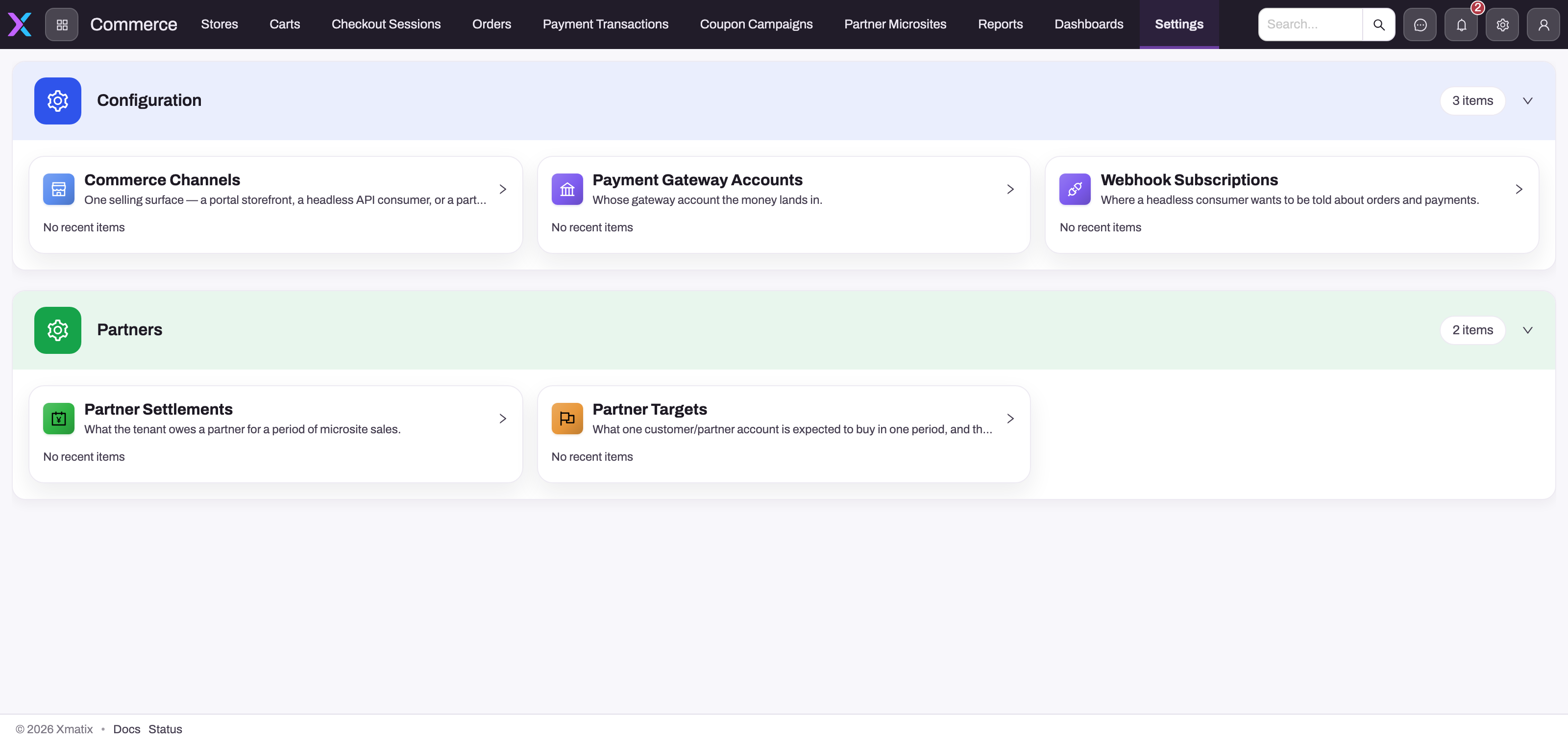
The screenshot above was taken before Commerce Home replaced the Settings entry. The shipped navigation has no Settings entry. The five configuration records behind it still ship, grouped in a Commerce Settings list:
| Group | Record | What it is for |
|---|---|---|
| Configuration | Commerce Channel | One selling surface: a portal storefront, a headless API consumer or a partner microsite |
| Configuration | Payment Gateway Account | The provider account that money lands in, held as secret-store references, never the secrets themselves |
| Configuration | Webhook Subscription | Where a headless consumer is told about orders, payments, abandoned carts and publications |
| Partners | Partner Settlement | What is owed to a partner for a month of microsite sales. Written by a scheduled job |
| Partners | Partner Target | What one account is expected to buy in a period, with its tier ladder |
To open one of these records, type its name (for example Commerce Channel) in the App Launcher search and pick it from the entity list. An administrator can put the shipped Settings page back in the Commerce navigation. Add it as a page entry to the Commerce app under Setup → Design Studio → Apps.
Commerce screens and records explains which screens you edit and which only the services write.
One order pipeline
A catalogue cart, a dealer's purchase order handed off to you, a storefront checkout and a field visit all end in the same sales-order document. From there the sales order lifecycle applies unchanged. A storefront order paid online can start as Approved if its channel has Auto Approve Prepaid on. Every other storefront order, including pay on account and cash on delivery, starts as Draft. See Direct to consumer.
Prerequisites
- The Enable Commerce switch is on. It is under Setup → Feature Hub → Commerce → Settings, in the General group, and it is on by default.
- Your security profile grants the Commerce app and read access to the records in its navigation. See Permissions.
- Items, price lists and accounts already exist. Commerce presents them; it does not replace the item master or the Sales masters.
- For storefronts: a portal site from xMatix Portals and, for online payment, a payment gateway account.
Procedure
Step 1 — Open the Commerce app
- Select the App Launcher in the top bar.
- Select Commerce. If it is missing, see I can't see the Commerce app.
- The navigation bar shows the entries listed above. Select one to open its list.
Step 2 — Follow an order from the catalogue
- Select Orders to see the sales orders that carts and dealer orders became.
- Open an order. Its lines, prices, scheme discounts, credit check and fulfilment are the same as on any sales order. See Sales orders.
- For a storefront order, open Checkout Sessions or Payment Transactions to see how the shopper got there and what the payment provider reported.
Step 3 — Open a configuration record
- In the App Launcher, type Commerce Channel, Payment Gateway Account, Webhook Subscription, Partner Settlement or Partner Target.
- Select the entity in the results to open its list.
- Open a record or select New to create one. Your profile must allow it (see Permissions).
Step 4 — Set the module up (administrators)
Work through the section pages in this order:
- Stores: create the store, its categories and its currency.
- Catalogue entries and Catalogue filter settings: add items and decide which filters the catalogue offers.
- Catalogue and pricing and Schemes and credit: give each account its price list, discounts, schemes and credit limit.
- Dealer ordering: let dealers and sales staff order from the catalogue.
- For end customers: Payments and gateways, then Direct to consumer to create the channel, publish the store and test a purchase.
- For partners: Partner microsites.
Section map
| Page | What it covers |
|---|---|
| Stores | Creating and maintaining a store, who it belongs to, and what it decides for the catalogue, selling scope and storefront |
| Catalogue entries | Adding items to a store's categories, and which entry fields the catalogue and storefront use |
| Catalogue filter settings | The Product Catalogue record: which filter groupings a store's catalogue offers, and its price and discount bands |
| Catalogue and pricing | Store catalogues and merchandising, and how price lists and discount groups give each account its own terms |
| Dealer ordering | Cart-style capture, the purchase-order handoff, and the standard pipeline the order then runs |
| Schemes and credit | Trade scheme evaluation on B2B documents and the credit gates on ordering |
| Portal storefronts | Delivering catalogue and account experiences to external buyers with Portals |
| Consumer accounts | Shopper signup and the customer account it creates |
| Direct to consumer | Channels, published catalogues, carts, checkout, coupons and the module settings |
| Payments and gateways | Payment gateway accounts, payment attempts and how a payment is confirmed |
| Partner microsites | A partner's own storefront, order routing by service area, settlements and targets |
| Screens and records | Every screen in the Commerce app: what each one holds, and which are read-only by design |
| Commerce FAQ | The questions B2B commerce evaluators ask, answered from how the platform works |
Example
A distributor of kitchen appliances sells to 40 dealers and has just opened a consumer website.
- The administrator checks that Enable Commerce is on, then creates the store Home Appliances with its categories and catalogue entries.
- Dealer price lists and a volume scheme are already in Sales, so dealers who order from the catalogue get their own prices and scheme lines with no further setup.
- For the website, the administrator searches Payment Gateway Account in the App Launcher and creates the account. They then search Commerce Channel and create a channel for the portal site, linked to the store.
- A shopper buys a mixer online. A sales manager opens Commerce → Checkout Sessions to watch the checkout complete, then Orders to find the new sales order. It is Approved because the channel has Auto Approve Prepaid on.
- From there the order is allocated, delivered and invoiced like every other sales order.
Training
Practice exercise
In a sandbox, with the System Admin profile:
- Open Commerce from the App Launcher and write down the entries in its navigation bar.
- Open Stores and then one store. Find its categories.
- Search Commerce Channel in the App Launcher and open the list.
- Open Setup → Feature Hub → Commerce → Settings and find the Carts, Checkout and Payments groups.
Expected result: the navigation starts with Commerce Home and ends with Reports and Dashboards. The channel list opens from the launcher even though it is not in the navigation. The module settings page shows Enable Commerce in the General group.
Quick reference
- A Commerce order is an ordinary sales order. Follow it under Orders or in Sales.
- Carts, Checkout Sessions and Payment Transactions are read-only: the storefront writes them.
- Channels, gateway accounts, webhooks, settlements and targets open from the App Launcher search.
- The Commerce app is web only.
- Module switches and timings are under Setup → Feature Hub → Commerce → Settings.
- Turning Enable Commerce off hides the apps and stops storefront and admin operations. Records still open from a direct link.
Permissions
App and record access are allow-lists. A user needs the app and read access on each record it lists. As shipped:
| Profile | Commerce app | Commerce Home page | Records |
|---|---|---|---|
| System Admin | Yes | Yes | Full access |
| Sales Manager | Yes | No | Full access to stores, orders, coupon campaigns, partner microsites and partner targets. Read only on carts, checkout sessions, payment transactions, channels, gateway accounts, webhook subscriptions and partner settlements |
| Sales Executive | Yes | No | Full access to every Commerce record, including channels, gateway accounts and webhook subscriptions |
Review the Sales Executive grants before you go live with online payment. You can narrow them under security profiles. The storefront-written records stay read-only on screen whatever the profile says, because only the services write them.
A user without the app does not see Commerce in the App Launcher. A user with the app but no read access on a record does not see that entry in the navigation.
Configuration
| Setting | Where | What it affects |
|---|---|---|
| Enable Commerce | Setup → Feature Hub → Commerce → Settings, General | On by default. Off removes the Commerce apps from the App Launcher and navigation, and storefront and admin operations answer "Commerce is not enabled for this tenant." Records still open from a direct link |
| Cart, checkout and payment timings | Same page, Carts, Checkout and Payments groups | Cart expiry, abandonment, reprice freshness, checkout lifetime, accepted price drift and payment reconciliation. Every value is in the Direct to consumer configuration table |
| Partner performance | Same page, Partner performance group | The partner leaderboard switch, minimum cohort size, rows shown and the lookback window. See Partner microsites |
| Channel options | The Commerce Channel record | Oversell policy, safety stock, auto-approval of prepaid orders, gateway account, pincode routing and cash on delivery |
| Navigation | Setup → Design Studio → Apps, the Commerce app | Which entries the app shows, including adding the shipped Settings page back |
| App and record access | Security profiles | Who sees the app, the Commerce Home page and each record |
Common problems
I can't see the Commerce app
Either your security profile does not grant the Commerce app, or Enable Commerce is off. Ask an administrator to check both. The switch hides the app from everyone, including System Admin.
There is no Settings entry in the Commerce navigation
The shipped navigation has none; Commerce Home took its place. Search the record you need (for example Payment Gateway Account) in the App Launcher. Alternatively, an administrator can add the Settings page back under Setup → Design Studio → Apps.
Commerce Home is missing for some users
As shipped, only the System Admin profile is granted the Commerce Home page. Grant the page to other profiles if they need it.
"Commerce is not enabled for this tenant."
A storefront or admin operation (such as publishing a store) ran while Enable Commerce was off. Turn the switch back on under Setup → Feature Hub → Commerce → Settings.
There is no New button on Carts, Checkout Sessions or Payment Transactions
These records are written by the storefront and the payment services only. To see how they change, place a test order. See Screens and records.
Common questions
Do commerce orders live somewhere separate from sales orders?
No. There is one order pipeline. An order from a catalogue cart, a dealer's purchase order, a storefront checkout, a back-office user or a field visit is the same document. It has the same lifecycle, the same pricing and the same credit check. The Orders entry in the Commerce app is the standard sales-order list. The sales order lifecycle describes it once for all of them.
Does Commerce only cover B2B?
No. Commerce covers two kinds of selling. B2B covers catalogues, dealer ordering, per-account pricing, schemes and credit. Direct to consumer covers published catalogues served to anonymous shoppers, guest carts, online payment, coupons and partner microsites. Both produce the same order document and run the same pipeline.
Do I need Portals to use Commerce?
No. Dealer ordering, catalogues, pricing, schemes and credit control run inside the platform's own web and mobile apps. You need Portals only when buyers browse or sign in on an external site of your own. That is covered in Portal storefronts. A headless front end of your own can use a commerce channel without a portal site.
Can I use the Commerce app on mobile?
No. The Commerce app is offered on the web only. Field staff take catalogue orders in the mobile app with Take Order. See Capturing data on mobile. Those orders are the same sales orders the Commerce app lists.
Where do invoicing and payment fit?
They come after the order and work the same way. Once an order is allocated and fulfilled, it is invoiced and collected like any sales order. See invoicing and payments. Receivables from those invoices are what the credit limit gate measures. Online storefront payments are recorded as payment transactions. See Payments and gateways.