
xMatix Payroll turns a month of salary into ledger entries you can defend. A payroll run calculates every employee of one company for one payroll period from their assigned salary structure, an approval gate signs it off, the accrual posts into the same double-entry ledger as every other document, and a salary payment batch pays the net salaries in one posting. Everything the run does is an explicit, named action on the run record — nothing happens implicitly, and recalculating replaces the previous pass instead of stacking on top of it.
Where payroll lives
Open the App Launcher (the grid icon next to the xMatix logo), search for Payroll and select the app. Its top navigation is grouped by job:
- Home — this month's period and run, the next pay date, what is waiting, and the people cost dashboard.
- Run payroll — Monthly run (Payroll runs, Payroll periods, Payslips), Inputs (Employees, Salary assignments, Payroll adjustments, Loans and advances) and Exits (Full and final settlements).
- Pay and comply — Salary payment batches, Statutory challans and Form 16 certificates.
- Income tax — Tax declarations, Monthly TDS projections, the TDS calculation sheet and Tax computation.
- Reports and Dashboards.
- Settings — the configuration records only: Pay structure (Payroll components, Salary structures), Statutory rules (PF rules, ESI rules, Professional tax slabs, LWF rules), Income tax rules (Tax regime rules, Salary tax slabs, Tax surcharge slabs, Tax deduction sections) and Calendar (Holidays).
You can also type a record type's name into the App Launcher's search box. Access to each record type is governed by the ordinary security profile permissions; payslips, declarations and other personal payroll records are scoped to the employee (see Payroll configuration). The module as a whole is switched on with Enable Payroll on the Payroll settings page.
Read the payroll-run list
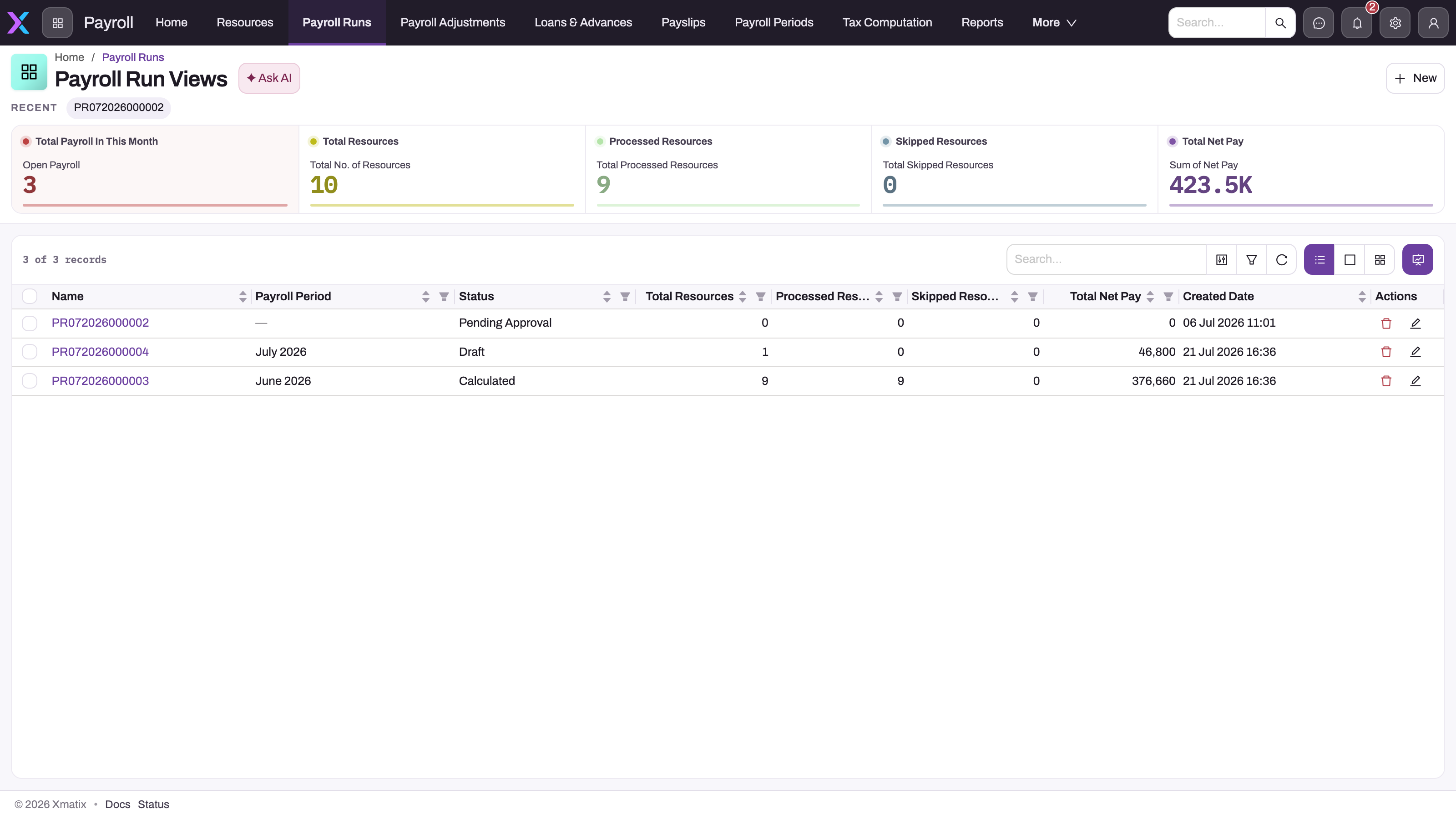
- 1
Payroll Runs on the Payroll app's top bar; Adjustments, Loans & Advances, Payslips, Payroll Periods and Tax Computation sit beside it, Full & Final Settlements under More.
- 2
Processed and Skipped Resources tiles: a non-zero skipped count means employees the calculation could not price — fix compensation or structure before posting.
- 3
Status is the lifecycle stage (Draft, Calculated, Pending Approval, Approved, Posted, Payment Generated, Paid); a Pending Approval run with zero resources was submitted before it was calculated.
- 4
Total Net Pay is the run-level control figure stamped by the last calculation; compare it with the posted journal and the salary payment batch.
- 5
Run names open the detail page where Calculate, Post, Generate Payslips, Generate Payment and Prepare TDS Challan live.
- 6
New creates only the run header for a company and payroll period — check the list for an existing run of that period first.
Payroll Runs is the control surface for the month. The tiles above the table summarise the visible population — open runs this month, total, processed and skipped employees, and the sum of net pay — and the columns carry the same figures per run: Payroll Period, Status, Total employees, Processed employees, Skipped employees, Total Net Pay and Created Date. Read a row before opening it: a run whose skipped count is not zero has employees the calculation could not price; a run showing Pending Approval with zero resources was submitted before it was calculated. Names open the run's detail page; New creates the header for another period.
The mental model
Four ideas explain most of what you will see:
- The employee is a satellite of the person record. HR lifecycle and payroll configuration live on the Employee; the bank account, IFSC, PAN and UAN live on the underlying Resource (the person), and every posting, payslip and open item is keyed on that person — so expenses, loans and payroll all reconcile to one identity.
- Salary is a structure, not a number. A Salary Structure lists Salary Component lines — earnings, deductions, employer contributions, reimbursements — each with a calculation rule and, through its Payroll Component master, a ledger account mapping. The run evaluates the structure; posting follows the mappings.
- The run is the unit of work. Calculate, review, generate payslips, post (directly or through approval), generate the payment batch, pay — each stage is an action on the run, each is recorded on the run's status, and recalculating an unposted run replaces its previous pass.
- Statutory amounts are configuration. Provident fund, state insurance and labour welfare fund come from the company's PF, ESI and LWF rule tables, professional tax from the slabs of the employee's work state, and salary TDS from a persisted monthly projection computed from the financial year's tax rule tables. The salary structure decides which schemes an employee has — one line per scheme — and the rule decides the amount. Statutory deductions and challans states exactly what is computed and what is data entry.
The run lifecycle at a glance
| Stage | Action on the run | What changes |
|---|---|---|
| Draft | New | The header exists for a company and payroll period; nothing is calculated |
| Calculated | Calculate | Salary TDS is re-projected, every employee is priced, per-employee details and component lines are written, counts and net pay stamped |
| Review / Approved | Optional: an approval process your administrator adds (none is shipped) | Final approval posts the run automatically; rejection returns it to Review |
| Posted | Post (or approval) | One payroll journal dated on the period's pay date; a Payroll Payable open item per employee |
| Payment Generated | Generate payment batch | A draft Salary Payment Batch with one line per employee: net salary plus the expense claims the run carries |
| Paid | Pay on the batch | One bank journal settles every employee's open items (salary and claims); the run records its batch |
Payslips sit beside this chain rather than in it: Generate payslips creates one Draft slip per processed employee at any point after calculation. Once the run is posted, Publish payslips renders every slip as a PDF, attaches it to the slip, marks it Published (which blocks recalculation of the run) and notifies each employee by push and email. Print payslip on a slip prints the same document; see Payslips.
What is in this section
- Employees — creating the Employee record that puts a person on payroll, what payroll reads from it, and taking a leaver off payroll.
- Employees and salary structures — how the employee master, compensation records, structures and the payroll component catalog fit together.
- Salary structures — building structures and their component lines, and assigning a structure and CTC to each person.
- Payroll components — the pay-element catalog: component types, statutory types and the GL accounts each run posts to.
- Payroll periods — the payroll calendar: what each period date does in calculation, posting, TDS and payslips.
- Leave types — the leave categories, and the Type setting that decides which approved leave becomes loss of pay.
- Leave requests — recording time off, approving it by status, and how payroll, check-in, dispatch and scheduling read pending and approved leave.
- Running payroll — the full monthly cycle from calculate to payment, with what each action checks.
- Salary payment batches — checking and paying a posted run's net salaries and reimbursed claims (or a leaver's settlement) in one bank payment, and what the batch does not do.
- Payslips — what a payslip carries, generation, printing, and the draft/published gate as it actually works.
- Statutory deductions and challans — how a run computes PF, ESI, PT, LWF and TDS from the rule tables, and depositing through challans.
- Statutory challans — drafting, recording and posting the monthly PF, ESI, PT, LWF and salary TDS deposits.
- Professional tax slabs — entering a company's PT schedule, how a run matches the band, the February amount and revising a schedule.
- ESI rules — the ESI wage threshold and rates, the contribution period, rounding and why ESI can come out as zero.
- Income tax on salary — regimes, declarations, the monthly TDS projection and the Tax Computation grid.
- Tax regime rules — the per-regime, per-year standard deduction, rebate and marginal relief, surcharge cap, cess and rounding, and why a missing rule stops TDS.
- Salary tax slabs — the progressive income-tax bands per regime and year, how the slab tax is added up and why it can come out as zero or doubled.
- Tax surcharge slabs — the surcharge bands per regime and year, the regime cap, marginal relief and why surcharge can come out as zero.
- Tax deduction sections — the deduction sections declarations are matched against: ceilings, regime availability, the employer rule and shared ceilings such as 80CCE.
- Tax declarations — recording employees' deduction claims, verifying the proof and making the verified amounts reduce salary TDS.
- Monthly TDS projections — finding and reading each employee's projection, reviewing regime choices and correcting a TDS amount.
- Payroll adjustments — one-off earnings and deductions for one employee in one period.
- Loans and advances — pay out a salary advance or loan and recover it in installments.
- Full and final settlement — closing out an exiting employee, and paying the net through its own payment batch.
- Payroll run approval — the sign-off gate between review and posting.
- Expense claims through payroll — claims pulled into the run, shown on the payslip and paid with the salary.
- Payroll configuration — the admin checklist: components, rule tables, control accounts.
- Troubleshooting payroll — symptoms, causes and fixes.
Payroll posts into the finance ledger — the accrual journal, the payable open items and the payment postings all follow the rules described in the finance documentation. If you are evaluating the product rather than operating it, start with the xMatix Payroll product overview or book a demo.
Common questions
Which records must exist before the first run?
A payroll company (the partner account whose payroll it is) with a Payroll Payable control account and a bank account; Payroll Components with GL and payable GL mappings; at least one Salary Structure with active component lines; Employees linked to Resources, with an active Salary assignment record naming that structure; and a Payroll Period covering the month. Payroll configuration walks the checklist in order.
Why does a run show skipped employees?
An employee is skipped when the run cannot price them: no active compensation record, a compensation record without a salary structure, or a structure with no active lines. The skipped count is stamped on the run header so the gap is visible before anything posts.
Is payroll India-specific?
The statutory vocabulary is Indian — PF, ESI, professional tax, LWF, salary TDS with Old and New regimes — and the tax rule tables are keyed by Indian financial year. The calculation engine itself (structures, proration by payable days, adjustments, loan recovery, posting) is not tied to a jurisdiction.