
An archive rule moves cold rows of one entity out of the operational database and into an archive table in the analytics warehouse, on a schedule you define. The trade is deliberate: the working system stays lean and fast, while the history remains queryable for analytics — archive tables can be used as sources in data models, and any Live report or dashboard can show them with the viewer's Live / Archived switch (reports, dashboards).
A run does three things in order, and stops at the first one that does not add up:
- Copies every row older than the cutoff to the archive table — a real table, so it keeps the rows after they leave the live data.
- Checks the copy by counting what actually landed. If that does not match the number of rows that were due, the run fails and the live data is untouched.
- Marks the rows deleted at the source. They stay in the database, still covered by its own point-in-time backup, but they stop appearing in lists, reports over live data, API queries, data models, datasets and dashboards.
Archived records are read-only history: they cannot be restored or un-archived, they never appear in the recycle bin, and the recycle bin's own clean-up never removes them — only the rule that archived them does. Treat activating a rule as a production change and estimate its impact first. When the rule runs offers two other modes: marking the rows deleted without copying them (for data the warehouse already holds), and deleting them permanently, which is what every rule did before 2026-09-08 and cannot be undone short of a database restore. In the default mode, Remove from the database after (days) purges the marked rows for good once that many days have passed, and only rows whose archive copy is verified. A new rule starts at 30 days; you can change it, or clear it to keep the rows marked deleted indefinitely (rules created before 29 October 2026 keep whatever they had).
A run also takes the records that belong to the archived rows with it: child tables linked by a cascading relationship (an order's lines, for example) are copied and marked deleted first, deepest first, so no live child is left under an archived parent, and a purge never removes a parent whose children are still live.
Prerequisites
- The archive administration capability (
setup.metadata.archive.manage) — it also gates the Archive Rules entry in Setup navigation. - A provisioned, reachable analytics warehouse for your organization — runs fail cleanly when it is unreachable, copying and deleting nothing. Only the permanent-delete mode works without it.
- Certainty about which entity, which date field, and which cutoff define "cold" for your data — the rule will act on exactly what you specify.
Procedure
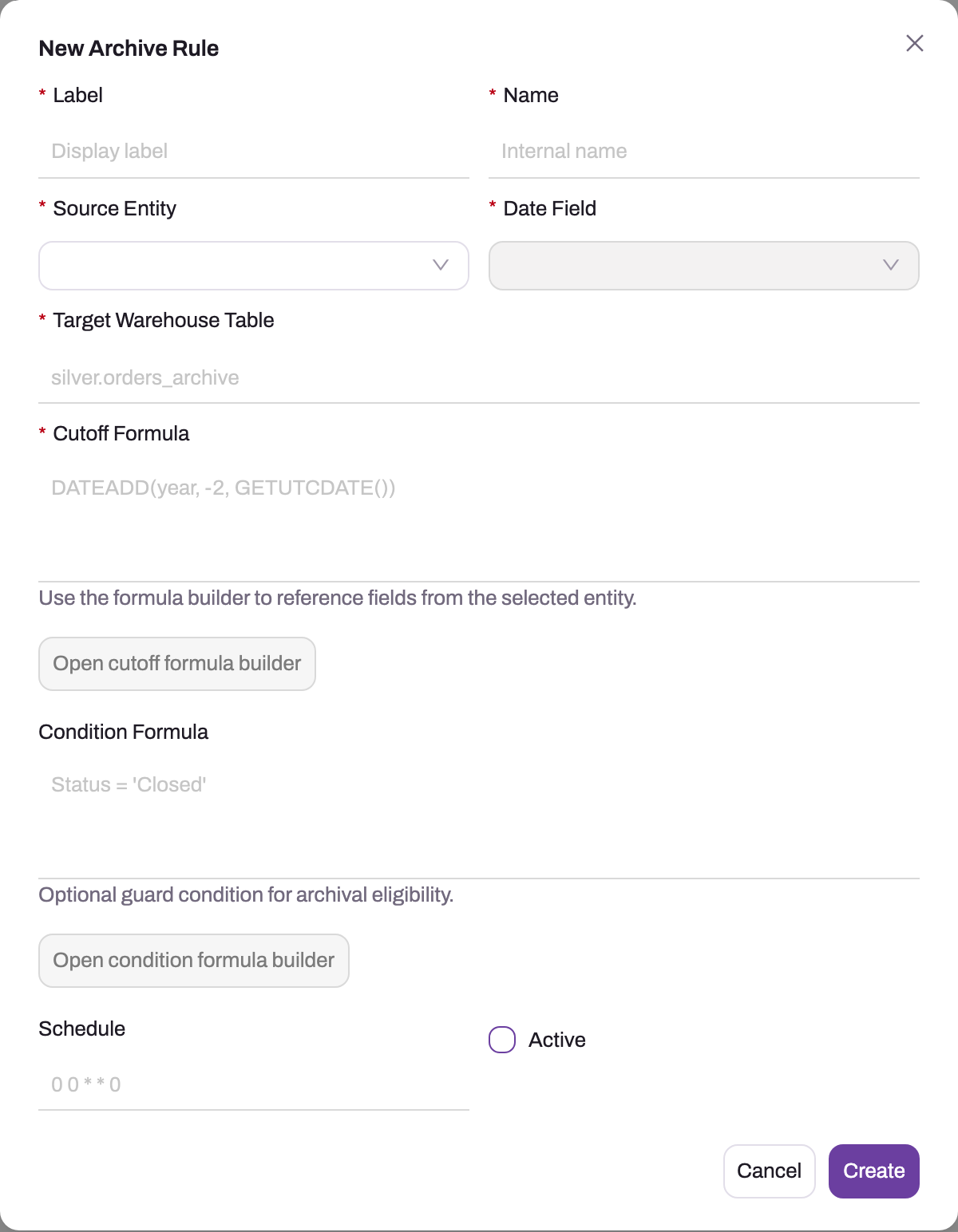
- 1
Source Entity and Date Field pick the records and the timestamp the cutoff is compared against; the field list fills after the entity is chosen.
- 2
Target Warehouse Table is where the rows move to; a bare name lands in the silver schema, and the table is created on the first run.
- 3
Cutoff Formula (required) resolves to a date — rows whose date field is before it qualify.
- 4
Condition Formula is an optional guard ANDed in, such as Status = 'Closed'.
- 5
Schedule is a five-field cron expression evaluated in UTC; blank means manual runs only.
- 6
Active off keeps the rule from being scheduled while you estimate its impact.
Step 1 — Create the rule
Open Setup → Platform → Data → Archive Rules and choose New Archive Rule. Fill in Label and Name (a descriptive display label and a stable internal name), Source Entity, and Date Field — the field list fills once the entity is chosen, and the field to pick is the one that represents business age, not merely the most convenient timestamp. When the rule runs decides what happens to the rows, and leaving it on the default is the safe choice; Archive table says where the copy lands, and empty means silver.<Entity>Archive. Then Cutoff Formula and, optionally, Condition Formula, each with an Open … formula builder button, plus Schedule and the Active checkbox. Leave Active off while defining formulas and estimating impact, then press Create. Before saving, verify the source/date pair against a real record so the cutoff measures what the business means by “cold.”
The list shows Label, Source Entity, Date Field, Active and Updated; each row offers Run, History, Edit, Clone Archive Rule and Delete.
Step 2 — Define what qualifies
Two expressions decide which rows are archived, and both are evaluated against the entity's real data:
- Cutoff formula (required) — an expression that resolves to a date, for example
DATEADD(year, -2, GETUTCDATE()). Rows whose date field falls before the cutoff qualify. - Condition formula (optional) — a predicate ANDed in, for example
Status = 'Closed', so only rows in a safe state qualify regardless of age.
Both fields offer a formula builder that can reference the selected entity's fields. Be precise here: a typo fails the run visibly, but a wrong-yet-valid condition archives the wrong rows silently.
Step 3 — Set the archive table
Leave Archive table empty to use silver.<Entity>Archive, or enter a name such as silver.orders_archive. A bare table name without a schema lands in the silver schema. Neither the schema nor the table needs to exist — both are created on the first run, with the source entity's columns. After a run, the entity's Silver view (silver.<Entity>) is refreshed so that it reads the archive table as well as the live rows.
Step 4 — Estimate the impact before activating
Save the rule inactive and confirm the list reports it that way. Reproduce its exact predicate in a filtered list or report: selected date field before the evaluated cutoff, AND the optional condition. Record the total and inspect samples near both sides of the boundary, including linked records that must stay operational. If anything surprises you, correct the rule and repeat the estimate; an inactive rule can accumulate a large backlog, so never activate using an old count.
Step 5 — Activate and run once manually
Activate the rule, then use the row's Run action for a first supervised run. A run proceeds in a fixed order: check that the source entity and date field still exist (a rule whose field was renamed or removed refuses to start), resolve the cutoff, skip if an identical window was already archived, verify warehouse connectivity (an unreachable warehouse fails the run before anything is touched), bulk-copy every qualifying row into the archive table, count what landed, and only then mark those rows deleted in the operational database (or, in the permanent mode, delete them).
Step 6 — Verify the run
Open History — the newest 50 attempts, each with Started, Completed, Status (Pending, Running, Succeeded, Failed, Canceled or Skipped duplicate), Archived Rows, Duration and Error — and inspect the newest attempt. Success should be close to the immediately preceding estimate; explain any difference caused by records changing in between. Spot-check that qualifying rows disappeared from operational lists and arrived in the named warehouse table with their key fields intact. A zero count is valid only when the same predicate now finds zero eligible rows.
Expected result
The first supervised run is Success, its archived count reconciles with a fresh estimate, qualifying rows are absent from operational queries and present in the intended warehouse table, and non-qualifying boundary records remain. History records the run, and the active UTC schedule is either intentionally populated or intentionally left manual-only.
Step 7 — Schedule it
Set the schedule as a five-field cron expression, evaluated in UTC — 0 2 * * 0 runs weekly at 02:00 UTC. The scheduler queues a run for every active rule whose schedule is due. The schedule is checked about once a minute, a run is queued only for occurrences after the rule's last run (the first occurrence is not back-filled), and a scheduled run that fails after a good one sends the rule's owner one in-app notification and email, saying nothing was retired, with one more when it recovers. Manual runs and ordinary successes send nothing; History is the full record. As you type, the field shows the next run in your organization's time zone with UTC alongside, and an expression the scheduler could not run is refused when you save. Two things silently prevent scheduled runs: an inactive rule and an empty schedule (manual-only is a valid choice) — so if a rule "never runs", check those two before anything else.
Common problems
The run failed. Read the error on the newest history entry. The usual causes are a SQL error in the cutoff or condition formula (fix the formula and run again), a date field that was renamed or removed since the rule was written (the run refuses to start), or warehouse connectivity — in which case nothing was copied or deleted, and the run can simply be retried later.
The run says success but archived zero rows. Usually correct behavior: nothing qualified, or an earlier run already archived the identical window — repeat runs over the same rule, cutoff, target and condition are skipped as duplicates rather than re-archived.
Other records now show empty lookups. Records in other entities that looked the archived rows up keep pointing at rows that are now marked deleted (or, in the permanent mode, gone), so the lookup shows empty. Only records linked by a cascading relationship are archived along with them. If active documents still point at the rows you archived, your condition formula was too broad; tighten it so only truly closed history qualifies.
Common questions
Can archived records be restored?
No. Archived records cannot be restored or un-archived — there is no button for it, and they never appear in the recycle bin, so they cannot be restored from there either. In the default mode the rows stay in the operational database marked deleted until the rule's purge removes them (30 days for a new rule), and a copy stays in the archive table for reporting. The permanent mode keeps no copy at all. This is the sharpest difference from the recycle bin, where restore is self-service. Before activating a rule, apply the same discipline as before a bulk delete: estimate, and be sure.
Is this the same archive the recycle bin uses?
No, and the distinction matters. The data lifecycle archive holds deleted records after their recycle-bin retention window, as a recovery of last resort. Archive rules act on live records that were never deleted — they offload cold history to the warehouse for performance and analytics. One is about undoing deletes; the other is about keeping the working set small. Archived records are kept out of the recycle bin entirely — they are not listed there, cannot be restored from it, and its retention clean-up leaves them to the archive rule's own purge, which checks the archive copy first.
Do reports still see archived data?
Reports and lists over live data do not — the rows are marked deleted in the operational database. The analytics side does: the entity's Silver view (silver.<Entity>) reads the archive table as well as the live rows, and an archive table can also be a source in its own right in a data model, so datasets can combine current operational data with archived history in one analysis.
How many rows did a rule archive in total?
Sum the archived-row counts of its successful runs in the run history. Run entries are per-attempt and append-only — failed attempts appear too, and a skipped-duplicate entry repeats the count of the run it duplicated rather than adding to it — so totalling every row of the history overcounts.