
Deleting a record in xMatix moves it to the Recycle Bin, where you can restore it until its Purge After date — 30 days after the delete by default. After that date the platform archives the record and removes it from the live database, and only a platform operator can bring it back.
This page explains the whole path a deleted record takes: the delete itself, what goes with it and what does not, the Recycle Bin, restore, the purge, and the separate archive that archive rules maintain.
Overview
| Stage | What the record looks like | Who can bring it back |
|---|---|---|
| Live | Shown in lists, lookups, reports and related lists | — |
| Deleted (in the Recycle Bin) | Hidden everywhere in the app; still stored, with Deleted, Reason and Purge After stamped on it | Any user who can open the Recycle Bin, until Purge After |
| Purged | Gone from the live database and from the Recycle Bin; a copy is kept in the platform's retention archive | Only a platform operator, on request |
Records that an archive rule moves out of the live database follow a different path. They are read-only history, never appear in the Recycle Bin and cannot be restored — see Recycle Bin and archive rules are different things.
When to use it
- Someone deleted a record by mistake and needs it back.
- You are about to delete many records and want to know what is recoverable, and for how long.
- A record "disappeared" and you want to rule out a delete before looking at sharing, filters or sync.
- You are deciding who should be able to see the Recycle Bin.
How xMatix handles it
A delete is a soft delete
When you delete a record — from its record page, from a list, through the Data API or by an automation — xMatix does not erase the row. It stamps it with:
- Deleted — when it was deleted, and by whom;
- Reason — empty for an ordinary delete (the Recycle Bin shows "—"). It is filled in only when the platform itself removes a record as part of a process, for example "Automatic payment of a paid-at-posting document removed";
- Purge After — the deadline for self-service restore: the delete time plus the retention window (30 days by default).
From that moment the record leaves every list, lookup, related list and report, even though it is still stored. The delete confirmation reads "This can't be undone." — in practice the record can be restored from the Recycle Bin until its Purge After date, but treat that date as a hard deadline.
Setup items that administrators delete — fields, layouts, view columns, dashboards and similar — are soft deleted the same way, with a fixed 30-day window, and appear in the Recycle Bin next to business records.
What a delete checks first
A delete is refused when:
- you do not have Delete permission on the entity, or record-level security does not give you delete access to that record;
- the record is locked by a pending approval request;
- a background job is processing the record (or the document it belongs to) — try again once the job has finished;
- an OnDelete business rule or a before-delete automation script on the entity blocks it.
What goes with the record — and what does not
Deleting a record does not automatically delete the records that point to it. The Cascade Delete switch you may see when designing a relationship is not saved, so the platform's generic delete never follows a relationship to child records. Children stay live unless the feature's own logic removes them. The cases the platform handles in its own logic include:
- Package component lines — deleting a package line on an order, invoice, purchase order, quote, opportunity, requisition or service order also deletes its component lines;
- Conversion batches — deleting a batch deletes its lines and releases what they held.
Rows removed this way are soft deleted too, with their own entries in the Recycle Bin.
Before you delete a parent record, check its related lists and the feature's own page to see what happens to the rows under it.
Restore is row by row
Restoring clears Deleted, Reason and Purge After and puts the row back among the live records. It restores exactly the rows you select, nothing else: the Recycle Bin does not remember which rows were deleted together. If a package line and its component lines were deleted, restore each of them. For a record of a custom object, restoring also runs the object's after-save automation, as a save would. If that automation fails, the restore still stands.
After Purge After
A platform retention process runs on a schedule (hourly by default). It finds deleted rows whose Purge After has passed, writes them to the platform's retention archive and removes them from the live database. From then on they no longer appear in the Recycle Bin.
A platform operator can recover individually identified rows from that archive. Recovered rows come back into the Recycle Bin — still deleted, with their original deletion details and a fresh 30-day Purge After — so an administrator can review them and restore them in the usual way. Rows that already exist are skipped, and recovery is row by row: asking for a parent does not bring back its related rows.
What never appears in the Recycle Bin
- Records an archive rule retired. They are history, not trash.
- Rows removed as part of deleting a whole organization (tenant). Those are restored, if at all, by the platform's own tenant-restore process.
- Anything already purged.
Recycle Bin and archive rules are different things
The Recycle Bin holds records someone deleted, for a limited time, so that the delete can be undone. Archive rules act on live records that were never deleted: they copy cold history to the analytics warehouse to keep the working database small. Archived records are read-only, can be viewed with the list's Archived switch (Archived records), never appear in the Recycle Bin and cannot be restored. The Recycle Bin's retention purge leaves them alone. Only the archive rule's own purge removes them, after checking the archive copy.
Prerequisites
- To delete: Delete permission on the entity (Setup → Access control → Profiles → Entity Permissions) and delete access to the record under record security.
- To restore: access to the Recycle Bin page — see Permissions.
- The Recycle Bin is a web screen. The mobile app has no Recycle Bin screen, so restore from the web app.
Procedure
Step 1 — Delete a record
- Open the record, or select it in a list.
- Choose Delete. On a record page the confirmation names the record ("Delete record name?"); in a list with several rows selected it reads "Delete 3 selected records?".
- Choose Delete to confirm.
You see "Deleted". From a record page you return to the list. If some rows in a multi-row delete are refused, the message reads "Deleted X of N records — Y failed" and shows the first reason. The rows that were deleted stay deleted.
Step 2 — Open the Recycle Bin
Open the App Launcher and choose Recycle Bin. It is also an item in the navigation of some shipped apps (for example Platform Settings, and the Tools group of Sales List), and an administrator can add it to any app — see Configuration.
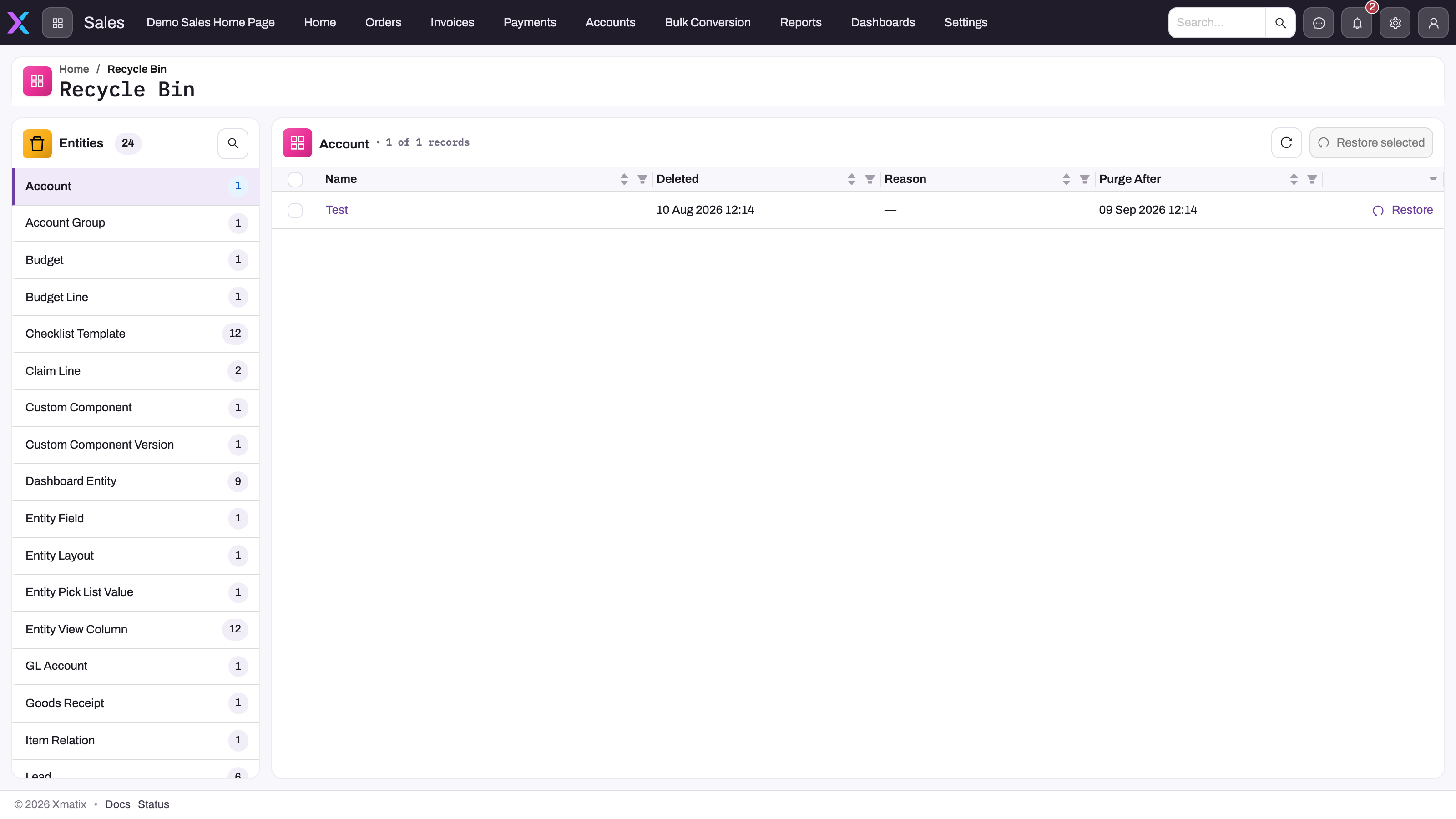
The page has two parts:
- Entities on the left: every entity that currently has deleted rows, alphabetically, with a count. Use the search button to find one. With nothing deleted, it shows "Recycle bin is empty".
- The table on the right: the selected entity's deleted rows, newest delete first, 25 per page, with Name, Deleted, Reason and Purge After.
Step 3 — Check the record before you restore it
Select the row's Name. The *Deleted Record — record name page shows the entity, the record Id, Deleted UTC, Reason and Purge After in its header, and a Record data card with every stored value under its field's internal name. Use it to confirm that this is the right record. Back* returns to the Recycle Bin.
Step 4 — Restore one record
Choose Restore on the row (or on the Deleted Record page) and confirm "Restore this record?". You see "Restored", and the record is back in its lists, lookups and reports. From the Deleted Record page you return to the Recycle Bin.
Step 5 — Restore several records
Tick the rows (all from the same entity), choose Restore selected and confirm "Restore N records?". You see "Restored N rows". To restore rows of another entity, select that entity and repeat.
Step 6 — Check the restored record
Open the restored record and check:
- its child and linked rows — restore any that were deleted separately;
- lookups that may have changed while it was deleted, and any value that must be unique;
- totals, balances and any external system that received the delete.
Business rules
- Retention window. Purge After = delete time + the platform's retention setting (30 days by default). Read the actual date on the row. Do not work it out from memory.
- Setup items (metadata) always get a 30-day window.
- Purge timing. The retention process runs about hourly, so a row can stay in the Recycle Bin for a short while after Purge After. Do not rely on that.
- Restore never changes Purge After of other rows and never restores related rows.
- Archive-rule rows are excluded from the Recycle Bin, from restore and from the retention purge. Only the archive rule's own purge removes them, after it has checked the archive copy.
- Operator recovery re-inserts rows as deleted rows with a new 30-day Purge After. It skips rows that already exist.
Example
A sales coordinator tidies up duplicate customer accounts on a Monday morning and deletes Maple Leaf Traders by mistake. That account is the real one, with open orders.
- The coordinator opens App Launcher → Recycle Bin and selects Account in the Entities list.
- The row Maple Leaf Traders shows Deleted a few minutes ago, Reason "—", and Purge After 30 days from now.
- The coordinator opens the row, checks the Record data card (the account number and GSTIN match), and chooses Restore.
- The account is back in the Accounts list. Deleting an account does not delete its orders, so they were never in the Recycle Bin. The coordinator opens the account and checks that its orders and contacts appear under it again.
Training
Practice exercise
In a sandbox:
- Create a test record in any entity you can delete (for example a lead named "Recycle test"), then delete it.
- Open the Recycle Bin, select the entity and find the row.
- Note its Purge After date, open the row and look at the Record data card.
- Restore it.
Expected result: the record disappears from its list after the delete and appears in the Recycle Bin with Reason "—" and Purge After 30 days after the delete. After Restore you see "Restored", the row leaves the Recycle Bin, and the record is back in its list with its values unchanged.
Quick reference
- Delete = soft delete. The record is hidden, not erased.
- Restore from App Launcher → Recycle Bin until Purge After (30 days by default).
- Restore is row by row. Related rows are never restored with the record.
- Deleting a parent does not delete its children unless the feature does it itself (package components, conversion batch lines).
- Reason is empty for ordinary deletes.
- After Purge After, only a platform operator can recover the row, and it comes back into the Recycle Bin.
- Archived records are not in the Recycle Bin and cannot be restored.
- Restore on the web. The mobile app has no Recycle Bin screen.
Permissions
- Deleting needs Delete on the entity in the user's security profile plus delete access to the record under record security. Without it, the server refuses the delete.
- The Recycle Bin is not tied to an entity's Delete permission. The Recycle Bin page and its restore only check that the user is signed in. They do not apply entity permissions or record security to the rows they list, show or restore. So any signed-in user who opens the page can see and restore any deleted row in the organization, including setup items. Removing the Recycle Bin item from an app's navigation hides the way in, but the page itself still opens. Treat it as an administrator tool. Keep the item in administrator apps only, and tell users to ask an administrator for restores.
- Recovering purged rows is a platform-operator task, not a tenant permission.
Configuration
- Where the Recycle Bin appears. Setup → Design Studio → Apps → Apps → the app → Manage Items → add a feature item and choose Recycle Bin. Remove the item from apps that non-administrators use (see Permissions). The App Launcher lists the Recycle Bin when at least one app you can see has the item.
- Delete permission. Setup → Access control → Profiles → Entity Permissions → Delete for each entity. See Security profiles.
- The delete confirmation. The standard Delete action uses the confirmation described above. An administrator can give an entity's Delete action its own confirmation wording on the action. The button stays a danger button.
- Blocking deletes. Use an OnDelete business rule to stop deletes that break your process (for example, deleting an order that is already dispatched). Approval processes that lock records on submission also block deletes while a request is pending — see Approval processes.
- Retention window. The 30-day window is a platform setting. It is not set per organization or per entity, and there is no setup screen for it.
- Archive rules — a separate, tenant-configured way to move cold live records out of the database. See Archive rules.
- Deleted sandboxes follow their own window — see Sandboxes.
Before a bulk delete
- Fix the exact population. Save or export the filtered records you plan to delete (Export data) and have the business owner approve the list.
- Map what happens to related rows. Children are usually left live; check the feature pages for the few that cascade.
- Check for blockers. Approval locks, running background jobs and OnDelete rules can refuse part of the selection. Read the "Deleted X of N records" message.
- Record the deadline. Look at the Purge After values in the Recycle Bin right after the delete.
- Plan the restore set. If you may need to undo it, list every entity whose rows the delete touched — each is restored separately.
- Validate after any restore. Recheck lookups, lines, totals, security scope and connected systems.
Common problems
I deleted a record and it is not in the Recycle Bin
Check, in order:
- The entity. The Recycle Bin shows one entity at a time. Search the Entities list for the right one.
- Purge After has passed. The row has been archived and removed. Ask your platform contact to recover it from the retention archive. It then comes back into the Recycle Bin.
- An archive rule retired it, rather than a delete. Look for it with the list's Archived switch (Archived records). It cannot be restored.
- It was never deleted. It may be filtered out of your view or outside your record access — see Why can't a user see a record?.
"Record not found — This record may have been purged or restored already."
The row you opened from the Recycle Bin is no longer a deleted row. Someone restored it, or the retention process purged it. Search the entity's list first. If it is not there, treat it as purged.
The restored record is missing its lines or linked rows
Restore never brings back related rows. Go back to the Recycle Bin, select each related entity (for example the line entity) and restore the rows that belonged to the record.
I deleted a parent and its child records are still there
That is expected: deleting a record does not delete records that point to it, and the relationship's Cascade Delete switch has no effect. Delete the children separately if they should go too.
Delete is refused with "locked by a pending approval request"
The record has an approval request in progress. Ask the approver to finish it, or recall the request, then delete.
Delete is refused while a job is running
A background job is processing the record or its document. Wait until the job has finished and try again.
The Reason column is empty
Ordinary deletes do not record a reason. The column is filled in only when the platform removes a record as part of a process.
"Deleted X of N records — Y failed"
Part of a multi-row delete was refused. The message shows the first failure. The rows that were deleted are in the Recycle Bin. Fix the cause for the rest (permission, approval lock, running job, business rule) and delete them again.
Common questions
Is deleted data destroyed immediately?
No. An ordinary delete hides the record and keeps it in the Recycle Bin until its Purge After date, 30 days after the delete by default. Even after that, the retention process archives the row before removing it from the live database, so a platform operator can still recover it. The delete confirmation says "This can't be undone." because users should not rely on recovery. Within the window, though, any user with access to the Recycle Bin can restore the record in a few clicks. Archive rules are the exception: in their permanent mode they delete records outright.
Does restoring a parent bring its children back?
No. Restore acts on exactly the rows you select. In most cases the children were never deleted, because deleting a parent does not cascade. Where a feature does delete related rows with the parent (package component lines, conversion batch lines), those rows are separate entries in the Recycle Bin. Restore them too, then open the parent and check that its lines, totals and links are complete before users work with it again.
Who can restore records?
Anyone who can open the Recycle Bin page. It does not check the entity's Delete permission or record security, so it can show and restore any deleted record in the organization, including setup items such as fields and layouts. Keep the Recycle Bin in administrator apps only and route restore requests through an administrator. Deleting, by contrast, does need the entity's Delete permission and delete access to the record.
Can I change the retention window?
Not from setup. The window is a platform setting (30 days by default) that applies to every organization and every entity on the platform. Setup items always get 30 days. If you need a record kept longer, restore it before its Purge After date. If you need old live records out of the way without deleting them, use an archive rule.
Can I restore records on the mobile app?
No. The mobile app has no Recycle Bin screen; choosing a Recycle Bin item there opens a placeholder. Open the Recycle Bin in the web app instead and restore the record there. The Recycle Bin covers the whole organization, so the web screen is the one place to restore from.