
Inbound routing is how xMatix decides whose softphone rings when someone calls one of your organization's numbers: each number has at most one route, and the route sends its calls to a queue, to one named person or to an AI agent. It sits between the numbers xMatix provisions for you and the agents who answer in the softphone. You author routes on the screens described in Telephony configuration, and every call ends up in the call register whatever happens to it.
Overview
Three things decide where a call goes:
- The number that was dialled. The called number is the whole routing key. xMatix never looks at who is calling, the time of day or the caller's history to pick a target, so teams that want different handling for different purposes use one number per purpose (a support line, a sales line, an after-hours line).
- The number's route. A route names one target of one of three kinds: a Queue, a Human agent or an AI agent. Only an active route on an active number counts.
- Who is online right now. A person is rung only through their Calls drawer, and only while they are online in it. Queue routing also looks at each agent's presence and workload.
When the route cannot place the call, xMatix does not drop it. It falls back to ringing every agent who is online in the Calls drawer, so a misconfigured route makes calls noisier, not lost.
When to use it
Read this page when you are:
- planning which numbers your organization needs and what each one should reach;
- choosing between a queue, a direct person and an AI agent for a number;
- explaining to agents why a call rang them, rang everybody or rang nobody;
- working out why a route on the Routing screen shows Error.
For the step-by-step screens (labelling numbers, creating queues, adding human and AI agents, creating a route), use Telephony configuration. For how a queue picks an agent, use Queues and omni-channel routing.
How xMatix handles it
What happens when a call arrives
- A call record is created. The call appears in the register with Status Ringing, the caller's number, the number dialled and the ring time. A repeated notice from the voice platform about the same call never creates a second record.
- The caller is matched. xMatix compares the last seven digits of the caller's number with your contacts' Phone, Mobile Phone, Home Phone and Other Phone, then, if no contact matches, with accounts' Phone. The first match fills the call's contact and account, so whoever is rung sees a name rather than a bare number. A caller number with fewer than six digits is not matched. Matching only labels the call; it never changes where the call goes.
- The route is looked up. xMatix looks for an active route whose number is the number dialled and is itself active.
- The target is rung, as the next table describes, or the fallback ring takes over.
The three targets
| Route to | Who is rung | When it falls back to everyone |
|---|---|---|
| Queue | A work item is created in the queue and offered to one eligible agent in the queue's agent pool, picked by the queue's routing model. Only that agent's Calls drawer rings. | Nobody in the pool is eligible (not Available, presence lease expired, at their work limit, or the pool is empty), or the queue no longer exists. The unplaced work item is kept as Pending. |
| Human agent | Only that person's Calls drawer rings, in every browser tab where they are online. | The human-agent entry has been switched off (or is missing). |
| AI agent | Nobody. The voice platform brings the AI agent into the call, and it answers. | Never: an AI-agent route does not ring people. |
Who counts as eligible in a queue, how presence and work limits work, and what each routing model does are covered on Queues and omni-channel routing. Two points matter for phone routes in particular: routing does not check whether the queue is Active, and it does not check whether the queue's Channels include Voice.
The fallback ring
The fallback ring sends the call to every agent who is online in the Calls drawer — anyone who has selected Go online in at least one open tab. It happens when:
- the number has no route, or its route or number is switched off;
- a human-agent route's entry is inactive;
- a queue route finds nobody eligible, or its queue was deleted;
- anything goes wrong while the route is being handled.
Signing in to xMatix is not enough to receive fallback calls. Agents who are offline in the Calls drawer, and users who have no Calls drawer at all, are never rung.
Ringing is not the same as being answered
A ring is a notification to the softphone, not a reservation:
- A direct route to someone who is offline rings nobody. xMatix does not check that the person is online before it rings them, and it does not fall back. The call stays Ringing until the caller hangs up.
- Declining only silences your own browser. The softphone's decline closes the popup in all your tabs, but the call is not offered to anyone else.
- A queue call is offered once. If the chosen agent does not pick up, the call is not passed to the next agent in the pool.
When the call ends, answered or not, its record becomes Completed and any queue work item for it is closed, which frees that agent's capacity. An unanswered call keeps an empty Answered time.
Keeping routes in sync
A route only takes effect once it also exists on the voice platform that answers your numbers. xMatix keeps the two in step for you:
- Every change syncs the whole organization. Creating, editing, deleting or resyncing a route, and creating or saving an AI agent, pushes every route to the voice platform. Deleting a route removes it there too.
- Active routes only. A route that is switched off is removed from the voice platform, and its number is treated as having no route. Its Status shows Inactive.
- Status. Each active route shows Syncing… (pending), Synced (point at it to see when it last synced) or Error (point at it to read the reason). While any route is syncing, the Routing screen checks again every 10 seconds, and simply opening the screen retries any route still pending.
- Resync on a row retries that route straight away. It is unavailable while the route is syncing.
- Another rule can take the number first. Even when a route is in place, the voice platform can have an older rule, which you cannot see, that answers the same number first. xMatix looks for this on every sync and marks the route Error naming that rule rather than showing Synced.
Prerequisites
- Telephony is part of your subscription, the number has been provisioned for your organization, and Enable Telephony (CTI) is on. See Telephony configuration.
- You have the Manage telephony (CTI) capability to create or change routes.
- The people who should take calls are in the agent pool of at least one active queue — even people you route to directly — because without that they have no Calls drawer.
- For an AI-agent route, the AI agent is registered and active.
Procedure
Creating and editing routes is described step by step in Telephony configuration. The tasks below are the routing decisions around it.
Step 1 — Decide what each number is for
List your numbers on Setup → Feature Hub → Service → Telephony → Trunks & numbers → Phone numbers and give each one a Label that says its purpose. Decide the target for each:
- a Queue when several people share the work and you want one of them chosen for each call;
- a Human agent for a personal line, where the call should reach one person or nobody;
- an AI agent when no person should be rung, for example outside working hours.
Numbers you are not ready to route can be switched off; calls that still reach them ring everyone online.
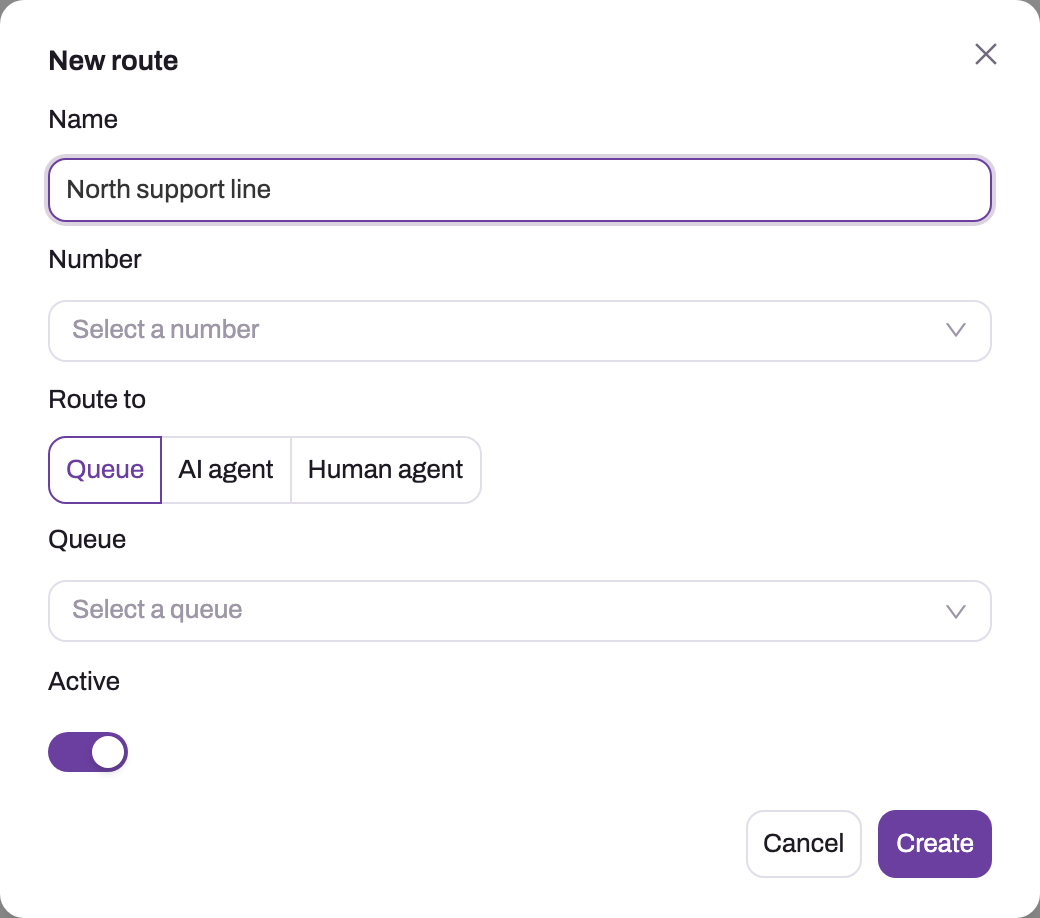
- 1
Name is for administrators — call it after the line's purpose, one number per purpose.
- 2
Number lists the organization's provisioned inbound lines; each active number carries one active route.
- 3
Route to picks the target type: Queue (offered to the queue's available members), AI agent, or Human agent (rings one person).
- 4
The selector below changes with the target type — here a Queue; for the other types a named AI agent or a user.
- 5
Active decides whether the route takes part; an inactive or missing route falls back to the organization-wide ring.
Step 2 — Make sure the target can take calls
- Queue: the queue has an Agent pool, and its members are active resources linked to their users. Agents go online in the Calls drawer and set themselves Available.
- Human agent: the entry is active on Telephony → Agents → Human agents, and the person is in an active queue's pool so they have a Calls drawer.
- AI agent: the agent is active on Telephony → Agents → AI agents.
The target pickers in the route dialog list only active queues, active AI agents and active human agents. A queue whose Channels do not include Voice is listed with (no Voice channel) after its name; it can still be chosen and still receives calls.
Step 3 — Create the route and wait for Synced
On Setup → Feature Hub → Service → Telephony → Routing, select New route, choose the Number, the Route to type and the target, leave Active on and select Create. The route appears as Syncing… and changes to Synced within seconds. If it shows Error, see Common problems.
Step 4 — Test from an outside phone
Go online in the Calls drawer and call the number from another phone. Check the call register afterwards: the call should show the number dialled and, if the caller is one of your contacts, their name. Then test the fallback by switching the route off and calling again: everyone online should be rung.
Step 5 — Explain a call that went somewhere unexpected
Open the call in the register and note the number dialled. On Routing, find the route for that number and check, in order:
- Is there a route for that number, and is it active and Synced?
- Is the number active on Phone numbers?
- For a queue: did anyone in the pool meet the eligibility rules at that moment? The supervisor console shows presence and open load.
- For a human agent: is the entry active, and was the person online?
Business rules
- One route per number. A second route on the same number is refused with This number already has a route; edit the existing route instead.
- One target per route, of the kind chosen in Route to. Otherwise saving fails with Exactly one route target matching the target type must be set.
- Default name. A route saved without a Name is called route- followed by the number.
- Only active numbers are offered in the route dialog. Switching a number off later makes its route fail to sync.
- Routing reads the route at the moment the call rings. Editing a route affects the next call, not one already ringing.
- Deleting a target. An AI agent or human agent that a route targets cannot be deleted until the route is retargeted or deleted. A queue has no such guard: if it is deleted, calls on its routes fall back to everyone.
- Switching a target off. An inactive human-agent entry sends its calls to the fallback ring. An inactive AI agent puts its route into Error. An inactive queue keeps receiving calls.
- Queue work. Each queue call creates one work item, which is closed when the call ends.
Example
A small service business has three numbers. Its administrator sets them up like this:
| Number label | Route to | Target |
|---|---|---|
| Service desk | Queue | Service advisors (Load balance, four agents) |
| Workshop manager | Human agent | The workshop manager's own entry |
| After hours | AI agent | After-hours assistant |
At 10:05 a customer whose mobile number is on their contact record calls the service desk. Two advisors are online and Available; the one with the least open work is rung and sees the customer's name and account. At 10:40 all four advisors are on calls at their work limit, so the next caller rings every agent online, including the workshop manager, and the receptionist picks up. In the evening the after-hours number is answered by the AI agent, and nobody is rung. A caller who dials the workshop manager's line while the manager is offline hears it ring out; the register shows the call Completed with no Answered time, which the manager uses as a call-back list the next morning.
Training
Practice exercise
In a sandbox with telephony enabled and two test users who are in an active queue's pool:
- Create a route from a spare number to a queue whose pool holds both users. Wait for Synced.
- Have user A go online and set Available; user B stays offline. Call the number.
- Set user A to Away and call again.
- Edit the route to Human agent for user B, who stays offline, and call again.
- Switch the route off and call again.
Expected result: in step 2 only user A is rung. In step 3 nobody in the pool is eligible, so the call falls back and user A is rung again, as an agent who is online in the Calls drawer. In step 4 nobody is rung. In step 5 the route shows Inactive and the call rings user A as a fallback. All four calls are in the call register.
Quick reference
- The number dialled is the routing key; one route per number, one target per route.
- Queue → one eligible agent rings; Human agent → one person rings; AI agent → nobody rings.
- Fallback = every agent online in the Calls drawer, not every signed-in user.
- A direct route to someone offline rings nobody, and there is no fallback.
- Declining or not answering does not pass the call on.
- Routes must be Synced to work; point at Error to read why, fix it, select Resync.
- Retarget routes before deleting an AI agent or human agent; queues are not guarded.
Permissions
| What | Needs | Without it |
|---|---|---|
| See, create, edit, resync and delete routes; see the target pickers | Manage telephony (CTI) | The Routing entry is missing from Setup and its requests are refused. |
| Switch telephony on or off | Manage module settings | The Telephony Settings entry is missing. |
| Watch live calls and agent presence | Supervise telephony (CTI) | The supervisor console shows that access is required. |
| Be rung by a route | No capability. A place in an active queue's pool, a linked resource, and being online in the Calls drawer. | No Calls drawer, so no rings. |
The capabilities are granted on a security profile's Entitlements tab; see Security profiles.
Configuration
| Setting | Where | What changing it affects |
|---|---|---|
| Route Number, Route to, target, Active | Setup → Feature Hub → Service → Telephony → Routing | Who the number's next call reaches. Every change re-syncs all routes. |
| Number Label and Active | Telephony → Trunks & numbers → Phone numbers | Whether the number can carry a route, and how it reads in the route dialog. |
| Queue Agent pool and Routing model | Telephony → Queues | Which agents a queue route can ring and how one is picked. |
| Human-agent Active | Telephony → Agents → Human agents | Whether direct routes to the person ring them or fall back. |
| AI-agent settings and Active | Telephony → Agents → AI agents | How the AI agent answers. Saving re-syncs every route. |
| Enable Telephony (CTI) | Telephony → Settings | Whether agents get the Calls drawer at all. |
| Contact and account phone fields | The contact and account records | Whether the caller is recognized on the ring. |
Routes have no schedule, priority or overflow setting. Time-of-day handling needs separate numbers or an edit to the route's target.
Common problems
Calls to the number ring everybody
The fallback ring took over. Check that the number has an active route that shows Synced, that the number is active, and then the target: a human-agent entry that was switched off, a deleted queue, or a queue in which nobody was Available with spare capacity. See Queues and omni-channel routing for the agent checks.
Calls to a person's direct line ring nobody
The person was not online in the Calls drawer when the call came in, or has no Calls drawer because they are in no active queue's pool. A direct route does not fall back. Have them go online, add them to an active queue's pool if needed, or route the number to a queue instead.
Nobody is rung and the call is answered by a voice assistant
The number is routed to an AI agent. That is expected; change the route's target if people should take these calls.
The agent declined but nobody else got the call
Declining only closes the popup in that agent's browser. The call is not offered to another agent. Ask agents to let calls they cannot take ring out, and staff queues so an Available agent is there.
The caller's name does not show on the ring
No contact or account phone number ends in the same seven digits as the caller's number, or the caller's number was withheld or too short. Add the number to the contact's Phone, Mobile Phone, Home Phone or Other Phone (or the account's Phone).
A route shows Error
Point at Error to read the reason:
| Message | What to do |
|---|---|
| The route's number is missing or inactive. | Switch the number back on, or edit the route to an active number, then Resync. |
| The route's AI agent is missing or inactive. | Switch the AI agent on, or retarget the route, then Resync. |
| Telephony is not provisioned for this tenant yet. | Voice has not been set up for your organization. Contact xMatix support. |
| The voice platform could not be reached. Retry or contact support. | Select Resync after a minute. If it persists, contact xMatix support. |
| Creating the route on the voice platform failed. / Updating the route on the voice platform failed. | Select Resync. If it persists, contact xMatix support. |
| Calls to … are answered by another dispatch rule on the voice platform … | Another rule that you cannot change answers this number first. Ask xMatix support to remove the rule the message names, then Resync. |
| This route's rule is in place, but the voice platform could not be checked for another rule answering its calls first. Resync to check again. | Select Resync. |
The full troubleshooting guide is Troubleshooting telephony.
Saving a route fails
This number already has a route; edit the existing route instead. means the number is taken: edit that route. Select the target. or Select the inbound number. means a required choice is empty.
Common questions
What happens when nobody in the queue is available?
The call rings every agent who is online in the Calls drawer, not just the queue's members, and the queue keeps a Pending work item for it. There is no waiting room or hold music: a call that cannot be placed with its pool goes to everyone rather than waiting for a queue agent. The Pending item is not offered again later. To keep calls in the pool you intended, make sure enough members are online and Available, or add people to the queue's resource group.
Can one number ring a queue during the day and an AI agent after hours?
Not automatically. A route has no schedule, priority or overflow: it is one number and one target. Use separate numbers for each purpose, or edit the route's target when your hours change. The edit syncs again within seconds and applies to the next call. Calls that are already ringing keep the handling they started with.
Do unanswered calls disappear?
No. Every inbound call is in the call register from the moment it rings, whatever happens next. An unanswered call ends as Completed with an empty Answered time, and it keeps its caller match and ring time. Filter the register on an empty Answered to build a call-back list. Calls a direct route could not deliver, and calls nobody picked up after the fallback ring, appear the same way.
Does the caller's identity change where the call goes?
No. Routing is decided only by the number that was dialled. The caller match runs first so the person rung sees a name, but known customers, accounts and open cases do not change the target. If certain callers should reach a dedicated team, give them a dedicated number and route it to that team's queue.
Why do I need a queue to route straight to one person?
Because the Calls drawer — the only place a call can ring — appears only for people in the agent pool of at least one active queue. A direct route uses the person's human-agent entry to say whom to ring, but they still need the drawer to hear it. A queue they belong to can be one that no route points at.